
Teacher without a reliable connection
Wants to work on the go with lesson files saved in advance and sync them later. Check which school apps actually work offline.


Start with the programmes and files your school uses: check that you can open and edit them without an internet connection, then sync them later. Next, compare the weight, screen and ports with what you’ll need on the trip. The quoted battery life isn’t a guarantee of how long you’ll be able to work on location.
Wants to work on the go with lesson files saved in advance and sync them later. Check which school apps actually work offline.
Takes a laptop along with school-trip materials and weighs portability against screen space and the ports they need.
Needs specific programmes, file formats or a school-managed work environment. Whether a laptop is suitable depends on those exact requirements.
A good fit if: your school uses compatible web apps and Google Drive, and you make your files available offline in advance.
Bear in mind: some apps don’t work offline. The Dell Chromebook 14 CC14260 has 4 GB of memory and 64 GB eMMC in the base configuration described.
A good fit if: you need your school’s Windows programmes or use SharePoint files synced in advance.
Bear in mind: check the specification and included power adapter. HP says the recommended 65 W USB-C adapter is sold separately for the OmniBook 5 configuration reviewed.
A good fit if: you’ve confirmed your school software works on macOS and you’re looking for a compact model.
Bear in mind: Apple specifies two Thunderbolt 4 ports for the 13-inch MacBook Air with M5 described here. Check they’re compatible with your presentation equipment.
Your choice mainly depends on offline access, portability, school software and, where relevant, handling pupil data.
| What to consider | What should you check? | Who is this most relevant to? |
|---|---|---|
| Offline lesson files | Make the files you need available offline in advance, then test opening, editing and syncing them without a connection. | If I want to use lesson files on a school trip without internet access, I want to know in advance what will actually work. Around 33% of consumers prioritise offline access. |
| Portability and power | Compare the weight of your chosen configuration and charger, the screen size and the quoted battery life. | If I’m taking my laptop along with school-trip materials, I want a practical balance between portability and screen space. Around 27% of consumers prioritise travelling light and working without a power socket. |
| School software and ports | Check the required apps and file formats, as well as the port needed for your presentation equipment. | If my school requires specific programmes or ports, I want to make sure the laptop is compatible beforehand. Around 27% of consumers prioritise compatibility with school software and presentation equipment. |
| Pupil data | Check which devices, accounts and storage methods your school allows before saving data offline. | If I need pupil data on a device, I want to follow my school’s policies. Around 13% of consumers prioritise protecting pupil data. |
Offline access takes preparation, and some apps won’t work without a connection. Simply having a cloud account isn’t enough.
Make your lesson files available before you leave, then test the apps you use with your connection switched off.
Memory, storage and included accessories can vary between configurations. For example, HP says the recommended adapter is sold separately for the OmniBook 5 configuration reviewed.
Check the full model code, chosen configuration and what’s included in the box.
According to the Dutch government, a manufacturer’s warranty is an additional benefit. If a product is faulty, the retailer is your point of contact for a solution.
Check who is legally making the purchase and read any additional service terms before paying for them.
The Chromebook 14 CC14260 is a ChromeOS option for schools that use compatible apps and files.
The OmniBook 5 14-hh0600ndx is a Windows option for lesson files and presentations when Windows suits your school environment.
The 13-inch MacBook Air with M5 is a macOS option if your school software works on it.
These Joybuy laptops are suited to lesson planning on the go. Compare configurations by local memory, screen size, ports and Windows environment, and test offline access with your own school files.
 No image available
The 13.3-inch configuration could suit you if you’re looking for a portable Windows laptop for lesson files you can take with you locally.
Windows 11 Home, 16 GB of memory, a 512 GB SSD, a 13.3-inch IPS screen, HDMI and USB ports. Listed weight: 1.46 kg.
 No image available
The 15.6-inch screen could suit you if you prefer a larger display for lesson planning.
16 GB DDR4 memory, a 512 GB SSD, a 15.6-inch FHD IPS screen, a 3050E processor and USB, USB-C and HDTV ports.
 No image available
This Windows laptop could suit you if your school environment uses Windows 11 Pro and you want to take your files with you locally.
15.6-inch Full HD screen, Intel Core i5-13420H, 16 GB DDR5 memory and a 512 GB SSD. Listed weight: from 1.61 kg. USB-C with DisplayPort.
 No image available
This 16-inch Windows laptop could suit you if you’re looking for a larger screen and plenty of local storage; bear the screen size in mind when travelling.
Windows 11 Pro, 32 GB of memory, 1 TB of storage and a 16-inch 3K OLED touchscreen with 120 Hz. Listed battery capacity: 99 Wh.
 No image available
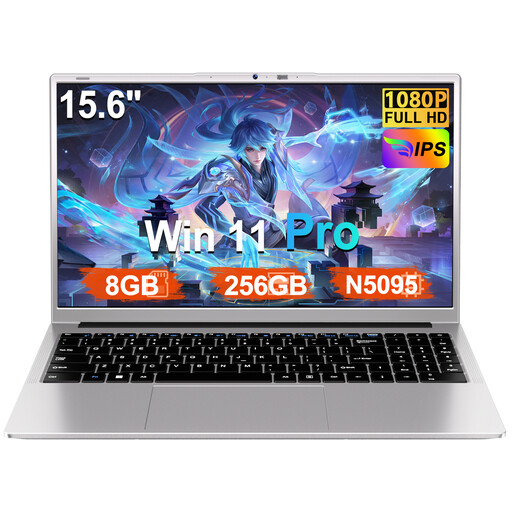
This configuration could suit you if you’re looking for a Windows laptop for lesson files and its listed specifications meet your school software requirements.
Windows 11 Pro, 8 GB of memory, a 256 GB SSD, expandable to 1 TB, an N5095 processor and a 15.6-inch FHD screen. The product description quotes battery life of up to 6 hours; this isn’t a measured figure for a school trip.
Make the files you need available offline before you leave, then test them without a connection. Google explains how to do this with compatible Drive files on a Chromebook; Microsoft explains how to sync SharePoint files to your computer. Also check separately whether your school apps work offline.
According to Google, go to ‘About ChromeOS’ and ‘Additional details’ to check the device’s update schedule. After its final software update, it will no longer receive ChromeOS or browser updates, according to Google.
For a consumer purchase in the Netherlands, the retailer is your point of contact if a product is faulty; there is no fixed statutory warranty period. According to the Dutch government, for distance purchases from a business, you can usually change your mind within 14 days. Check whether this applies if the school or your employer is the purchaser.
Check with your school before saving pupil data on a personal laptop. The Dutch Data Protection Authority explains that schools must be able to demonstrate the technical and organisational measures they use to protect pupil data. Which devices and storage methods are allowed depends on your school’s policies.