Who is this relevant for?

Beginner with limited desk space

You want to practise Python while leaving enough room to type. Measure the available space and compare it with the laptop’s external dimensions; screen size alone won’t tell you whether the device will fit. The Consumers’ Association discusses screen size as a factor to consider.

Budget-conscious Python beginner

You want to get started with local Python exercises without automatically opting for a powerful setup. First, check that the operating system supports your preferred development environment. Microsoft’s guide to Python in Visual Studio Code explains that the Python interpreter is required separately.

Learner who keeps several tools open

You may use documentation and browser windows alongside your code editor, so memory and storage are worth comparing. The Consumers’ Association says 8 GB is enough for light use and recommends 16 GB where possible for running several programmes at once.

What should you look for when choosing?

Compact Windows laptop

Best for: using Python locally and Visual Studio Code on a 14-inch laptop with a built-in keyboard.

Keep in mind: check the exact external dimensions and keyboard layout; memory can vary between versions and may sometimes be soldered in place.

Compact MacBook Air

Best for: anyone who wants macOS and is looking for a compact laptop.

Keep in mind: compare the purchase price and ports with Windows models. Apple’s stated battery life is based on streaming and web browsing, not Python work.

Chromebook with Linux

Best for: anyone who wants to use their preferred Python tools in the Linux development environment and has checked that it’s supported in advance.

Keep in mind: Linux is switched off by default and may not be available on a Chromebook managed by a school or employer, according to Google.

What to consider What should you check? Which shoppers is this for?
Desk space Measure the available space and compare it with the external dimensions of the exact laptop. Leave room for items such as a mouse or separate keyboard. I want enough room left to type and perhaps put down accessories; shoppers who prioritise desk space make up around 36%.
Purchase price Compare the exact configuration and check that you can use Python, Visual Studio Code and the Python extension on your chosen system. The extension does not include the Python interpreter, according to Microsoft. I’m looking for an affordable starting point that can handle my lessons and preferred software; shoppers who prioritise purchase price make up around 29%.
Several windows and tools Check the memory, SSD capacity and whether the memory can be upgraded. The Consumers’ Association says 8 GB is enough for light use and recommends 16 GB where possible for running several programmes at once. If I often have an editor, documentation and browser windows open at the same time, memory matters more; shoppers who prioritise multitasking make up around 21%.
Portability and connections Compare the stated weight and ports of the exact version. Consider battery-life claims in the context of the stated usage; they don’t necessarily indicate how long the laptop will last while programming. I want to use the same laptop in different places regularly, so portability matters to me; shoppers who prioritise mobility make up around 14%.

Common pitfalls

  • Looking only at screen size

    Screen size doesn’t tell you how much desk depth the whole device takes up, or how much room you’ll have left for accessories.

    Measure the available space and compare it with the external dimensions of the exact version before you choose.

  • Assuming a product range has just one fixed configuration

    Specifications can vary between versions. The Lenovo IdeaPad Slim 3 version reviewed has soldered memory, which limits the scope for upgrading it later.

    Compare the full model code and the specifications of the version you’re considering.

  • Assuming every Chromebook supports local Python

    The Linux development environment must be available and able to be enabled on the specific device. Management by a school or employer may prevent this, according to Google.

    Before buying, check Linux support and any administrator restrictions for the exact device.

  • Confusing paid-for extra cover with your statutory guarantee

    The retailer remains responsible for the statutory guarantee if a consumer product is faulty, according to the Netherlands Authority for Consumers and Markets.

    Before paying for extra cover, compare what additional protection it offers.

Brands to compare

Lenovo

The IdeaPad Slim 3 is a compact Windows option; the details below apply to version 82XN008RMH.

  • Lenovo lists a 14-inch Full HD IPS screen, Ryzen 5 7520U, 16 GB RAM and a 512 GB SSD for this version.
  • The RAM is soldered in place and the keyboard has an English (Euro) layout. Check that it suits you.

Acer

The Aspire Go 14 is a compact Windows model to compare; the configuration mentioned is NX.KT8EH.009.

  • Acer lists Windows 11 Home, a 14-inch WUXGA IPS screen, 8 GB RAM and a 512 GB SSD for this version.
  • Acer warns that features can vary between models in the product range. Base your choice on the exact version.

ASUS

The Vivobook S14 (S3407) is a compact Windows model to compare for its screen layout and configuration.

  • ASUS lists a 14-inch 16:10 IPS screen, Intel Core 5 210H, 16 GB RAM and a 512 GB SSD for the version reviewed.
  • Check the exact version. ASUS claims about comfort and battery use are not measurements of Python performance.

Apple

The 13-inch MacBook Air is a compact macOS option for anyone who wants this operating system.

  • Apple lists a 13.6-inch display, 16 GB unified memory and a 512 GB SSD for the configuration reviewed.
  • The stated battery life is for video streaming and wireless web browsing, not Python work. Compare the ports and purchase price too.

Joybuy product picks

These picks include compact Windows and macOS laptops to compare for learning Python at a small desk. Before deciding whether one will fit your workspace, check the external dimensions of the exact version.

HP OmniBook 7 Aero 13-bg1051nd, 13.3-inch

HP OmniBook 7 Aero 13-bg1051nd, 13,3 inch

A compact Windows model to compare if you work at a small desk and want to use several windows.

The product description lists Windows 11 Home, 16 GB RAM, a 512 GB SSD, dimensions of 29,73 × 21,12 cm and a weight of 1,46 kg.

Joybuy

Lenovo IdeaPad Slim 3 14AHP10, Ryzen 7 8840HS, 16 GB, 1 TB SSD

Lenovo IdeaPad Slim 3 14AHP10, Ryzen 7 8840HS, 16 GB, 1 TB SSD

A 14-inch Windows laptop to compare if you’re looking for a compact workspace with room for several programmes and files.

The product details list 16 GB memory and a 1 TB SSD.

Joybuy

Apple MacBook Pro 14-inch M5 Pro, 24 GB, 1 TB

Apple MacBook Pro 14-inch M5 Pro, 24 GB, 1 TB

A compact macOS option to compare with Windows models if you expect to use several development tools and files.

The product details list a 14.2-inch display, 24 GB memory, 1 TB storage and dimensions of 31,26 × 22,12 cm.

Joybuy

Lenovo IdeaPad Slim 3 14AHP10 R7, 16 GB, 512 GB

Lenovo IdeaPad Slim 3 14AHP10 R7, 16 GB, 512 GB

A 14-inch laptop with Windows 11 Home to compare for a compact Python workspace.

The product details list 16 GB RAM and a 512 GB SSD.

Joybuy
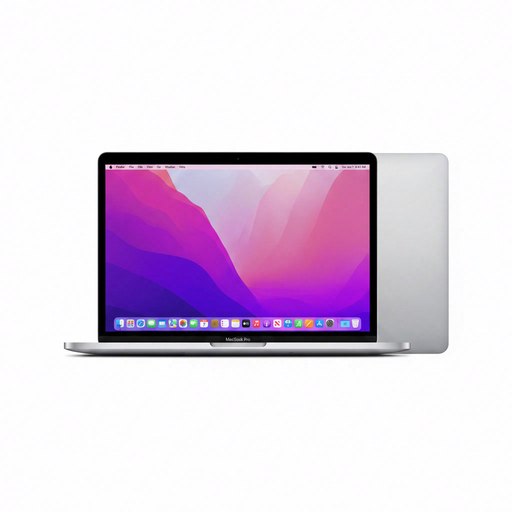
Apple MacBook Pro 13-inch M2, 24 GB, 256 GB

Apple MacBook Pro 13-inch M2, 24 GB, 256 GB

A compact macOS model to compare if you’re looking for a smaller screen and more memory.

The product details list a 13.3-inch screen, 24 GB memory, a 256 GB SSD and dimensions of 30,41 × 21,24 cm.

Joybuy

Frequently asked questions

Do I need to install Python separately if I use Visual Studio Code?

Yes. According to Microsoft’s Python guide, Python 3, Visual Studio Code and the Python extension are separate components; the extension does not include the Python interpreter.

Can I learn Python locally on a Chromebook?

You can use the Linux development environment if it’s supported on the specific device and you’re allowed to enable it. Google says Linux is switched off by default and may not be available on Chromebooks managed by a school or employer.

What should I check if I want to connect a separate monitor or keyboard?

Check the ports on the exact laptop and make sure you have enough room for the extra equipment. Arboportaal outlines rules for employees who work at a screen for more than two hours a day, under which a separate monitor or keyboard may be needed when using a laptop. These employer rules do not automatically apply to every private individual learning Python.

What are my rights if I’m unhappy with an online laptop purchase or it’s faulty?

For online consumer purchases, there is generally a statutory cooling-off period of up to 14 days after delivery, with some exceptions, according to ACM ConsuWijzer. If a product is faulty, the retailer is responsible for the statutory guarantee, according to the Netherlands Authority for Consumers and Markets; an additional commercial warranty does not replace this right.
