
Pattern collector
You download PDF patterns and want to find them again later, even if you no longer have the original website open.


The right laptop depends on how you find and back up your patterns. Windows and macOS offer built-in tools for searching and local backups, while a Chromebook is best suited to you if PDFs and external storage fit the way you work. Keep your patterns in a dedicated local folder, test whether you can find your own PDFs, and try restoring a file from a separate drive. Then compare the screen, storage and ports on the exact model you’re considering.
You download PDF patterns and want to find them again later, even if you no longer have the original website open.
You want to protect your collection if your laptop is lost or damaged, so you’re looking for a practical way to keep a copy on separate storage.
You take patterns with you and want to balance a screen that’s comfortable to read on with a laptop that’s easy to carry. You’ll also need to consider the port for your backup drive.
Start with how you’ll manage your files: decide where you’ll store your patterns, how you’ll find them and how you’ll restore them. Then choose a screen and ports that suit your files and backup drive.
| What to consider | What to look for | Who should prioritise this? |
|---|---|---|
| Finding patterns | Decide whether searching by filename is enough or whether you want to search the text inside PDFs. Test your own files and check that your archive folder is included in the search index. | I want to be able to find a downloaded pattern later by name or content. Around 29% of consumers prioritise being able to find files locally. |
| Separate backup | Choose a backup method and check that your external drive’s connection is compatible. Try restoring a file, too. | I want a recoverable copy on a separate drive if I lose my laptop. Around 29% of consumers put data protection first. |
| Reading space | Compare the screen size and resolution of the exact model. If possible, open a pattern similar to the PDFs you use. | I want to read the text and images in a pattern comfortably. Around 24% of consumers prioritise screen space for reading. |
| Portability | Compare the weight and screen size of the exact model. Also consider when you’ll connect your external drive to back up your files. | I take my laptop to different places and want to access my patterns wherever I am. Around 18% of consumers prioritise portability. |
A second folder on the same laptop won’t protect you if the device is lost. Microsoft describes Windows Backup as syncing selected folders with OneDrive; File History and Time Machine work differently when it comes to restoring files.
Choose a separate backup location and try restoring a pattern file.
Microsoft says the classic Windows search index includes certain folders by default; you may need to adjust the settings for other archive locations. On a Mac, you can choose which categories appear in Spotlight results.
Create a dedicated archive folder and test the search with your own files, especially if you want to find text inside PDFs.
Google warns that files in Downloads may be deleted if your Chromebook is running low on storage.
Move patterns you want to keep to a dedicated folder and make a separate copy on suitable external storage. Check the file system on any existing drive, too.
Models in the same range can differ in memory, storage, ports and included accessories. For example, Acer says the Aspire Go 15 NX.JRREH.015 is supplied without a charger.
Check the full model number, ports and box contents before you choose.
If a charger isn’t included, you’ll need to source a compatible one yourself.
The Aspire Go 15 and Chromebook Plus 516 offer different ways to work: Windows for indexing and backups, or ChromeOS with a focus on managing files locally.
The 13-inch MacBook Air M5 is a macOS option if you want to combine local searches with Spotlight and external backups with Time Machine.
The IdeaPad Slim 3 15IRH10 is a laptop range worth comparing if upgradeable storage or connectivity is important to you.
The HP ProBook 4 G2i 16-inch DU1E9EA#ABH is a Windows 11 Pro model with a larger screen.
These Joybuy picks are laptops with SSD storage. When comparing laptops for a knitting pattern archive, focus on the screen, operating system and port for an external backup drive.
 No image available
This Windows 11 Home model comes with a 512 GB SSD and a 15.6-inch Full HD screen. Check that its ports are compatible with your external backup drive.
 No image available
This Windows 11 Pro model has 32 GB DDR5, a 512 GB SSD and a 16-inch screen with a resolution of 1920 × 1200. The product description says it’s supplied without a power adapter, so check how you’ll power the laptop.
 No image available
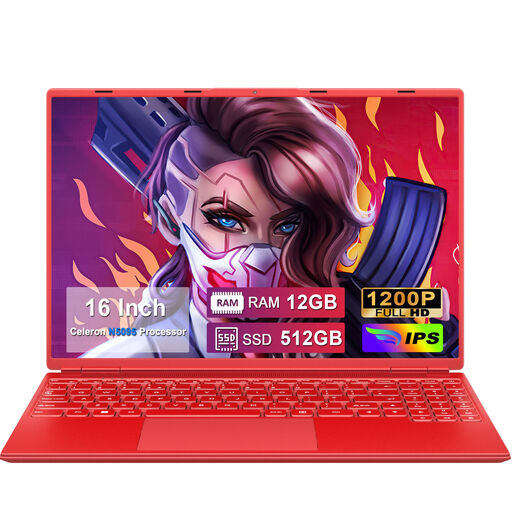
The product description lists a 16-inch screen with a resolution of 1920 × 1200 and a 512 GB SSD. Before choosing a backup method, check which operating system and ports are included with this model.
 No image available
This model comes with a 1 TB SSD and a 16-inch QHD screen. Check which operating system and ports are included with the model you choose before connecting an external drive.
 No image available
The product name lists Windows, 16 GB DDR5, a 512 GB SSD and a 17.3-inch Full HD IPS screen. The product description says the charger isn’t included, so check how you’ll power the laptop.
No. Microsoft describes Windows Backup as syncing selected user folders with OneDrive. To keep a separate local copy, you can use File History with an external drive and test restoring a file.
Connect a compatible external storage device and add it as a Time Machine disk in the macOS settings. Apple recommends using a backup device with at least twice the storage capacity of your Mac; you may be asked to erase the device during setup.
Google lists PDFs as a supported file type and compatible USB drives as external storage. Don’t keep patterns you need for the long term only in Downloads: Google warns that files there may be deleted when storage is low. Check your drive’s file system, too.
Check that your external backup drive is compatible with the port and backup method, and that the laptop model you choose includes a charger. If a product is faulty, the seller in the Netherlands is responsible for the statutory guarantee. ACM ConsuWijzer says there is no fixed time limit for this guarantee and that a commercial warranty doesn’t take away your rights.
No. Having a backup doesn’t give you permission to distribute or publish copyrighted material. The Dutch Government distinguishes between making a copy for personal use and distributing it; check the terms that apply to the pattern, too.