Joybuy laptops for writing
These laptop recommendations are for writing and reviewing a job application letter, with software, keyboard layout and portability to the library in mind.
 Image unavailable
HP OmniBook 7 AeroNGAI 13-bg1051nd NL Copilot+
A Windows option for anyone who wants to edit a cover letter and CV and take their laptop with them.
The product name lists a 13.3-inch screen and AMD Ryzen AI 5. Check the keyboard layout on the exact configuration.
View at Joybuy
 Image unavailable
Lenovo IdeaPad Slim 3 14AHP10
A Windows option for writing and saving a cover letter and CV.
The product name lists Ryzen 7 8840HS, 16 GB RAM, a 1 TB PCIe SSD and a QWERTY keyboard. Check that the keyboard layout suits you.
View at Joybuy
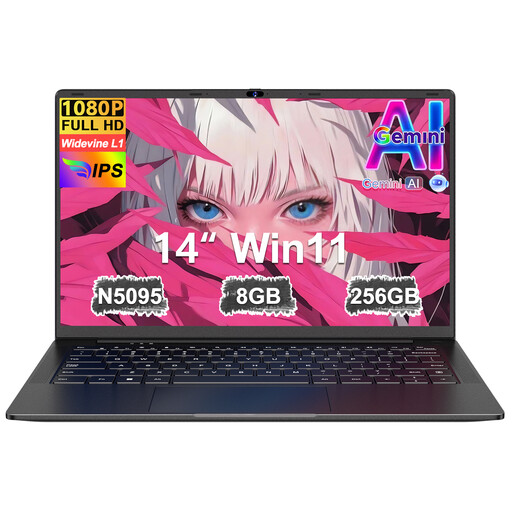 Image unavailable
Ruzava 14-inch laptop, N5095, black
An option to compare if you’re looking for a laptop for basic text work.
The product name lists 8 GB RAM, a 256 GB SSD, an FHD screen and a numeric keypad. The storage is described as expandable up to 1 TB.
View at Joybuy
 Image unavailable
Apple MacBook Neo 13-inch A18 Pro, Citrus (2026)
A macOS option for anyone who wants to write their application letter and do other work in that software environment.
The product name lists 8 GB RAM, a 256 GB SSD and a QWERTY keyboard. According to the product description, a 20 W or higher USB-C power adapter is required and isn’t included.
View at Joybuy
 Image unavailable
ASUS Zenbook A14 UX3407QA-QD479W
A Windows option for anyone looking for a laptop for writing and working on the go.
The product name lists Snapdragon X, 16 GB RAM, a 512 GB SSD, WUXGA OLED and a Dutch QWERTY keyboard. According to the product description, a compatible 65 W USB-C Power Delivery charger is required; it isn’t included.
View at Joybuy
Frequently asked questions
Do I need a powerful laptop to write a job application letter?
Not if you mainly use the internet, email and basic office software. For this kind of use, the Consumers’ Association suggests a Core i3 or Ryzen 3-class processor, 8 GB RAM, 256 GB storage and a 14-inch Full HD IPS screen as a guide. This is buying advice, not a minimum requirement.
Can I carry on working if the library’s Wi-Fi drops out?
You can with Google Docs if you enable offline access in advance by following Google’s instructions and make the files available. Before you leave, check that you can access the documents using the right account. You’ll need an internet connection again to submit them online.
Do I have to pay separately for Word?
After signing in with a Microsoft account, you can use free web versions of Word, Excel and PowerPoint. The desktop versions are included with some Microsoft 365 subscriptions, among other options. Check which version you need before factoring in a subscription.
What product safety requirement should I check for a laptop?
The Dutch government says electronic products sold in the EU must have a CE marking. Check the product information for the exact configuration you want to buy, and ask the seller for clarification if the marking or documentation isn’t clear.
What are my rights when I buy a laptop online?
Many online consumer purchases come with a statutory 14-day cooling-off period after delivery, although there are exceptions. This is separate from your rights if a product is faulty: the Dutch government identifies the seller as your point of contact for a solution.


