
Indexer checking duplicate entries
Compares advert entries, keeps references to the source and wants to review possible duplicates before removing any entries.


Start with the software: if you regularly use Excel Power Query, a Windows laptop is a good choice, while a MacBook may suit you if the features you need work with your version of macOS. Then choose based on how much room you need for scans and index data, your storage requirements and how often you take your laptop with you. No laptop can determine on its own whether two historical adverts are genuine duplicates.
Compares advert entries, keeps references to the source and wants to review possible duplicates before removing any entries.
Checks advert text in historical newspapers against an index and needs a practical layout for comparing the source with the data entered.
Takes files along for source checks and weighs portability against the space needed for scans and other research files.
A good fit if: you regularly use Excel Power Query to import data and review possible duplicate rows.
Bear in mind: the results also depend on which columns you compare; differences in OCR text may need to be checked against the original.
A good fit if: you work on macOS and have checked in advance that your version of Excel and your indexing software support the steps you need.
Bear in mind: Power Query features vary by Excel version; also check that the screen and ports suit your workspace.
A good fit if: you can do all your indexing work using suitable web apps and cloud files.
Bear in mind: the Microsoft 365 file editing workflow described by Google requires OneDrive; check that your offline workflow is suitable too.
| What to consider | What should you check? | Who is this important for? |
|---|---|---|
| Software and duplicate checks | Check your version of Excel and operating system; decide which fields to compare and keep an unchanged copy of the source file. | If I want to review possible duplicate entries without accidentally removing source records, this check is my priority. Around 36% of consumers put duplicate checks first. |
| Room for the scan and index | Compare the screen size and resolution with how you want to view the scan and data side by side. | If I want to check the source material and index at the same time, I focus on a screen layout that works for my files. Around 29% of consumers prioritise having enough screen space to read the scan and index. |
| Local storage | Work out how many scans and work files you’ll keep locally, and check the SSD capacity of the exact configuration. | If I want to keep my own collection locally, I want storage that suits my files. Around 21% of consumers give local storage top priority. |
| Taking it to archives | Compare the dimensions and weight with your travel plans; also check the charger and charging options at the places you usually visit. | If I work at different research locations, portability matters most to me. Around 14% of consumers make portability their top priority. |
Microsoft Support describes Power Query for Excel 2016 and later on Windows; availability and features can vary by platform and version. The columns you select determine which rows are treated as duplicates. An advert with different OCR text may therefore still need to be checked against the scan.
The columns you select determine which values Power Query compares. Removing duplicates takes repeated values out of the edited list; filtering hides them temporarily. A repeated advert may also be a separate placement.
Keep the original file and check possible matches against the scan before merging or removing any records.
A product range can include different processors, operating systems and configurations. The specifications of one model do not necessarily apply to every configuration.
Check the full model number and the specifications of the configuration you’re considering.
The Microsoft 365 file editing workflow on a Chromebook described by Google requires OneDrive.
Test a representative index file to check that the features you need and the file location work with your workflow. Bear in mind the cloud storage and setup you’ll need.
The KB points out that more recent newspapers may be subject to copyright and privacy rights. Access to searchable sources does not, by itself, mean you can freely publish adverts.
Before publishing, check the rights and terms for the specific source and intended use.
The ThinkPad E14 Gen 7 is a useful reference if you’re looking for a Windows workflow on a 14-inch laptop.
The ExpertBook B1 B1503 range is worth considering if you’re looking at a larger built-in screen for checking sources.
A 13-inch MacBook Air with M5 offers a compact macOS option if you’ve checked in advance that it supports the software features you need.
The Latitude 5450 is an example of a business Windows range with different processor and operating system options.
These Joybuy laptops are Windows models for viewing scans alongside index data and storing work files.
 No image available
The listed 16-inch screen may suit a workflow where you view the source and index side by side.
16-inch 3K OLED touchscreen with 120 Hz; 64 GB RAM; 2 TB SSD; Windows 11 Pro; QWERTY keyboard.
Use an HP adapter approved for this model and keep the ventilation openings clear.
 No image available
The listed 16-inch screen may suit you if you want room for source material alongside your data while indexing.
16-inch 3K OLED touchscreen with 120 Hz; 32 GB RAM; 1 TB SSD; Windows 11 Pro; QWERTY keyboard.
Use an HP adapter approved for this model and keep the ventilation openings clear.
 No image available
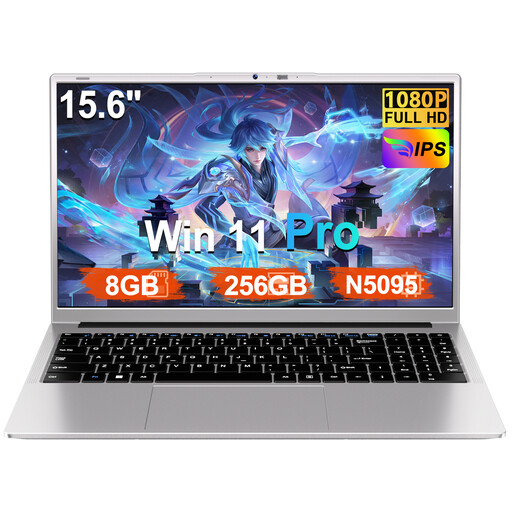
The 15.6-inch screen may be useful if you want to view source material and the index side by side.
FHD screen; 8 GB RAM; 256 GB SSD, expandable to 1 TB according to the product name; N5095 processor; Windows 11 Pro.
No image available
The listed 16-inch screen may suit a workflow where you view scans and index data side by side.
16-inch 3K OLED touchscreen with 120 Hz; 128 GB RAM; 2 TB SSD; Windows 11 Pro; QWERTY keyboard.
Use an HP adapter approved for this model and keep the ventilation openings clear.
 No image available
The listed 15.3-inch screen may suit you if you’re looking for a larger built-in screen for checking sources.
15.3-inch screen; 64 GB RAM; 1 TB SSD; QWERTY keyboard.
Keep the ventilation openings clear and use a compatible power adapter.
No. Check possible duplicates before removing them. Filtering hides duplicate values temporarily, while removing them takes them out of the edited list. Microsoft Support says that Power Query uses the selected columns to identify duplicate values; keep the source file and compare matches with the scan.
It depends on the features and workflow you need. Google describes opening and editing Excel files through Microsoft 365 on a Chromebook; this workflow requires OneDrive. Also check that your index file and any offline work are suitable for the apps you choose.
Check whether the software, storage service and any adapters you need are included in your chosen setup. Also read about any additional costs listed by the seller. Paid extended cover does not replace your statutory rights under Dutch law.
Not automatically: being searchable does not, by itself, give you permission to republish material. The KB says that more recent newspapers may be subject to copyright and privacy rights, and that conditions may apply to reuse. Check the rights and terms for the specific source and intended use.
According to the Dutch government, you should contact the seller to resolve an issue under the statutory guarantee, rather than contacting only the manufacturer. A manufacturer’s guarantee or additional cover is on top of this.