Joybuy products for inventory lists
The models below are mainly Windows laptops in a range of screen sizes, plus a MacBook Air. Before buying, check that your inventory files and required software work with the specific configuration.
 Image unavailable
NOTODD Laptop 14-inch Celeron N5095, 8 GB RAM, 256 GB SSD, Windows 11
A Windows option if your inventory software works on this configuration.
The Joybuy product listing specifies a 14-inch screen with 1920 × 1200 pixels, an IPS panel, Windows 11, 8 GB RAM and 256 GB of SSD storage.
View at Joybuy
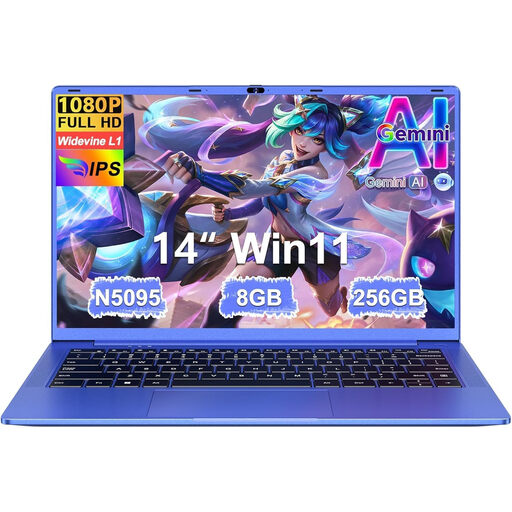 Image unavailable
Ruzava Laptop 14-inch N5095, 8 GB RAM, 256 GB SSD, numeric keypad
Consider this Windows laptop if your inventory app works with it and you’d like to enter corrections using a numeric keypad.
The Joybuy product listing specifies a 14-inch Full HD IPS screen, Windows 11, 8 GB RAM, 256 GB of SSD storage and a numeric keypad.
View at Joybuy
 Image unavailable
HP OmniBook 3 16-by0058ndx, AMD Ryzen 5 7520U, 8 GB RAM, 512 GB SSD
The larger screen may suit you if you want more room to view inventory entries and don’t need a particularly compact laptop.
The Joybuy product listing specifies a 16-inch anti-glare IPS screen with a 16:10 aspect ratio, Windows 11, 8 GB of memory and 512 GB of SSD storage. The product description says that a charger isn’t included.
View at Joybuy
 Image unavailable
HP OmniBook 3 17-dp0050ndx, 17.3-inch Full HD IPS, 8 GB RAM, 512 GB SSD
This configuration has a larger screen, so weigh the extra viewing space against how compact you want your laptop to be when carrying it.
The Joybuy product listing specifies a 17.3-inch Full HD anti-glare IPS screen, Windows 11, 8 GB of memory and 512 GB of SSD storage. The product description says that a charger isn’t included.
View at Joybuy
 Image unavailable
Apple MacBook Air 15-inch M5, 16 GB, 512 GB, Starlight, QWERTY keyboard (2026)
Consider this MacBook Air if your inventory files and required software work on macOS.
The Joybuy product listing specifies a 15-inch screen, M5, 16 GB of memory and 512 GB of storage. According to the product information, a power adapter isn’t included.
View at Joybuy
Frequently asked questions
Can I edit my inventory without the library’s Wi-Fi?
Yes, if you’ve made the files and required app available offline in advance. Google explains how to use supported Drive files offline on a Chromebook; Microsoft explains how to make OneDrive files available locally. Try opening your own file without an internet connection beforehand.
Is 8 GB of memory and 256 GB of storage enough?
It can be a useful guideline for basic office work, but it doesn’t guarantee that every inventory app or large collection of attachments will fit. The Consumers’ Association of the Netherlands mentioned 8 GB RAM and 256 GB of storage in a publication dated 14 August 2026. Also check the requirements of your own software and how many files you want to keep locally.
How can I check how long a Chromebook will receive updates?
According to Google, you can view the update schedule in the ChromeOS settings, in the additional details under ‘About ChromeOS’. The update end date varies by device, so don’t judge it by the purchase date alone.
If something goes wrong, do I have to contact the manufacturer only?
No. According to the Dutch government, the seller must provide a solution if a product is faulty. The Netherlands has no fixed statutory warranty period; a manufacturer’s warranty doesn’t replace your legal rights.
Do I have a cooling-off period when buying online in the Netherlands?
According to the Dutch government, consumers buying at a distance are entitled to a 14-day cooling-off period in many cases. Check the terms and any exceptions that apply to your specific purchase.


