What should you look for when choosing?
First, choose an operating system that suits the way you manage your household budget. Then compare the screen, portability, privacy and anything else you’ll need for your chosen configuration.
Windows laptop
Choose this if: you use a Windows programme installed on your computer, or you don’t want to switch your spreadsheet to a browser-based alternative.
Keep in mind: the screen, keyboard, weight and included charger can vary between configurations.
Chromebook
Choose this if: your household budget and the services you need work in a supported browser.
Keep in mind: Microsoft Support says that macros in an Excel file won’t run in Excel for the web. Also check the update schedule for the exact Chromebook model.
MacBook
Choose this if: the programmes you need are available for macOS.
Keep in mind: check that the ports on your chosen configuration suit the devices you want to connect.
| What to consider |
What to check before buying |
Who might find this more important? |
| Compatibility |
Test a copy of your file in the web app you’re considering. Check formulas, file format, macros and any locally installed software. |
If I want to keep using my existing household budget without losing any features, I’ll check my own file first. Around 29% of consumers put software compatibility first. |
| Privacy and connection |
Consider whether you can use your phone as a hotspot. When banking, check the network and the full web address; HTTPS alone doesn’t prove that a website is trustworthy. |
If I view account details in a shared workspace, I want to avoid other people seeing my screen or using an untrusted network. Around 23% of consumers put privacy first. |
| Portability and battery |
Compare the weight of the exact configuration, the charger you’ll need and the battery details for the way you use your laptop. |
If I often take my laptop with me and want to work away from a socket, I’ll weigh portability against how long I need to work. Around 18% of consumers put portability first. |
| Screen readability |
View one of your own bills or spreadsheets on the screen. Compare the screen size, resolution and anti-glare finish of each model. |
If I want to read figures and columns comfortably, I’ll assess the screen using my own documents. Around 18% of consumers put readability first. |
| Total cost and lifespan |
Check what’s included in the box and, for a Chromebook, when automatic updates will end for that specific device. |
If I want to avoid unexpected purchases and use my laptop for longer, I’ll check the accessories and support in advance. Around 12% of consumers put cost and lifespan first. |
Joybuy laptops for managing your finances
The Joybuy products shown are Windows laptops for managing your finances when you need Windows software. Compare the screen size and included charger for each configuration.
 No image available
HP OmniBook 3 14-hy0058ndx, 8 GB RAM, 512 GB SSD
A Windows configuration for household finances using software that runs on Windows.
14-inch IPS screen with 1920 × 1200 resolution and anti-glare finish; 8 GB RAM; 512 GB SSD; Windows 11 Home.
Supplied without a charger; you’ll need a suitable USB-C Power Delivery charger to charge it.
Joybuy
 No image available
HP OmniBook 5 Flip 14-fp0251ndx 2-in-1, 8 GB RAM, 512 GB SSD
A Windows laptop for managing your finances with software that runs on Windows; the screen supports touch.
14-inch touchscreen with 1920 × 1200 resolution; 8 GB RAM; 512 GB SSD; Windows 11 Home.
A suitable USB-C charger and stylus are not included.
Joybuy
 No image available
Lenovo IdeaPad Slim 3 15AHP10, 16 GB RAM, 512 GB SSD
A Windows configuration for local work with compatible software. The larger screen may suit you if you want more room to view documents.
15.3-inch anti-glare IPS screen with 1920 × 1200 resolution and a 16:10 aspect ratio; 16 GB memory; 512 GB SSD.
The charger must be purchased separately.
Joybuy
 No image available
Acer Aspire Go 15 AG15-72P-56BJ, 16 GB RAM, 512 GB SSD, AZERTY
A Windows configuration for everyday work with compatible software, with a larger screen for your documents.
15.6-inch Full HD IPS screen with matte finish; 16 GB RAM; 512 GB SSD; Windows 11 Home.
This configuration has an AZERTY keyboard and is supplied without a power adapter.
Joybuy
 No image available
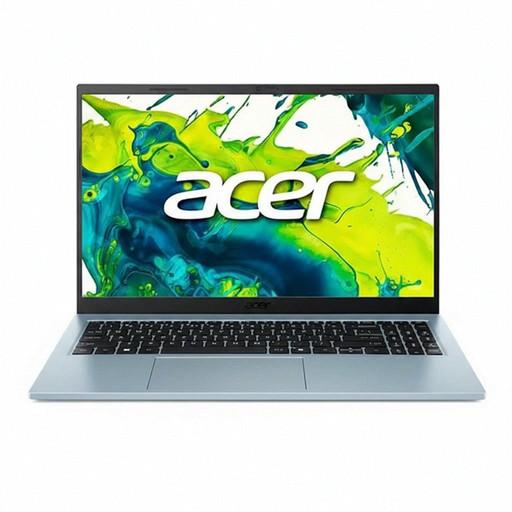
Acer Aspire Go 15 AG15-72P-599F, 8 GB RAM, 512 GB SSD, QWERTY
A Windows configuration for managing your finances with compatible software, with a larger screen for viewing bills and spreadsheets.
15.6-inch Full HD IPS screen with matte finish; 8 GB RAM; 512 GB SSD; Windows 11 Home.
Joybuy
Frequently asked questions
Can I use my existing Excel household budget on a Chromebook?
For basic tasks, you can use Excel for the web in a browser. Test your own file: Microsoft Support says that some features work differently and that macros in an opened .xlsm file won’t run in the browser.
How can I use a laptop to view account details at the library?
For sensitive banking tasks, use a mobile connection if possible. Check the full web address, as HTTPS alone doesn’t prove that a website is trustworthy. Lock your laptop or take it with you when you step away. You could also consider whether you need a suitable privacy filter.
How can I keep the battery in good condition?
The Consumentenbond points out that laptop batteries wear out over time. Avoid prolonged exposure to heat and check whether your specific laptop has a feature that limits charging. With this setting, you may need to recharge sooner.
What if I’m unhappy with a laptop bought online or it breaks too soon?
For a standard online consumer purchase in the Netherlands, you generally have up to 14 days after delivery to change your mind, subject to legal exceptions. If a product is faulty, the seller is responsible under Dutch statutory guarantees for providing an appropriate remedy free of charge, according to ACM ConsuWijzer. A manufacturer’s guarantee doesn’t take away this right.


