First, choose a laptop that can run your group’s software and files, then compare the battery figures for the exact configuration with how you expect to use it. Windows and macOS may suit locally stored files and compatible programmes; a Chromebook is best suited to a ChromeOS workflow, with files made available offline in advance. Claimed battery life is no guarantee of how long a group project will take, and you’ll need an internet connection to collaborate online.
Who is this relevant to?
A group working for a long time without a power socket
If you want to prepare your project on a single charge, it’s worth comparing the battery test and the conditions it was carried out in. For example, Apple distinguishes between wireless web browsing and video streaming; neither test reflects how long a group project will take.
A group with an unreliable internet connection
If you need shared project files when you’re offline, make them available offline in advance. Google says that compatible Drive files on a Chromebook will sync later; Microsoft explains that files stored online only in OneDrive won’t open without an internet connection.
A student who needs specific software
Before buying, check that the operating system supports the required apps and files. Microsoft and Google set out different requirements for using Microsoft 365 on a Chromebook, so check that this workflow meets the requirements of your course.
What should you look for when choosing?
Windows laptop
A good fit if: your course requires Windows programmes or your group works with locally stored Office files.
Bear in mind: battery, screen and included power adapter vary by configuration. Make cloud files available locally in advance if you want to keep working offline.
MacBook
A good fit if: the required programmes work on macOS and you’re looking for a compact laptop for documents and discussions.
Bear in mind: Apple quotes up to 15 hours of wireless web browsing or 18 hours of video streaming for the 13-inch MacBook Air with M5. These are different tests, not a promise of how long your project will take.
Chromebook
A good fit if: your group uses compatible ChromeOS and Google apps and makes any required Drive files available offline in advance.
Bear in mind: not every app works offline. Google says that using Microsoft 365 on a Chromebook requires OneDrive.
| Consideration |
What to look for |
Who it matters most to |
| Battery life |
Compare the exact configuration and the activity used in the stated test; usage and screen brightness affect battery life. |
If I want to know whether the group can finish its planned work session without charging, I compare the test with how we’ll use the laptop. Around 36% of consumers put battery life first. |
| Offline files |
Make shared files available locally in advance and check that they’re accessible offline. |
If the connection might drop, I still want to be able to open and edit project files. Around 29% of consumers put access to files without internet first. |
| Portability and viewing together |
Compare the weight, screen size and ports of the exact configuration. |
If I’m taking the laptop with me and the group needs to look at a plan together, I weigh portability against screen space. Around 21% of consumers prioritise this combination. |
| Software and additional essentials |
Check the operating system, required apps and what charging equipment is included. |
If you need specific software, it’s important that it works on the laptop and that the necessary accessories are included. Around 14% of consumers prioritise compatibility and any extra purchases they may need to make. |
Common pitfalls
-
Taking ‘up to so many hours’ as a guaranteed battery life
A battery test for video playback or web browsing doesn’t automatically tell you how long the laptop will last with your apps, screen brightness and workload.
Check which activity the battery figures refer to, then compare the exact configuration with how you expect to use it.
-
Assuming every cloud file opens offline
A OneDrive file that’s only available online won’t open without an internet connection. On a Chromebook, compatible Drive files must be made available offline in advance.
Before you leave, check that all the shared documents you need are accessible offline.
-
Assuming Windows, Mac and Chromebook are interchangeable
Required apps and ways of working with files vary by operating system. Software licences and accessories can also affect what you can use straight away.
First check that the required apps and files are supported, then check what’s included with the specific configuration.
A software licence you need or an adapter you have to buy separately could add to the cost; check this for the configuration you’ve chosen.
Brands to consider
Apple
The MacBook Air is an option if you’re looking for a compact macOS laptop; specifications vary between the 13-inch and 15-inch configurations.
- Apple quotes up to 15 hours of wireless web browsing and 18 hours of video streaming for the 13-inch M5 configuration.
- These are manufacturer tests for different activities, not a prediction of how long the laptop will last during a group project. Also check that the required software works on macOS.
HP
The OmniBook 3 range includes Windows laptops for everyday use; check the full model code for the configuration you’re considering.
- For the HP 14-hu0625ndx, HP lists 16 GB RAM, a 512 GB SSD and USB-C, USB-A and HDMI ports.
- The charger is listed as sold separately for this specific configuration. Check which accessories are included with the exact model you’re considering.
ASUS
The Chromebook Plus CX34 may suit a ChromeOS workflow using compatible apps and files made available offline in advance.
- For the Dutch CX3402CBA configuration, ASUS lists a 14-inch screen, 8 GB memory, 128 GB storage and a 50 Wh battery.
- Wh indicates battery capacity, not the number of hours you can work. Not all apps can be used offline.
Lenovo
The IdeaPad Slim 5 14AKP10 is a Windows option to compare in terms of configuration, ports and battery information.
- Lenovo publishes specifications that vary by configuration for this model range.
- Lenovo says that actual battery life depends, among other things, on configuration, software, wireless use and screen brightness. Before buying, check the full model code and configuration.
Laptop options at Joybuy
These laptops may suit study and project work using locally stored files. Check the operating system, stated battery information and included accessories for each configuration.
 No image available
HP OmniBook 3 14-hy0058ndx
May suit group work using Windows software and locally stored project files.
AMD Ryzen 5 7520U, 8 GB RAM, 512 GB SSD and Windows 11 Home. The charger isn’t included and must be bought separately.
View at Joybuy
 No image available
Auusda T161N
The stated storage capacity may be useful if you want to keep project files locally.
i3-1000NG4 processor, 16 GB DDR4 RAM and 1 TB SSD. The description lists a 16-inch screen.
View at Joybuy
 No image available
Auusda T156A
May suit study and project work where you want to store files locally.
3050E processor, 16 GB DDR4 RAM and 512 GB SSD. The description lists a 15.6-inch FHD IPS screen.
View at Joybuy
 No image available
Lenovo V15 G5 IRL
May suit a group project that needs Windows software and locally stored project files.
Intel Core i5-13420H, 16 GB DDR5, 512 GB SSD and Windows 11 Pro. The stated starting weight is 1.61 kg.
View at Joybuy
 No image available
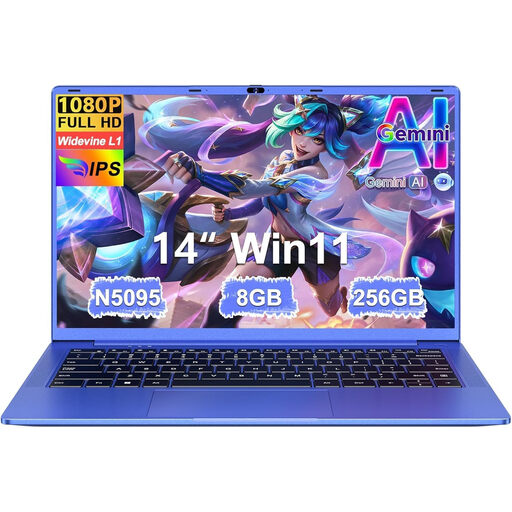
Ruzava 14-inch laptop
The stated weight and screen size may matter if you’re taking the laptop to a place to work.
N5095 processor, 8 GB RAM and 256 GB SSD. The description quotes up to 7 hours of battery life and a weight of 1.39 kg; this battery life isn’t a guarantee for your work session.
View at Joybuy
Frequently asked questions
Can you work together on the same online document without internet?
Don’t assume you can. Make files available locally in advance and agree how you’ll merge changes once the connection is restored; the cloud services described only sync offline changes when you’re back online.
How do you prepare a laptop for working without a power socket?
Before you leave, check that the files you need are available locally. On a Windows laptop, you can lower the screen brightness and turn on battery saver; then compare battery life with the apps you use and the length of your work session.
Should you factor in an Office licence or charger?
Check the configuration you’ve chosen and whether your course gives you access to the software you need. Microsoft distinguishes between a one-off Office purchase and Microsoft 365, which includes the services covered by the subscription; the charger for the HP 14-hu0625ndx is listed as sold separately.
What warranty rights and cooling-off period apply to an online purchase in the Netherlands?
According to ACM ConsuWijzer, the seller is responsible if a product doesn’t perform as you could reasonably expect under normal use. For an online consumer purchase, you generally have up to 14 days after delivery to change your mind, subject to legal exceptions.


