Who is this laptop guide for?

Scriptwriters who revise frequently

If you rewrite scenes and panel descriptions, it helps to have a workflow that lets you find comments and changes without losing track of the main text. Final Draft, Literature & Latte and Microsoft Support describe features for scripts, annotations and tracked changes respectively.

Scriptwriters who often work on the go

If you take your laptop to different workspaces, you’ll need to balance portability against the screen space available for your script and notes. A manufacturer’s quoted battery life won’t necessarily match how long the laptop lasts during one of your writing days.

Scriptwriters who make visual notes

If you look at reference images alongside your script, consider how much screen space is available. Annotating directly on the screen is an additional requirement: check whether the exact model works with a suitable pen and whether one is included.

What should you look for when choosing?

Standard Windows laptop

Choose this option if: you mainly type and use comments or tracked changes.

Bear in mind: a touchscreen or pen isn’t guaranteed, and you’ll need to judge the keyboard comfort for yourself.

Compact MacBook Air

Choose this option if: you want macOS and portability matters more to you than a large built-in screen.

Bear in mind: a more compact screen gives you less room to view your script and references side by side.

Windows 2-in-1 with touchscreen

Choose this option if: as well as typing, you want to view or mark up ideas and notes directly on the screen.

Bear in mind: having a touchscreen doesn’t in itself confirm pen support or that a pen is included.

What to consider What should you check? Who is this important for?
Writing and revisions Try the keyboard and touchpad; check whether your software saves comments or changes in the way you want. If I rewrite scenes frequently, I want to be able to find comments and changes without losing track of the main text. Around 36% of consumers are most concerned about revisions and writing comfort.
Portability Compare the size and weight of the exact configuration; when looking at battery figures, check what activity the manufacturer tested. When I write in different places, I want to be able to carry my laptop easily and not have to work next to a power socket. Portability is the top priority for around 29% of consumers.
Space for references Check whether your script and images are both easy to read at the same time; for a 2-in-1, check pen support and what’s included in the box. If I look at panel references alongside my script, I want enough screen space. Drawing on the screen is only necessary if it suits the way I work. Around 21% of consumers prioritise visual references or notes.
Configuration and use Choose memory and storage to suit your programmes and image files; also check the requirements and any costs of your writing software. I don’t want to pay for features I won’t use, but I do want enough room for my files and programmes open at the same time. Around 14% of consumers focus mainly on a suitable configuration and the purchase price.

Common buying mistakes

  • Assuming a touchscreen comes with everything you need to draw

    A touchscreen doesn’t confirm which pen works with the laptop or whether one is included.

    For the exact model, check both which pens it supports and what’s included in the box.

    If you want to annotate by hand, you may need to buy a compatible pen separately.

  • Choosing a Chromebook without checking the software

    Final Draft says that its programme doesn’t work on Chromebooks. As a result, a laptop that otherwise seems suitable may not fit with your existing writing workflow.

    First, make a note of the programmes and file-sharing options you need, then check the requirements for your chosen operating system.

  • Confusing a series name with the specifications of a particular model

    Specifications can vary between models in the same series, for example in memory, screen and ports.

    Compare the full model number with the specifications of the configuration you’re considering.

Brands to consider

Acer

The Aspire Go 14 NX.KT8EH.009 is a standard 14-inch Windows laptop, while the Aspire Go Spin 14 NX.J3UEH.001 offers a 2-in-1 option.

  • According to Acer’s model specifications, the Aspire Go 14 NX.KT8EH.009 has 8 GB RAM, 512 GB SSD storage and a WUXGA screen. The Aspire Go Spin 14 has a touchscreen.
  • Acer lists a maximum of 8 GB memory for the Aspire Go Spin 14. The touchscreen listing doesn’t confirm that a specific pen is compatible or included.

Apple

The 13-inch MacBook Air with M5 is a macOS option for anyone looking for a more compact laptop.

  • Apple lists 16 GB memory and 512 GB SSD storage for the base configuration. The manufacturer quotes battery life based on separate video and web browsing tests.
  • Those test figures aren’t a measure of how long it will last during a writing day. Also check that your writing software and file-sharing needs are compatible with macOS.

Lenovo

Lenovo covers ThinkBook and IdeaPad Slim ranges for different writing needs. Compare the specific configuration rather than relying on the series name alone.

  • Lenovo highlights the keyboard, screen, portability and battery life as things to consider when choosing.
  • General information about a range won’t tell you which configuration suits your work; check the features of the exact model.

Laptop picks at Joybuy

This selection includes Windows laptops for writing and revisions, including 2-in-1 models, and MacBook Air models for those weighing up macOS, screen space and portability.

HP OmniBook 5 Flip 14-fp0075nd C5VM5EA#ABH

HP OmniBook 5 Flip 14-fp0075nd C5VM5EA#ABH

A Windows 2-in-1 for viewing your script in tablet mode too; check which pen is right for the way you work.

14-inch touchscreen; stylus not included.

View at Joybuy

Lenovo ThinkBook 16 G8 IAL 21SK00EBMH

Lenovo ThinkBook 16 G8 IAL 21SK00EBMH

The 16-inch size could suit you if you want more built-in screen space for your script and notes; bear in mind the trade-off between screen size and portability.

16-inch WUXGA screen; Intel Core Ultra 5 135H 14-Core; Intel Arc Graphics; 16 GB DDR5; 512 GB SSD; Windows 11 Pro; QWERTY keyboard.

View at Joybuy

Apple MacBook Air 15-inch M5 16GB 512GB Starlight QWERTY Keyboard

Apple MacBook Air 15-inch M5 16GB 512GB, Starlight

A macOS option with a 15-inch screen if you want more built-in space than a more compact model offers.

16 GB memory; 512 GB storage; QWERTY keyboard. Power adapter not included.

View at Joybuy

Lenovo IdeaPad Slim 5 15ARP10, Ryzen 5 7535HS, 16GB, 512GB SSD

Lenovo IdeaPad Slim 5 15ARP10

A Windows laptop for anyone who values a larger screen and room to keep several applications open alongside their script.

15.3-inch WUXGA screen; Ryzen 5 7535HS; 16 GB memory; 512 GB SSD; QWERTY keyboard. Power adapter sold separately.

View at Joybuy
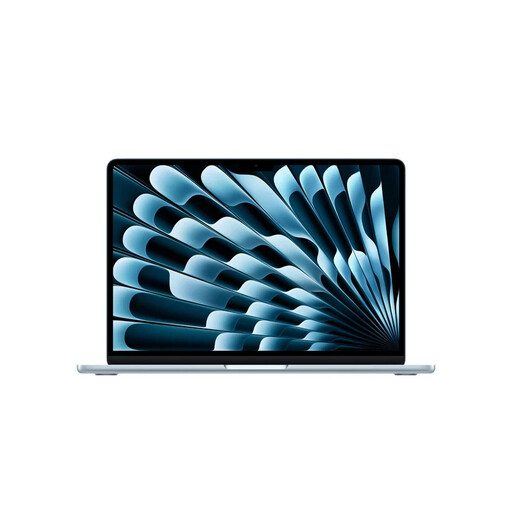
Apple MacBook Air 13-inch M5 16GB 512GB Sky Blue QWERTY Keyboard

Apple MacBook Air 13-inch M5 16GB 512GB, Sky Blue

A more compact macOS option if you often take your laptop with you and are happy with less built-in screen space.

16 GB memory; 512 GB storage; QWERTY keyboard. Power adapter not included.

View at Joybuy

Frequently asked questions

Do you need a specialist graphics laptop for a graphic novel script?

Not if you only write text and work with revision notes. If you also use large image files or drawing software, first check the requirements for that additional work.

Do Final Draft and Scrivener work on a Chromebook?

Final Draft says that it doesn’t work on Chromebooks. The current Final Draft FAQ lists macOS 12 or later, or Windows 11 or later with an Intel or AMD processor; Literature & Latte lists macOS 11 or later and 64-bit Windows 10 or later for Scrivener. Check the current requirements for your software before making a choice.

How can you keep revision notes separate from your script?

Depending on your software, you can use features for annotations, comments or tracked changes. Scrivener offers inline annotations and comments in the Inspector; Final Draft has a tracked changes feature, while Word marks additions and deletions. Check which format your editor can open and review.

How can you keep different versions of your script?

Keep copies of important versions and save an extra copy in a different location. The Consumers’ Association advises splitting files between your laptop, external storage and online storage; also check how your writing software exports projects.

What if a laptop you bought online isn’t right for you or breaks?

For an online consumer purchase in the Netherlands, there is generally a 14-day cooling-off period after delivery, with some exceptions and conditions. Faults are covered by your statutory rights to a product that meets reasonable standards: according to ACM ConsuWijzer, the seller is your point of contact for a solution if the product doesn’t meet what you could reasonably expect under normal use. A manufacturer’s warranty doesn’t replace those rights.
