What should you consider when choosing?
Start with the required software and files. Then work out how much screen space and comfort you need, before weighing up size, battery use and any additional costs.
| What to consider |
What should you check? |
Who should pay particular attention? |
| Documents and submission |
Check that the operating system, required storage service and application portal can open, edit and submit the file in the required format. Test a sample file and the export. |
If I want to edit and submit the required file without conversion issues, I’ll prioritise compatibility; around 36% of consumers say this is their main concern when buying. |
| Long writing sessions |
Compare the screen size, resolution and finish with your viewing distance, light levels and available table space. Also check whether you can connect the separate input devices you want to use. |
If I want to write for long periods and read documents comfortably, I’ll consider the screen setup and space for a separate keyboard; around 29% of consumers prioritise posture and readability. |
| Purchase and aftercare |
Choose a configuration that suits the programmes you need and check what’s included in the box. If you’re considering a paid service package, find out exactly what additional rights it provides. |
If I don’t want to spend more on specifications or services than my application work requires, I’ll compare the configuration and terms; around 21% of consumers put cost and aftercare first. |
| Working in other places |
Compare the size with the screen space you need and check the conditions behind any battery-life claims. Make the files you need available offline in advance and test that setup. |
If I want to work on my application away from my usual workspace, I’ll consider portability, power and offline access; around 14% of consumers give portability top priority. |
Joybuy laptops for working with documents
This Joybuy selection includes Windows laptops for writing and editing documents. Check that they support the software and submission portal you need for your application.
 No image available
Lenovo IdeaPad Slim 3 15AHP10
Windows 11 Home is listed for this configuration; check that it supports the software you need for your application.
15.3-inch WUXGA IPS screen, 16:10 aspect ratio and anti-glare finish.
Ryzen 7 8840HS, 16GB DDR5 and 512GB PCIe 4.0 SSD.
QWERTY keyboard.
View at Joybuy
 No image available
Samsung Galaxy Book4 NP750XGK-KG3NL
Windows 11 Home is listed for this configuration; check that it’s compatible with your application software and files.
15.6-inch Full HD IPS screen with an anti-glare finish.
Intel Core 7 150U, 16GB RAM and 512GB SSD.
View at Joybuy
 No image available
MSI Modern 14 F1MG-867NL
Windows 11 Home is listed for this configuration; check that it supports the programmes you need for your application.
14-inch Full HD IPS-level screen with an anti-glare finish.
Intel Core 7 150U 10-Core, 16GB DDR4 and 512GB SSD.
Backlit keyboard and Wi-Fi 6E.
View at Joybuy
 No image available
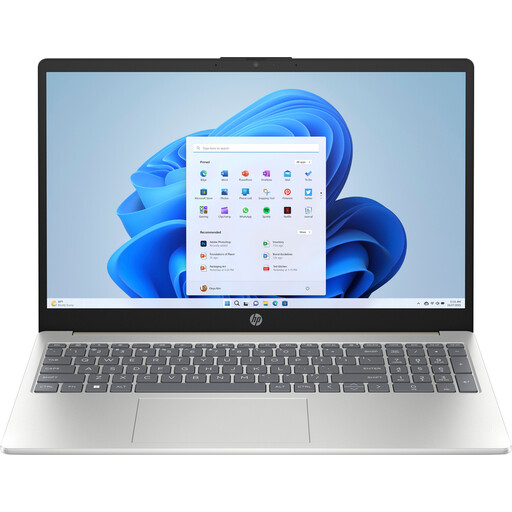
HP Laptop 15-fd1253ndx
Windows 11 Home is listed for this configuration; check that it suits the required programmes and submission process.
15.6-inch Full HD anti-glare screen.
Intel Core 5 120U, 8GB DDR5 and 512GB SSD.
View at Joybuy
 No image available
ASUS Vivobook 17 X1704MA-AU153W
Windows 11 Home is listed for this configuration; check that it supports your application software.
17.3-inch Full HD anti-glare screen.
Intel Core 5 320, 8GB RAM and 256GB SSD.
The listed configuration weighs 2.10 kg and takes up more table space than a more compact model, with its 17.3-inch screen.
View at Joybuy
Frequently asked questions
Can I use a Chromebook to apply for a grant?
You can if the submission portal and the editing you need work in supported web apps; test the required final file first. Microsoft states that the desktop versions of Microsoft 365 for Windows and Mac cannot be installed on a Chromebook. The Microsoft 365 process on a Chromebook described by Google requires OneDrive.
How can I prepare files in case my internet connection drops?
Make any relevant Google Docs, Sheets or Slides files available offline in advance, and check that this works while you’re still connected. Google describes this offline setting, but that doesn’t mean every submission portal will work without an internet connection.
Is a laptop’s built-in keyboard enough for long sessions at the kitchen table?
For employees who work at a screen for more than 2 hours a day, Arboportaal describes a requirement for the screen and keyboard not to be attached to one another. When using a laptop, it must therefore be possible to use a separate screen or keyboard. This is a conditional workplace rule, not a general requirement for every individual buying a laptop for writing.
Should I buy an extended warranty?
Not necessarily: according to the Dutch government, statutory consumer rights apply to purchases made by consumers in the Netherlands, and the seller must provide a solution if there’s a problem. An additional warranty is only worthwhile if its terms give you more rights than you already have. If you’re buying on behalf of an organisation, check the relevant contractual terms separately.
Do I have a cooling-off period when buying online?
For distance purchases from a business, consumers have a 14-day cooling-off period in many cases, according to the Dutch government. Check the applicable terms, and don’t assume this consumer right also applies to a business purchase.


