
Researcher between appointments
You open archive websites during short breaks and carry your laptop with you all day. Weight, the ability to work away from a socket and a screen that’s comfortable to read can all influence your choice.


Start by letting your genealogy software guide your choice: Stichting Aldfaer develops Aldfaer for Windows, while Ancestris says it is also available for macOS. Then weigh portability and battery life against the screen space, storage and ports you need for scans. You may not need a powerful graphics card for this kind of work.
You open archive websites during short breaks and carry your laptop with you all day. Weight, the ability to work away from a socket and a screen that’s comfortable to read can all influence your choice.
You read source images, save photos and make a note of where you found them. So look at screen space, storage and ports. The Dutch Genealogical Society explains how genealogy software can organise information about both discoveries and sources.
You want to update your existing data while you’re out and about. Check the operating system and how easy it is to transfer and back up your data. Stichting Aldfaer states that Aldfaer was developed for Windows; Ancestris lists Windows and macOS as options.
First check that your current genealogy software works with the operating system. Then compare portability, screen space and storage with your day-to-day routine.
| What to consider | What to look for | Who should pay particular attention? |
|---|---|---|
| Portability and battery life | Compare the weight of the exact configuration, including anything else you’ll be carrying. Assess battery life under comparable conditions; a stated maximum doesn’t guarantee how long you’ll be able to work. | If I carry my laptop between appointments, I want a bag that doesn’t get unnecessarily heavy and to be able to carry on working when there’s no socket. Around 31% of consumers prioritise portability and working away from a socket. |
| Records and scans | Check the screen size and resolution of the exact configuration, and work out how many files you’ll store locally. Check that it has the ports you need for your scanner, card reader or external monitor. | If you want to view records alongside your notes and store scans locally, the most useful things are a suitable amount of screen space and enough storage. For around 25% of consumers, scans and screen space are their main concern. |
| Software compatibility | Check which operating systems your software supports. Try transferring your data using a copy of your family tree and its associated files first. | If I want to keep using my existing genealogy software and data, my laptop needs to support the way I work. For around 25% of consumers, software compatibility is their top priority. |
| Data and accessories | Set up a backup that you can restore. Also check which charger and ports come with the exact configuration. | If you want to protect your research files and avoid surprises with essential accessories, it’s worth having a restorable backup and checking what’s in the box. Around 19% of consumers give top priority to data protection and overall costs. |
A stated maximum battery life depends on how the laptop is used and doesn’t tell you how much work you can do between charges. A small screen may also leave less room to read a record alongside your notes.
Compare the weight of the complete set-up you’ll be carrying and look for battery tests carried out under comparable conditions. Also check whether the screen is large enough for your documents.
Remember to factor in a suitable charging option or adapter if you need one during your working day.
Stichting Aldfaer says that Aldfaer was developed for Windows. Ancestris lists both Windows and macOS, so check that the software you actually want to use is supported.
Make a note of the programme name and version, and try transferring a copy of your data before switching operating system or programme.
Switching may take time, as you’ll need to check your data and associated files.
The product information for the Lenovo and HP configurations mentioned says that the charger is not included or is sold separately. This doesn’t automatically apply to other configurations.
Check what’s in the box and the charging power required for the exact model before you order.
If a charger isn’t included, you may need to buy a suitable one separately.
If your device is lost or files go missing, you could lose your research too. Veilig Internetten describes backups as a way to restore files.
Keep a recent backup separately and check that you can restore files from it.
The IdeaPad Slim 3 14AHP10 is a Windows product range with ports that can vary between configurations.
According to Acer Netherlands, the Acer Swift Go 14 NX.KP0EH.006 is a specific Windows configuration with a 14-inch OLED screen, 16 GB of memory and a 1 TB SSD.
The 13-inch MacBook Air with M5 is a macOS option if you can run the software you need for genealogy work on it.
HP lists the HP OmniBook 7 Aero 13-bg1694ndx as a 13.3-inch Windows configuration weighing less than 1 kg.
These laptops have a range of screen and storage configurations for viewing and saving genealogy sources while you’re out and about. Check that the operating system on each configuration is compatible with your software.
 No image available
The 15.6-inch screen may suit anyone who wants more screen space for viewing documents.
16 GB DDR4 RAM and 512 GB SSD.
The product description lists an FHD IPS screen.
 No image available
This configuration lists Windows 11 Home, which is relevant if your genealogy software requires Windows.
14-inch WUXGA IPS screen, 16 GB memory and 1 TB SSD.
The listed weight is 1.39 kg.
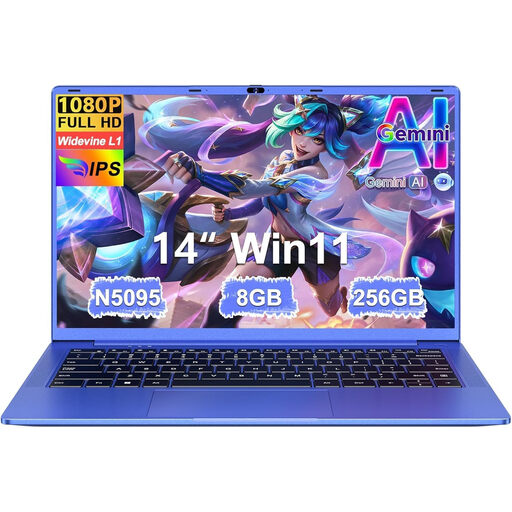 No image available
The product description lists everyday computing, work and study as possible uses.
8 GB RAM and 256 GB SSD.
The product description lists a 14-inch FHD IPS screen and a weight of 1.39 kg.
 No image available
This configuration lists Windows 11 Home, making it an option to consider if your genealogy software requires Windows.
14-inch Full HD IPS-level screen, 16 GB DDR4 and 512 GB SSD.
The listed weight is 1.40 kg.
 No image available
The 15.6-inch Full HD screen may suit anyone who wants to view records on a larger display; check whether this configuration is comfortable to carry.
16 GB DDR5, 512 GB SSD and Windows 11 Home.
The title lists a 144 Hz screen refresh rate and an RTX 5070 with 8 GB GDDR7.
Don’t assume Aldfaer will work on a new macOS laptop: Stichting Aldfaer says the programme was developed for Windows. The developers of Ancestris list both Windows and macOS; check that the software is compatible with your existing files and way of working.
Keep a recent backup somewhere other than your laptop and test that you can restore your files. Veilig Internetten lists cloud storage and external storage as options, and discusses encryption for extra protection.
Not without considering the rules. According to the Dutch Data Protection Authority, you will usually need permission to publish other people’s personal data. The exception for personal or household use comes with conditions, including limiting access to a small group and ensuring it isn’t publicly searchable. Assess each publication on its own merits.
For an applicable distance purchase by a consumer, the Dutch government says you will generally have 14 days to change your mind. If a product is faulty, the seller is obliged to provide a product that works properly; the right to change your mind and your legal rights when goods are faulty are separate matters.
Not for this task alone. The Consumers’ Association says 8 GB RAM is enough for light internet and office work, and that 16 GB is an option if you can get it. Give particular consideration to your software, how many applications you use at once and the size of your scans.