Start with the word processor: Word, LibreOffice Writer and Google Docs support heading styles and tables of contents, but the desktop software available varies by operating system. Then choose a screen and keyboard that suit your writing sessions. Extra memory, storage or portability is most relevant if you expect to use lots of windows, garden photos or different workspaces. Before buying, check the exact configuration, software licence and whether a charger is included.
Who is this laptop choice for?
Writers creating a structured guide
If you want to move chapters and subheadings around and update a table of contents, a word processor with heading styles is particularly useful. Microsoft Support, LibreOffice Help and Google Docs Editors Help explain features for structuring documents and creating tables of contents.
Writers with lots of garden photos and reference material
If you use images or several windows alongside your text, compare screen space, memory and storage across configurations. The Consumers’ Association of the Netherlands recommends considering 16 GB of memory for smooth multitasking.
Writers who work in different places
If you write at home, in the garden and in other workspaces, weigh portability and charging needs against screen space. Google Docs Editors Help explains how to set up offline access to Google Docs in advance; also check that the files you need will be available without an internet connection.
What should you consider when choosing?
Your word processor and working habits determine which features matter. Extra capacity is most useful if you work with lots of images or several programmes at once.
| What to consider |
What to look for |
Who this matters to |
| Heading structure and word processor |
Create a test document in the app you plan to use, with several heading levels and a table of contents. Check that you can use the desktop version you want. |
I want to move chapters and subheadings around without having to rebuild the table of contents by hand each time. Around 36% of consumers say document structure is their top priority. |
| Typing and reading space |
Compare the screen size and resolution of the exact configuration. Check the keyboard layout and, if possible, try it out. |
If I spend a long time writing and reviewing my work, I want a keyboard and screen that suit my working sessions. Around 29% of consumers say extended typing and reading is their top priority. |
| Portability and offline working |
Check the weight and included charging accessories. Set up offline access in advance if you want to use Google Docs without an internet connection. |
I take my laptop to different workspaces and want to be able to access my document there. Around 21% of consumers say working in different places is their top priority. |
| Garden photos and multiple windows |
Work out how many files you’ll store locally and how many programmes you’ll use at once. Then compare the memory and storage in the exact configuration. |
When I have lots of garden photos and reference material open alongside my text, I want enough room for my files and windows. Around 14% of consumers say images and multiple sources are their top priority. |
Common pitfalls
-
Mistaking prominent text for a proper heading
Making text larger or bold doesn’t automatically give a document the structure needed for navigation and a table of contents.
Use heading styles at several levels, then check that you can update the table of contents.
-
Expecting a Chromebook to run the desktop version of Word
Microsoft says that the Windows and Mac desktop versions of Microsoft 365 can’t be installed on a Chromebook.
Try creating a sample guide in the web app you plan to use. Choose a different operating system if you need a specific desktop feature.
-
Assuming software or a charger is always included
Software and included accessories can vary by configuration. A trial version isn’t the same as a permanent software licence.
Check which software licence and charging accessories come with the exact configuration you’re buying.
Depending on the configuration, you may need to buy a separate software licence or compatible adapter.
-
Assuming the specifications for a product range apply to every configuration
The screen, memory, keyboard and availability can vary by model.
Compare the full model number and the specifications of the configuration on offer with the manufacturer’s information.
Brands and configurations as a guide
Acer
The Aspire Go 14 AG14-32P-39GD is an example of a Windows laptop with a 14-inch screen for writing.
- For this configuration, Acer lists a matt IPS screen with a resolution of 1920 × 1200, 8 GB of memory and 512 GB of SSD storage.
- The quoted maximum battery life is the manufacturer’s estimate, not an independent test result. Check the keyboard layout and availability of the configuration you’ve chosen.
Lenovo
The IdeaPad Slim 5 is an example of a Windows laptop with more screen space; specifications vary by configuration.
- Lenovo PSREF lists 16 GB of soldered memory and a 512 GB SSD for model 83J3004GNT.
- Lenovo PSREF marks this particular configuration as discontinued. Check the model number and screen specifications; specifications don’t necessarily apply to other configurations in the product range.
Apple
MacBook Air is a macOS option for anyone who prefers a compact laptop for writing.
- Apple lists 16 GB of memory and 512 GB of storage for the 13-inch M5 configuration reviewed.
- The battery life quoted by Apple is based on specified usage tests and doesn’t reflect every writing session. Also check which charging accessories are included.
HP
HP offers a range of 14-inch Windows configurations, including a 2-in-1 with a touchscreen.
- HP lists 16 GB of RAM, a 512 GB SSD and a 2K touchscreen for the OmniBook X Flip 14-kc0600ndx.
- These specifications apply to that configuration; you don’t need a touchscreen to write a guide with nested headings.
Joybuy products
These laptops are options for combining writing with the screen space and features that suit your way of working. Compare the exact configuration and keyboard layout before choosing.
 No image available
HP OmniBook 3 17-dp0050ndx
The 17.3-inch screen may suit anyone who wants plenty of room for documents.
17.3-inch FHD IPS screen, 8 GB of memory, 512 GB SSD and Windows 11 Home. The power adapter is not included.
View on Joybuy
 No image available
Acer Aspire Go 15 AG15-72P-56BJ
A Windows option with a matt screen for reading and editing documents.
15.6-inch FHD IPS screen, Intel Core 5 120U, 16 GB RAM, 512 GB SSD and Windows 11 Home. This configuration has an AZERTY keyboard.
View on Joybuy
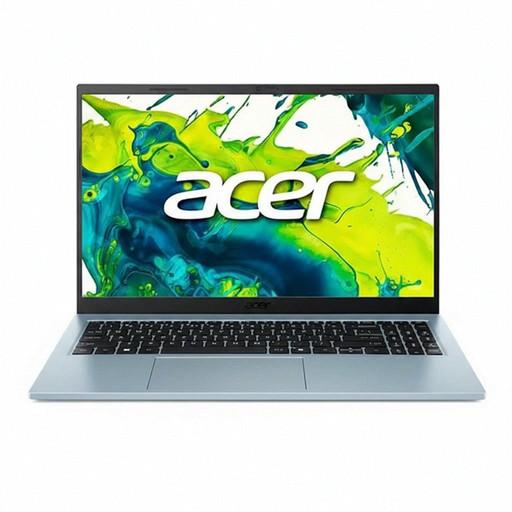 No image available
Acer Aspire Go 15 AG15-72P-599F
The listed QWERTY layout may be useful if that’s the keyboard layout you’re used to.
15.6-inch FHD IPS screen, Intel Core 5 120U, 8 GB of memory, 512 GB SSD and Windows 11 Home. The product information describes the screen as matt.
View on Joybuy
 No image available
ASUS Vivobook S16 S3607QA-SH109W
A 16-inch screen may suit anyone who wants more room for documents while writing.
16-inch WUXGA OLED screen, Snapdragon X processor, 16 GB LPDDR5X, 512 GB SSD and Windows 11 Home. The listed weight is 1.70 kg.
View on Joybuy
 No image available
Auusda T161N
The listed 16-inch screen size may suit anyone looking for more screen space while working on documents.
16-inch FHD IPS screen, Intel i3 1000NG4 processor, 16 GB DDR4 RAM and 1 TB SSD. The product information also lists a backlit keyboard and fingerprint unlocking.
View on Joybuy
Frequently asked questions
Do I need a powerful laptop for nested headings?
Not just for structuring headings. Word, Writer and Google Docs use heading styles to structure documents; the Consumers’ Association of the Netherlands considers a basic configuration suitable for everyday office work. More memory is mainly worth considering if you use lots of programmes at once.
How do I create a table of contents that I can update later?
Use proper heading styles rather than just bold text. LibreOffice Help explains how tables of contents are based on paragraph styles and heading levels, and how to update them. Check the instructions for the word processor you use.
Can I use Google Docs without an internet connection?
Yes, if you set up offline access in advance and make the document available offline. Google Docs Editors Help lists a compatible browser, the Google Offline Documents extension and sufficient storage space among the requirements.
Are Word or a charger automatically included?
Don’t assume so; it varies by configuration. Lenovo PSREF lists an Office trial version for model 83J3004GNT, while a Joybuy listing for a MacBook Air says that no charger is included. Check the software licence and the contents of the box for the exact model.
What are my rights when I buy a laptop online in the Netherlands?
According to ACM ConsuWijzer, online consumer purchases generally come with a cancellation period of up to 14 days after delivery, subject to legal exceptions. The seller is also responsible for the statutory guarantee if the product doesn’t meet what you could reasonably expect; a manufacturer’s warranty doesn’t replace this right.


