What should you look for when choosing?
Basic Windows laptop
Best for: if you need Windows desktop software as well as writing, or want a standard laptop for studying and writing.
Keep in mind: don't automatically pay more for extra performance; compare the keyboard, screen and upgrade options for each configuration. The Consumentenbond recommends 8 GB RAM as a starting point for basic office work, and 16 GB if you want to run several programmes at once.
Chromebook
Best for: if you mainly write in web apps and can make the files you need available offline in advance.
Keep in mind: Microsoft says the Windows and Mac desktop versions of Office can't be installed on a Chromebook. Google Chromebook Help warns that some apps won't work offline.
MacBook Air
Best for: if you want macOS and a laptop you can take between your room and campus; Apple Netherlands lists the 13-inch MacBook Air M5 as weighing 1.23 kg.
Keep in mind: check that your writing software works on macOS and that the configuration fits your budget.
For the specific model, check the keyboard layout, screen size and resolution, reflections and included accessories. If possible, try the keyboard and touchpad, and see whether the screen will fit comfortably on your desk.
| What matters to you |
What should you check? |
Who is this for? |
| Typing and reading |
Try the keyboard and touchpad; check the layout, screen size and resolution, and reflections. |
I write for long periods at a small desk and want to type comfortably and read text easily. Around 33% of consumers put typing and reading comfort first. |
| Total cost |
Compare the configuration and check whether you still need to buy a charger or writing software. |
As a student, I don't want to pay for performance my other tasks don't require. Around 27% of consumers put the total purchase cost first. |
| Software and files |
Check the system requirements for your writing app and test opening and saving files without an internet connection. |
I want to know that my writing app and manuscripts will work as I need them to, even if the connection drops. Around 20% of consumers put app and file access first. |
| Portability |
Compare the weight of the laptop and charger; check the conditions under which any battery-life figures were measured. |
I take my work between my room and other places, so I consider what I'll need to carry every day. Around 20% of consumers put portability first. |
Laptops for writing on Joybuy
These models include Windows laptops and a MacBook Air for writing and document work. When choosing, consider the screen and keyboard features listed, the software you need and whether a charger is required.
 No image available
HP OmniBook 5 Flip 14-fp0075nd C5VM5EA#ABH
This model is suitable for writing and document work on Windows; the keyboard is backlit and has a QWERTY layout. It requires a compatible USB-C charger of at least 45 W, which is not included.
View on Joybuy
 No image available
HP OmniBook 3 14-hy0058ndx, Ryzen 5 7520U, 8 GB RAM, 512 GB SSD
A Windows model for documents and everyday tasks. The product name specifies an AMD Ryzen 5 7520U, 8 GB RAM and a 512 GB SSD; this model is supplied without a charger.
View on Joybuy
 No image available
ASUS Vivobook 15 X1504MA-BQ588W, Core 3 304, 8 GB RAM, 256 GB SSD, QWERTY
This model is suitable for writing and everyday tasks on Windows. The product information specifies a 15.6-inch Full HD screen with an anti-glare finish, 8 GB RAM and a 256 GB SSD.
View on Joybuy
 No image available
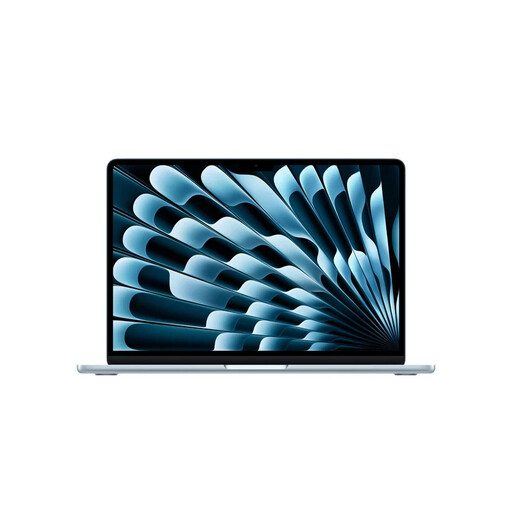
Apple MacBook Air 13-inch M5, 16 GB, 512 GB, Sky Blue, QWERTY
A macOS option if you take your writing with you; the product information lists a weight of 1.23 kg. Check that your writing software works on macOS.
View on Joybuy
 No image available
ASUS Zenbook A14 UX3407QA-QD479W, Snapdragon X, 16 GB RAM, 512 GB SSD, WUXGA OLED, Dutch QWERTY
This model is suited to writing in Dutch and taking documents with you. The product information lists a weight of around 0.98 kg; it requires a compatible 65 W USB-C Power Delivery charger and cable, neither of which is included.
View on Joybuy
Frequently asked questions
Do I need 16 GB RAM just for word processing?
No. The Consumentenbond recommends 8 GB RAM as a starting point for basic office work. Its checklist recommends 16 GB if you want to use several programmes at once; also check the requirements of your other study tasks.
Can I work on my chapter on a Chromebook without internet access?
You can work with certain Google Drive files if you make them available offline in advance. Google Chromebook Help says changes will sync once you reconnect, and that some apps won't work offline. Test your own writing workflow beforehand.
Can I install the desktop version of Word on a Chromebook?
No. According to Microsoft, the Windows and Mac desktop versions of Microsoft 365 or Office can't be installed on a Chromebook. Check whether the available web-based option meets your requirements for documents and your course.
How can I set up a student room for long writing sessions?
Arrange the screen and input devices so they're comfortable to use, and change position during long sessions. For laptop work, Arboportaal recommends making room for a separate keyboard and mouse, optionally with a stand or external screen. This is workplace advice, not a legal requirement for students writing at home.
What are my rights when I buy a laptop online in the Netherlands?
According to the Dutch Government, online purchases from a business usually come with a 14-day cooling-off period; buying from a private individual is different. If a product is faulty, the seller must provide a solution, according to the Dutch Government. The Netherlands has no fixed statutory warranty period that applies to all products.


