
Vandaag of morgen in huis

Kwaliteit gegarandeerd
Download de app
Categorieën

Buying a new laptop can be a challenge. You're bombarded with specifications: processors, RAM, storage types. It's easy to overpay for features you don't need, or to choose a model that feels too slow after just a year. This article will help you make an informed choice for a laptop for everyday use, based on factual specifications. We focus on the balance between performance, ease of use, and price for tasks like email, word processing, browsing, and media streaming.
Before you buy a laptop, it's helpful to understand the main components. This way, you'll know exactly what to look for.
The processor is the brain of the laptop and largely determines its speed. For everyday tasks like browsing, emailing, and using Office programs, a modern Intel Core 3 or Core 5 processor is generally sufficient. These offer a good balance between performance and power efficiency. A Core i7 is more powerful and is particularly useful if you regularly use more demanding software or perform many tasks simultaneously.
Memory, or RAM, is your laptop's short-term memory. It determines how many programs and tabs you can run smoothly at the same time.
A Solid State Drive (SSD) is the standard for laptop storage today. An SSD is significantly faster than a traditional hard disk drive (HDD), resulting in faster laptop boot times and program loading.
Most laptops for general use have a 14-inch or 15-inch display. A 15-inch laptop offers more screen real estate, which is pleasant for multitasking. A 14-inch model is more compact and lighter, making it easier to carry. Pay attention to the resolution: Full HD (1920x1080 pixels) is the standard for a sharp and clear image.
A Windows 11 laptop is the current standard. This operating system offers a modern interface, good security, and broad compatibility with software and accessories.
Below is a selection of laptops that are suitable for everyday use based on their specifications. The selection is based on an objective comparison of product parameters.
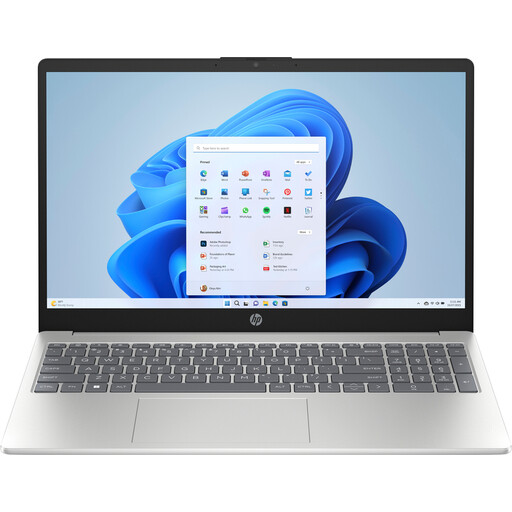
Why This Product: This HP laptop offers a very balanced combination of modern components. The Intel Core 5 processor is efficient and powerful enough for most daily tasks. The combination of 16GB DDR5 RAM and a 512GB SSD ensures a smooth and fast user experience, even when multitasking.
Pros:
Who It's For: Ideal for students and remote workers looking for a reliable laptop for work and study. The specifications are more than sufficient for Office applications, online meetings, research with many browser tabs, and streaming media in high quality.
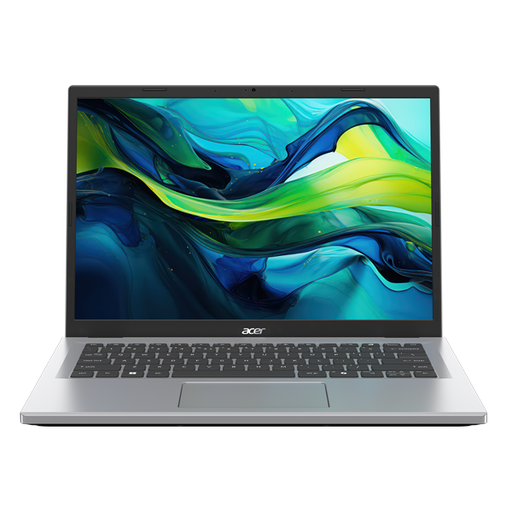
Why This Product: This Acer laptop focuses on mobility without compromising on essential performance. With a more compact 14-inch screen and a weight of 1.45 kg, this model is easy to carry. The WUXGA resolution (1920x1200) offers a slightly taller aspect ratio (16:10), providing extra vertical space for documents and web pages.
Pros:
Who It's For: Suitable for users who are often on the go and need a light, compact laptop for basic tasks. Think of students travelling between lectures and the library, or professionals who frequently work outside the office.
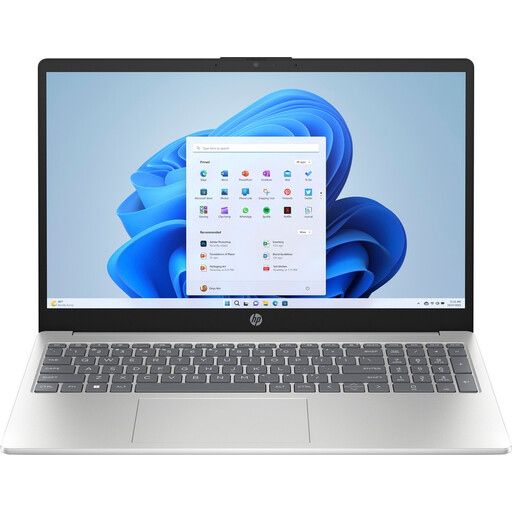
Why This Product: This model is the most powerful option in this selection, thanks to the Intel Core i7-1355U processor. This processor offers considerably more processing power, which is noticeable when working with larger files, complex spreadsheets, or light photo editing. The combination with 16GB RAM and a 512GB SSD makes this a very capable all-rounder.
Pros:
Who It's For: For the professional or 'power user' who demands a bit more from their laptop. If you regularly work with large datasets, create media-rich presentations, or do hobbyist photo editing, the Core i7 processor in this HP laptop provides the extra speed you need.
| Feature | HP 15-fd0050nd | Acer Aspire Go 14 | HP 15-fd0072nd | | :--- | :--- | :--- | :--- | | Processor | Intel Core 5 120U | Intel Core i3 N355 | Intel Core i7-1355U | | RAM | 16 GB DDR5 | 8 GB | 16 GB DDR4 | | Storage | 512 GB SSD | 512 GB SSD | 512 GB SSD | | Display | 15.6-inch Full HD | 14-inch WUXGA | 15.6-inch Full HD | | Weight | 1.59 kg | 1.45 kg | 1.59 kg |
The models above were selected based on a good balance for everyday tasks. If your ideal configuration isn't among them, or if you want to compare more options from brands like HP and Acer, check out our full range.
️ View all Traditional Laptops
1. How much RAM do I really need for everyday use? For basic use like browsing and email, 8 GB of RAM is sufficient. However, for a smooth multitasking experience and to future-proof the laptop, 16 GB RAM is the recommended choice. Programs and websites are becoming increasingly demanding, and 16 GB will prevent the laptop from slowing down.
2. Is an Intel Core i5 or i7 processor necessary for a laptop for everyday use? Not necessarily. A modern Intel Core 3 or the new Intel Core 5 processor is often powerful enough for most daily tasks. A Core i7 offers added value if you regularly use more demanding applications, such as photo editing software, or if you often work with very large files. For the average user, the performance difference in everyday tasks is not always worth the extra cost.
3. What is the advantage of an SSD in a laptop? An SSD (Solid State Drive) has no moving parts, unlike a traditional hard disk drive (HDD). This makes an SSD much faster, quieter, and more durable. You'll notice this immediately: the laptop boots up in seconds, programs open quickly, and files are copied faster. An SSD is one of the most noticeable upgrades for the overall speed of a laptop.
Written by: Joybuy Product Recommendation Officer