
Student who needs specific study software
You want to create flashcards and install the software required for your course. So first check which operating system those apps need. Anki offers desktop downloads for Windows, macOS and Linux.


First, choose a laptop that runs the software required for your course and your flashcard app. Anki offers desktop downloads for Windows, macOS and Linux, while you’ll need to check separately that your preferred setup will work on a Chromebook. Then decide between a more compact laptop that’s easy to carry and a larger screen for viewing your course materials alongside your flashcards. You don’t automatically need a more powerful configuration for light use.
You want to create flashcards and install the software required for your course. So first check which operating system those apps need. Anki offers desktop downloads for Windows, macOS and Linux.
You want to view source material and flashcards side by side, and value screen space and comfortable typing more than having the most compact laptop possible.
You create flashcards in your room and while travelling or on campus. Check the size and weight of the exact model, and find out how you can charge it.
Start with the software your course requires. Then decide how much screen space you need and how often you’ll take your laptop with you.
| What to consider | What to look for | Who should pay particular attention? |
|---|---|---|
| Software compatibility | Make a note of the apps you need to install and check their operating system requirements and any device management restrictions. Google warns that Linux isn’t always available on a Chromebook and may be blocked on a school-managed device. | I want to be sure my flashcard app and course software will work before choosing a laptop. Around 36% of consumers put support for the software they need first. |
| Screen space and typing | Check the screen size, resolution and keyboard layout of the exact model. Think about how much room you need to view your course materials alongside your flashcards. | I mostly work at my desk and want to see my course materials alongside my flashcards. Screen space and comfortable input are the main buying concerns for around 29% of consumers. |
| Choose specifications to suit your workload | Compare the memory with the programmes you use at the same time. On 14 August 2026, the Consumers’ Association said 8 GB was enough for light use and recommended 16 GB where possible to give you more headroom when running several programmes. | I want enough capacity for my studies without assuming I’ll be doing demanding tasks. Around 21% of consumers focus mainly on getting specifications that suit their needs. |
| Taking it with you and charging | Check the weight, required connections and charging power of the exact model. Also check whether a suitable adapter is included in the box. | I take my laptop with me regularly and want to know how I can charge it where I study. Around 14% of consumers prioritise portability and practical charging. |
Anki offers desktop downloads for Windows, macOS and Linux. Google says Linux on ChromeOS isn’t available on every device and may be blocked on a school-managed device.
First check which apps your course requires and which setup your flashcard app supports.
The European Commission says that, since 28 April 2026, EU common charger rules have also applied to laptops. That doesn’t mean an adapter comes with every model; HP notes that a USB-C adapter is sold separately for some versions sold in the Netherlands.
Before buying, check what’s included in the box and the USB-C power required for the model you’ve chosen.
With some models, you’ll need to arrange a suitable adapter separately.
According to the Dutch government, there’s no fixed statutory warranty period in the Netherlands. If there’s a problem with a product, the seller is responsible for resolving it. A manufacturer’s warranty or extra cover is in addition to your statutory rights.
Compare what any additional warranty covers, and contact the seller if there’s a problem with your product.
The IdeaPad Slim 3i range includes Windows models for everyday tasks and desk use.
The OmniBook 3 is a compact Windows model. The OmniBook 5 Flip is a separate option if you’re looking for a convertible with a touchscreen.
The MacBook Neo and MacBook Air are options if macOS is suitable for your other study programmes.
The Aspire Go 15 is a Windows range worth comparing if you’re looking for a larger screen for your student room.
A Windows Vivobook and a Chromebook cater to different software needs.
This selection focuses on larger-screen laptops for creating flashcards at a desk, with Windows and macOS models.
 No image available
Well suited to desk use, with room to view your course materials alongside your flashcards.
 No image available
An option if macOS is suitable for your study programmes and you’d like a larger screen.
 No image available
Well suited to desk use if you want a larger screen for viewing course materials and flashcards.
 No image available
A Windows model with a larger screen for working at a desk.
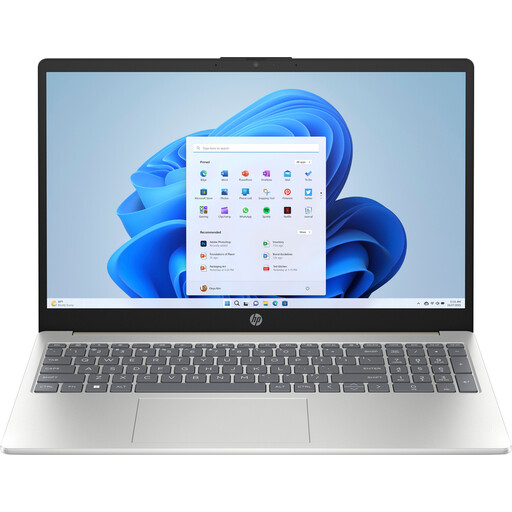 No image available
A larger Windows laptop to compare if you mostly create flashcards at your desk.
No. Anki offers desktop downloads for Windows, macOS and Linux. If you want a Chromebook, check which version of Anki you need and whether Linux support is available and allowed by your device’s administrator.
Anki offers a free service for syncing between devices. Once you’ve set it up, check that your flashcards are syncing properly. For important study files, also follow your course’s backup arrangements.
No. According to the Dutch government, there’s no fixed statutory warranty period in the Netherlands. If there’s a problem with a product, the seller is responsible for resolving it. A manufacturer’s warranty or extra cover is in addition to your statutory rights.
According to the Dutch government, when you buy from a business online, you often have a 14-day cooling-off period. Before buying, check which terms apply to your order and make sure you’re buying from a business.
The European Commission says that, since 28 April 2026, EU common charger rules have also applied to laptops. Don’t assume this applies to every older or second-hand laptop. Check the connection, the power required and whether an adapter is included for the exact model.