Brands to consider
These brands offer examples of laptop types that may be relevant when choosing a laptop for field notes; their inclusion doesn’t mean that a specific configuration is available.
Lenovo
The ThinkPad E14 Gen 7 reviewed here is a traditional 14-inch business laptop for reading and typing.
- Lenovo specifies an anti-glare screen, 16 GB of memory and a 512 GB SSD for configuration 21T9001TMH.
- This configuration doesn’t have a touchscreen, and the listed keyboard is English (EU).
Acer
The TravelMate P4 Spin 14 TMP414RN-55-TCO is a convertible option if you’re considering pen input.
- Acer specifies a matt IPS touchscreen and an included stylus for this configuration.
- Check that the exact configuration is available and that your note-taking software supports the pen features you want.
Apple
The 13-inch MacBook Air with M5 is a compact macOS option, provided the applications you need work on it.
- Apple specifies a 13.6-inch screen and two Thunderbolt 4/USB-C ports.
- The advertised battery life is a manufacturer figure; you may need an adapter for your existing peripherals.
Dell
The Pro 14 Plus PB14250 configuration reviewed here is a business Windows laptop with a 14-inch screen.
- Dell specifies 16 GB of memory, a 512 GB SSD and a non-touch IPS screen for this configuration.
- Dell explicitly states that this configuration doesn’t include a charger; other configurations may differ.
Joybuy laptops for field notes
These Joybuy products are laptops for viewing and working with field notes; when comparing models, focus on screen size, portability and the connections you need.
 No image available
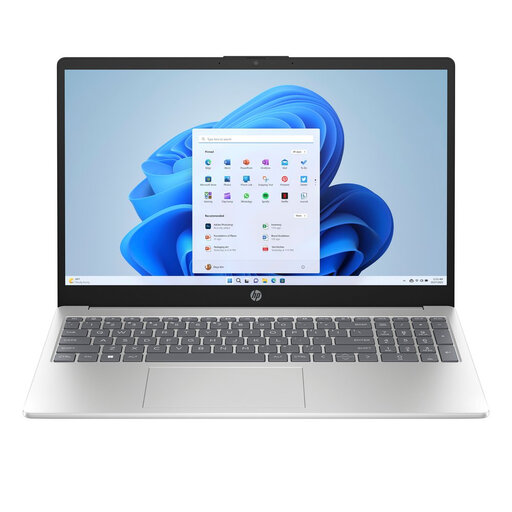
HP Laptop 15-fd1252ndx, 15.6-inch Full HD
The screen size and anti-glare finish make it a good fit if you want to review notes together around a table.
Intel Core 5 120U 10-Core; 8 GB DDR5; 512 GB SSD; Micro-Edge Anti-Glare; Windows 11 Home.
View at Joybuy
 No image available
Lenovo V15 G5 IRL, 15.6-inch FHD
An option to compare if you’re looking for a traditional laptop with a 15.6-inch screen for reviewing documents together.
Intel Core i5-13420H; 16 GB DDR5; 512 GB SSD; Wi-Fi 6; Windows 11 Pro.
View at Joybuy
 No image available
ASUS Zenbook A16, 16-inch WUXGA
The 16-inch screen size is worth considering if you want more room to work around the table, while still weighing up how easy the laptop is to carry.
16-inch WUXGA; 16 GB memory; 512 GB SSD; Windows 11 Home.
View at Joybuy
 No image available
MSI Prestige 16 AI+ C3MG-236NL Copilot+ PC
This configuration has a 16-inch screen; compare its size with the space you need to review field notes together.
Intel Core Ultra X7 358H; 32 GB LPDDR5x; 1 TB SSD; 16-inch 2.8K OLED, 120 Hz; Windows 11 Home.
View at Joybuy
 No image available
Lenovo IdeaPad Slim 5 15ARP10, 15.3-inch
The screen size gives you a useful point of comparison when weighing the benefits of reviewing notes together against carrying the laptop between workspaces.
Ryzen 5 7535HS; 16 GB memory; 512 GB SSD; QWERTY keyboard. The power adapter is not included with this configuration.
View at Joybuy
Frequently asked questions
Do I need a touchscreen to view field notes?
No, not if you’re only reading and typing. If you want to point to or write directly on a digital document, check the touch and pen features of the exact configuration and test whether your software works with them. Acer lists a touchscreen and an included stylus for the TravelMate configuration reviewed here.
What should I check before using the laptop at a shared table?
Open a representative note file in the software you need and compare the ports with your existing equipment. The configurations reviewed here have different connections, so check that your devices and any screen connections will work as intended.
Do I need to arrange a charger or adapter separately?
Check each configuration. Dell states that the Pro 14 Plus configuration reviewed here doesn’t include a charger; Apple lists two Thunderbolt 4/USB-C ports for the MacBook Air, so you may need an adapter for your existing peripherals.
What warranty and returns rights apply when buying in the Netherlands?
For a consumer purchase, your legal rights against the seller remain separate from any commercial warranty, according to ACM ConsuWijzer. Online consumer purchases generally come with a cooling-off period of up to 14 days after delivery, subject to exceptions. Consumer rules may not automatically apply to purchases made mainly for business use. Legal remedies for a faulty product are separate from cancelling a purchase.
Do notes containing personal data need to be stored on a particular laptop?
The Dutch Data Protection Authority doesn’t prescribe a specific laptop model. If an organisation processes personal data, it should choose security measures based on a risk assessment. Check the relevant security policy before storing or sharing data.


