Start by considering reflections in your workspace: a higher brightness rating alone won’t tell you whether you’ll still see a window reflected in the screen. Then choose the screen space and ports that suit your notes, and weigh these against portability and battery life.
Who is this laptop choice relevant to?
Reading notes by a window
You read field notes for long periods in one place where daylight from a window may fall on the screen. RTINGS.com explains that screen brightness and reflection handling work together to affect how clearly you can see the display.
Viewing files side by side
You want to view field notes alongside photos or other files, so you’re looking for enough screen space and ports that suit your equipment.
Reading notes on the go
You move between workspaces and weigh screen size against how easily you want to carry the laptop and use it away from a power socket.
What should you look for in a laptop for field notes?
First, consider the position of the window and the screen finish. Then compare screen space, ports and portability. A stated brightness rating alone won’t tell you how reflections will behave in your workspace, as RTINGS.com explains.
| What to consider |
What to look for |
Who is this important for? |
| Reflections in daylight |
Check the screen finish and brightness of the exact configuration. If possible, assess the display in similar daylight to your workspace. |
If I read notes for long periods in one place and the window is reflected in the screen, I mainly want to minimise reflections. Around 42% of consumers prioritise readability in daylight. |
| Space for multiple windows |
Compare screen size and resolution. Choose memory and storage to suit the files you use. |
If I want to view field notes alongside photos or other information, having enough screen space is essential. Around 25% of consumers prioritise space for multiple windows. |
| Portability and battery use |
Compare the size and battery specifications. Microsoft lists screen brightness as a setting that affects power consumption on Windows laptops. |
If I often change workspaces and don’t always have access to a power socket, I weigh up size and battery use together. Around 17% of consumers prioritise portability. |
| Software and peripherals |
Check the ports and software compatibility of the exact model against your own devices and programmes. |
If my note-taking software or peripherals are essential to the way I work, I check compatibility before buying. Around 16% of consumers prioritise their existing software and equipment. |
Common buying mistakes
-
Comparing brightness ratings alone
A bright screen won’t automatically prevent you from seeing a reflection of a window. RTINGS.com describes brightness and reflection handling as separate factors when viewing a screen.
Also check the screen finish of the exact configuration and consider the position of the window in your workspace.
-
Assuming a specification applies to an entire product range
Screen options can vary between configurations. Lenovo lists an anti-glare IPS screen for the ThinkPad E14 Gen 7 configuration 21T9001TMH; that specification doesn’t necessarily apply to other configurations.
Before buying, check the full model code and screen option.
-
Not checking whether the charger is included
HP states that the charger is sold separately for the EliteBook 8 G2i configuration reviewed.
Check what’s included in the box and whether you already have a compatible charger.
Brands to consider for this choice
Lenovo
The ThinkPad E14 Gen 7 configuration reviewed is a 14-inch option for anyone specifically looking for an anti-glare screen.
- Lenovo lists an anti-glare 300-nit IPS screen, 16 GB RAM and a 512 GB SSD for model 21T9001TMH.
- The stated brightness doesn’t measure readability in daylight; check the exact configuration.
Apple
The MacBook Air with M5 reviewed offers an option for anyone looking for more screen space.
- Apple lists a 15.3-inch screen, 500 nits, 16 GB of base memory and two Thunderbolt 4 ports for the 15-inch configuration.
- These specifications don’t confirm how the screen handles direct reflections from a window. Also check that your programmes work on macOS and that the ports meet your needs.
HP
The EliteBook 8 G2i configuration reviewed could suit you if you need plenty of memory and storage for files.
- HP lists 32 GB RAM, a 1 TB SSD and a 14-inch WUXGA screen for model DS5R0EA#ABH.
- This doesn’t establish how well this configuration handles reflections. HP also states that the charger is sold separately.
ASUS
The Zenbook 14 OLED (UX3405) offers a 14-inch OLED screen as an alternative to the IPS configurations mentioned above.
- ASUS lists a resolution of 2880 × 1800 pixels and brightness of up to 600 nits for this product range.
- ‘Up to’ doesn’t necessarily apply to every configuration or use case; this specification doesn’t confirm how direct reflections from a window are handled.
Laptops at Joybuy for field notes and daylight
This selection at Joybuy includes 14-inch laptops with screens described as anti-glare or anti-reflective, as well as a number of models with larger screens. Compare the specifications of the exact configuration with your workspace, files and need for portability.
 No image available
HP OmniBook 3 14-hy0058ndx, 8 GB RAM, 512 GB SSD
The product description specifies an anti-glare 14-inch IPS screen for reading field notes in daylight.
Resolution: 1920 × 1200. Processor: AMD Ryzen 5 7520U. Operating system: Windows 11 Home. The product description lists USB-A, USB-C and HDMI 2.1.
According to the product description, the charger is not included.
View at Joybuy
 No image available
MSI Modern 14 F1MG-867NL, 16 GB RAM, 512 GB SSD
The product description specifies a 14-inch anti-glare IPS-level screen for viewing notes in daylight.
Screen resolution: Full HD. Processor: Intel Core 7 150U. Operating system: Windows 11 Home. The description lists USB-C, USB-A, HDMI and a MicroSD card reader.
The description gives a weight of 1,40 kg; consider this in light of how often you’ll carry the laptop.
View at Joybuy
 No image available
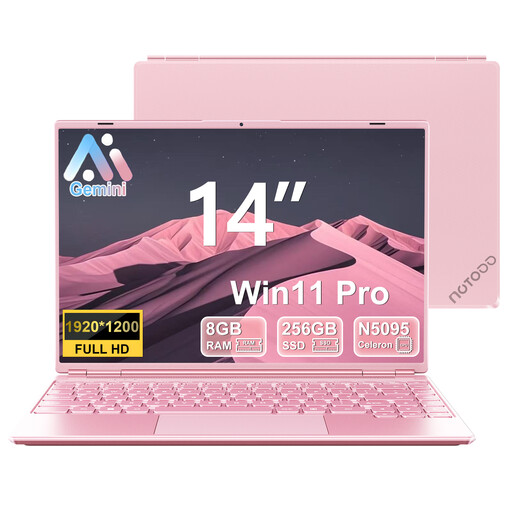
NOTODD 14-inch laptop, 8+256 GB SSD, pink
The product title specifies a 14-inch screen for reading notes.
Screen resolution: 1920 × 1200. The title lists an 8+256 GB SSD and support for storage expansion up to 1 TB, alongside a Celeron N5095 processor and Windows 11.
View at Joybuy
 No image available
MSI Katana 15 HX B14WFK-046NL, 16 GB RAM, 1 TB SSD
The product description specifies a 15.6-inch anti-glare screen for viewing field notes alongside other material.
Screen resolution: Full HD IPS. The description gives a weight of 2,4 kg, which is worth considering if you carry the laptop often.
View at Joybuy
 No image available
Apple MacBook Air 15-inch M5, 16 GB, 512 GB, Starlight
The product description specifies a 15.3-inch screen for viewing notes alongside other information.
Stated brightness: 500 cd/m². The description lists two Thunderbolt 4 ports and up to 18 hours of battery life; actual battery life may depend on settings and use.
According to the product description, the power adapter is not included. Check that your software works on macOS and that the ports suit your equipment.
View at Joybuy
Frequently asked questions
Is a higher number of nits enough for working beside a bright window?
No. A higher brightness rating alone won’t tell you whether you’ll see reflections from a window. Also consider the window’s position and how well the exact screen configuration handles reflections.
How can you reduce battery use when you’re not always using your laptop by the window?
On a suitable Windows laptop, you can adjust screen brightness and use power settings. Microsoft recommends lowering brightness to save power; adjust it as the ambient light changes.
Can you return a laptop bought online in the Netherlands within 14 days?
For online consumer purchases, ACM ConsuWijzer says you generally have a statutory 14-day cooling-off period from delivery. Check the applicable exceptions and returns policy; the statutory guarantee is separate from any manufacturer’s warranty.


