Who is this guide for?

Writers who want reference material beside their chapter

You want to view two documents, or your manuscript and reference material, at the same time during a writing session. Choose a laptop based on the usable screen space for your preferred editor layout.

Writers who type for long stretches

You’re looking for a comfortable keyboard with the right layout. Check the exact configuration: a brand name alone won’t tell you which keys it has.

Writers who are often on the go

You regularly take your laptop with you and need to balance portability against the space available for a split-screen writing layout.

What should you look for?

16-inch Windows laptop

A good fit if: you usually write in one place and want to try viewing two texts on the built-in screen. The HP ProBook 4 G1i and Lenovo ThinkPad E16 configurations reviewed have 16-inch screens; Microsoft Support explains how to snap separate windows side by side in Windows.

The trade-off: a larger device is less compact to carry around. Snapping windows side by side is also different from splitting two documents within a single writing app.

Compact 14-inch Windows laptop

A good fit if: portability matters more to you than having the maximum workspace on the built-in screen. ASUS lists the weight of the Zenbook 14 OLED configuration reviewed as 1,22 kg.

The trade-off: each of two text sections takes up a larger part of the smaller screen. ASUS also lists a glossy screen for this configuration and notes that the power adapter is not included.

15-inch MacBook Air with M5

A good fit if: you want to use macOS and are looking for a larger built-in screen. Apple lists a 15-inch MacBook Air with M5, with several memory and storage configurations.

The trade-off: check that your writing app, files and licence are compatible with macOS. According to Literature & Latte, a Scrivener licence for Windows does not unlock the macOS version.

Buying concern What to look for Who should prioritise this?
Workspace for a split editor Try your own editor with two texts, your preferred text size and any side panels on the screen size you’re considering. If I want to see chapters and notes side by side while writing, usable screen space comes first; around 36% of consumers say workspace is their main buying concern.
Keyboard for long writing sessions Check the full keyboard layout of the configuration you’ve chosen and, if possible, try the keyboard for yourself. Anyone typing long passages will want a layout that suits their writing habits; around 29% of consumers give the keyboard top priority.
Writing in different locations Compare the weight of the exact configuration and try your editor on the built-in screen. For consumers who often take their laptop with them, portability matters more than having the largest possible screen; around 21% prioritise being able to write on the go.
Keeping your series safe and accessible Check where your writing app stores backups, keep a copy somewhere else and make sure your licence works with the operating system you choose. If I want to keep my chapters and revisions safe if something goes wrong with my laptop, I’ll prioritise backups and software continuity; around 14% of consumers say protecting their project is their main buying concern.

Common mistakes

  • Choosing by screen size alone

    Two text sections, side panels and your chosen text size all need to fit together. A larger diagonal measurement doesn’t guarantee that your editor layout will feel comfortable to use.

    Test your own documents and side panels on the screen of the exact laptop configuration you’re considering.

  • Assuming every configuration has the same product-line specifications

    Screen, memory and keyboard specifications can vary between configurations. Dell, for example, shows several configurations of the Dell 16 Plus; you should also check the configuration you choose for the ASUS UX3405.

    Compare the full model or article number with the specifications for the configuration you want to buy.

  • Confusing autosave with a backup stored outside your laptop

    According to Literature & Latte, Scrivener saves automatic project backups to a folder on your computer by default. So that copy won’t automatically be stored somewhere else.

    Also set up a separate copy in another location and check that you can restore it.

  • Assuming the charger and software licence will always be suitable

    The HP page opened for D4TM6EA#ABH says the adapter is sold separately; the ASUS configuration page says no power adapter is included. Scrivener also uses separate licences for Windows and macOS.

    Before choosing, check what’s included with the exact laptop configuration and the terms of your writing software.

Brands to consider

HP

The ProBook 4 G1i 16 reviewed is a 16-inch Windows option for trying out two text sections on the built-in screen.

  • HP lists a WUXGA screen, 16 GB RAM and a 512 GB SSD for D4TM6EA#ABH.
  • According to HP, the power adapter for this configuration is sold separately; check what’s included in the offer you choose.

Lenovo

The ThinkPad E16 Gen 3 configuration reviewed is a 16-inch Windows option with a matte IPS screen.

  • For 21SRCTO1WWNL4, Lenovo lists a 1920 × 1200-pixel screen and an English (EU) keyboard with a numeric keypad.
  • Check that the keyboard layout suits your writing habits and that the exact model matches the specifications listed.

ASUS

The Zenbook 14 OLED configuration reviewed is a more compact Windows option for anyone who often takes their laptop with them.

  • For the configuration shown, ASUS lists a weight of 1,22 kg, a 14-inch glossy WUXGA OLED screen and 32 GB of memory.
  • The ASUS page opened says the power adapter is not included. Don’t assume these specifications apply to other UX3405 configurations without checking.

Apple

The 15-inch MacBook Air with M5 is a macOS option with a larger screen than the 14-inch ASUS configuration reviewed.

  • Apple lists 15-inch configurations with different memory and storage options.
  • Check your chosen configuration and the compatibility of your writing app and licence. A stated maximum battery life isn’t a measure of how long your writing session will last.

Dell

The Dell 16 Plus is another 16-inch Windows option to compare if you’re looking for a configurable model.

  • For DB16250, Dell shows a 16-inch IPS screen and a choice of memory and storage options.
  • The product page shows several configurations. Don’t assume that screen, keyboard or other specifications apply to a different configuration.

Laptops on Joybuy

These laptops offer a range of screen sizes and keyboard layouts to compare for writing with several text sections on the built-in screen.

ASUS Vivobook 18 M1807HA-S16512W laptop

ASUS Vivobook 18 M1807HA-S16512W, Ryzen 7 260, 16GB, 512GB SSD

The 18,4-inch WUXGA screen gives you room to try a split-screen writing layout; the stated weight is 2,60 kg.

The description lists a backlit Dutch QWERTY keyboard. According to the description, a suitable USB-C PD adapter is not included.

View on Joybuy

Lenovo V15 G5 IRL 15.6-inch laptop

Lenovo V15 G5 IRL, 15.6-inch FHD, Core i5-13420H, 16GB DDR5, 512GB SSD

The 15,6-inch Full HD screen with anti-glare finish is an option for trying a split-screen writing layout on the built-in display.

The description lists an English keyboard layout and a weight starting at 1,61 kg. The title lists Windows 11 Pro.

View on Joybuy

ASUS Vivobook 15 X1504MA-BQ588W laptop

ASUS Vivobook 15 X1504MA-BQ588W, Core 3 304, 8GB RAM, 256GB SSD

The 15,6-inch Full HD screen with anti-glare finish gives you a built-in display on which to try a two-section text layout.

The title lists a QWERTY keyboard.

View on Joybuy

HP OmniBook Ultra Next Gen AI 16-bk0004nd laptop

HP OmniBook Ultra Next Gen AI 16-bk0004nd, 16-inch, 128GB RAM, 2TB SSD

The 16-inch screen is an option for trying your manuscript and reference material together on one built-in display.

The title lists a 3K OLED touchscreen and a QWERTY keyboard. The description lists Windows 11 Pro.

View on Joybuy
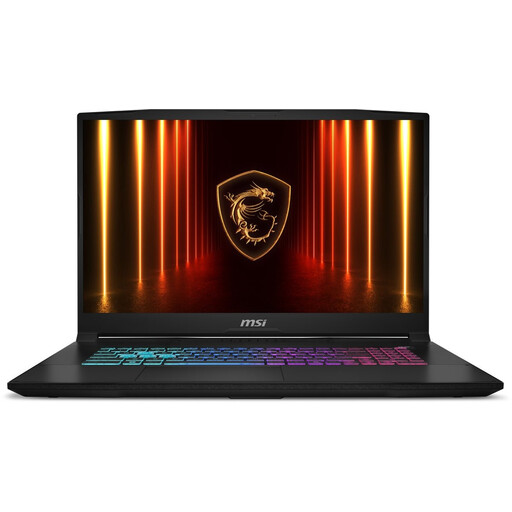
MSI Katana 17 HX B14WFK-021NL laptop

MSI Katana 17 HX B14WFK-021NL

The 17,3-inch QHD IPS screen with anti-glare finish gives you room to try viewing two text sections on the built-in display.

The description lists a Dutch QWERTY keyboard.

View on Joybuy

Frequently asked questions

Do I need a special laptop to view two texts side by side?

Not necessarily: Windows can snap two separate windows side by side. Literature & Latte also explains how to split the view horizontally or vertically in Scrivener. Try the layout you actually want to use on the screen size you’re considering.

How can I stop a faulty laptop from disrupting my series?

As well as any automatic backups, keep a copy somewhere else. According to Literature & Latte, Scrivener automatically backs up projects to a folder on your computer by default; also check where your writing app stores backups and whether you can restore them.

Can I transfer my Scrivener licence from Windows to macOS?

According to Literature & Latte, a Windows licence doesn’t unlock the macOS version, or vice versa. Before switching, check which operating system you need and which licence goes with it.

What are my rights when buying a laptop online in the Netherlands?

According to ACM ConsuWijzer, online purchases usually come with a 14-day statutory cooling-off period after delivery, although exceptions apply. You’re also covered by the statutory guarantee: the seller must supply a product that meets what you could reasonably expect. The Netherlands Authority for Consumers and Markets states that there is no fixed statutory two-year period for this.

Will I need to buy a charger as well?

Check what’s included with the exact configuration. The HP page opened for D4TM6EA#ABH says the charger is sold separately; the ASUS configuration page opened says no power adapter is included. This doesn’t automatically apply to other models from those brands.
