Who is this buying guide for?

Essay reviewer working with lots of sources

You read longer texts and may want to view images or source material alongside the essay. Try your own files to see whether the screen size, resolution and text size work comfortably for you. Consumentenbond emphasises that your choice of laptop depends on how you’ll use it, while ASUS Netherlands lists the display specifications for the Vivobook 14 M1407.

Participant who annotates by hand

You want to mark up passages or images directly during the workshop. Adobe describes annotation tools such as text, shapes and a pencil tool. Also check whether the exact laptop model supports a suitable pen and whether one is included.

Participant who moves between workspaces

You’ll be taking your laptop with you and want to know in advance whether its weight, battery life and charging options will suit the workshop. Apple lists the 13-inch MacBook Air with M5 as weighing 1,23 kg. That’s a useful point of comparison for carrying it around, but not a measure of how much reading space it offers.

What should you look for when buying?

Standard compact Windows laptop

A good fit if: you’ll mainly be reading PDFs and typing feedback, and need to carry your laptop between workspaces.

Bear in mind: you won’t be able to write on the screen with a pen. Check that two windows remain easy to read at your preferred zoom level.

Larger standard laptop

A good fit if: you want to view lots of text and images side by side, especially if you’ll usually be working at a table.

Bear in mind: check the actual dimensions and weight against your bag. A larger screen diagonal doesn’t tell you how much text will fit at your preferred zoom level.

Windows 2-in-1 with touchscreen

A good fit if: you want to annotate essays or images directly on the screen.

Bear in mind: a touchscreen doesn’t mean a pen is included. Check the pen, exact model and PDF app you’ll use.

Compact MacBook

A good fit if: the document software you need works on macOS and portability matters more to you than writing on screen.

Bear in mind: try your own documents in the smaller workspace. Apple’s stated battery life is based on the activity specified, so it won’t necessarily reflect a workshop using your apps.

What to consider What to look for when buying Who should consider this?
Reading space Open an essay and source side by side at your preferred zoom level; compare the screen size, resolution and reflections on the exact model. If I want to read text and a source at the same time, both need to fit comfortably at my chosen zoom level. Around 33% of consumers make reading space their top priority.
Carrying and charging Compare the weight of the exact model and check the conditions behind battery life figures. Check the charger and whether there’ll be a power socket at the venue. If I’m taking my laptop away for the weekend and can’t always sit near a power socket, carrying and charging it are important considerations. Around 25% of consumers prioritise these factors.
Handwritten annotations Check for a touchscreen, a compatible pen, included accessories and the ability to annotate a sample file. If I want to write on essays or images during the discussion, I want to be sure the pen and my workflow will work together. Around 25% of consumers make writing on screen their top priority.
Software and essentials Try your required PDF, Word or online workflow with a sample file; check what’s included with the exact model. If I want to know in advance whether my documents will work and what else I might need, I’ll check the software and box contents. Around 17% of consumers prioritise these things.

Buying pitfalls

  • Assuming a touchscreen comes with a pen

    For the Lenovo Yoga 7 2-in-1 Gen 10 83JR005QMH we looked at, the Yoga Pen is optional and sold separately. Other configurations may come with different items in the box.

    Before buying, check the full product number, pen compatibility and which accessories come with that configuration.

    You may need to buy a compatible pen separately.

  • Taking a battery life figure as a guaranteed workshop runtime

    Apple states that the 13-inch MacBook Air with M5 offers up to 15 hours of wireless web browsing. This figure is for that activity; it doesn’t tell you how long the battery will last at a workshop where you might be reading documents and using different apps.

    Compare the test conditions with your own workflow, and bring a suitable charging solution if you’re unsure whether there’ll be a power socket.

  • Assuming every configuration in a model range is the same

    The Dell 14 DC14250 is available in configurations with different amounts of memory. HP also states that the charger is sold separately for the OmniBook 5 Flip 14-fp0605ndx we looked at.

    Compare the full model and product number, configuration and box contents before ordering.

    For the HP configuration mentioned, you’ll need to arrange a suitable charger separately.

Brands to compare

ASUS

The Vivobook 14 M1407GA is a standard Windows laptop for reading and typing, with a compact matte screen.

  • ASUS Netherlands lists a 14,0-inch screen with a resolution of 1920 × 1200 pixels and 16 GB of memory for this configuration.
  • The screen isn’t touch-sensitive, and these specifications don’t automatically apply to other Vivobook configurations.

Lenovo

The Yoga 7 2-in-1 Gen 10 83JR005QMH is designed for anyone who wants to switch between typing, presenting and using a touchscreen.

  • Lenovo says this configuration has a 360° hinge and a touchscreen.
  • The Yoga Pen is sold separately. The reflective screen finish is worth considering at the workshop venue.

HP

The OmniBook 5 Flip 14-fp0605ndx is a Windows 2-in-1 with a touchscreen.

  • HP lists a 360° hinge and 16 GB of RAM for this configuration.
  • The charger is sold separately. A touchscreen doesn’t mean a pen is included, so check the accessories for the specific product number.

Apple

The 13-inch MacBook Air with M5 is a compact macOS option for anyone who’ll mainly be typing feedback.

  • Apple lists this configuration as weighing 1,23 kg, with up to 15 hours of wireless web browsing.
  • The battery life figure is for a specific activity. Check software compatibility and reading space with your own files.

Dell

The Dell 14 DC14250 is a standard Windows laptop where the configuration you choose matters.

  • Dell Netherlands lists configurations with, among other options, 8 GB or 16 GB of memory and a 14,0-inch FHD+ non-touch display.
  • Don’t assume a feature listed for one configuration applies to every DC14250; check the version you’ve selected.

Laptop options on Joybuy

This selection includes compact Windows laptops for reviewing documents, as well as a 2-in-1 option for anyone who wants to work directly on the screen.

HP OmniBook 3 AI PC 14-ht0013nd, 14-inch

HP OmniBook 3 AI PC 14-ht0013nd, 14-inch

A compact Windows laptop for reading essays and typing feedback.

The product listing specifies a 14-inch IPS display with a resolution of 1920 × 1200 pixels and a 16:10 aspect ratio, 8 GB of memory, a 512 GB SSD and Windows 11 Home.

View on Joybuy

MSI Modern 14 F1MG-867NL laptop

MSI Modern 14 F1MG-867NL

A standard Windows laptop for typing feedback and viewing documents.

The product listing specifies a 14-inch Full HD IPS-level anti-glare display, 16 GB of DDR4 memory, a 512 GB SSD and Windows 11 Home. The stated weight is 1,40 kg.

View on Joybuy
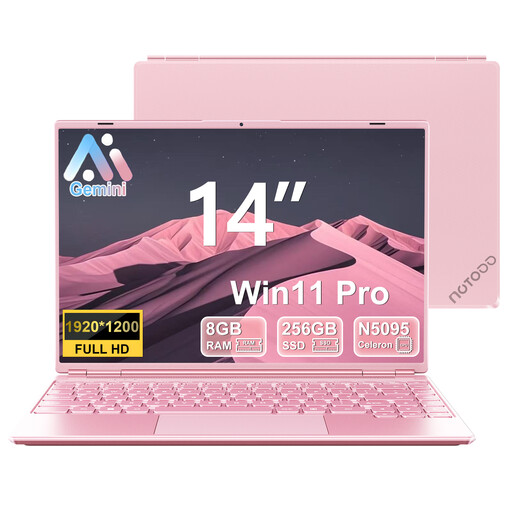
NOTODD 14-inch laptop, 8 GB memory and 256 GB SSD, pink

NOTODD 14-inch laptop, 8 GB/256 GB SSD, pink

A Windows laptop for editing documents and typing feedback.

The product listing specifies a screen resolution of 1920 × 1200 pixels, 8 GB of memory, a 256 GB SSD and Windows 11. The listed processor is a quad-core Celeron N5095 with a stated maximum speed of 2,9 GHz.

View on Joybuy

HP OmniBook 5 Flip 14-fp0075nd C5VM5EA#ABH

HP OmniBook 5 Flip 14-fp0075nd C5VM5EA#ABH

A Windows 2-in-1 for anyone who wants to work directly on the screen while reviewing essays. Check whether a suitable pen is included.

The product listing specifies a 14-inch OLED touchscreen with a resolution of 1920 × 1200 pixels and a 16:10 aspect ratio, 16 GB of memory and a 512 GB SSD. The charger isn’t included; the description specifies a compatible USB-C charger of at least 45 W.

View on Joybuy

HP OmniBook 3 14-hy0058ndx, 14-inch

HP OmniBook 3 14-hy0058ndx, 14-inch

A standard Windows laptop for reading essays and typing feedback.

The product listing specifies a 14-inch IPS display with a resolution of 1920 × 1200 pixels and a 16:10 aspect ratio, 8 GB of memory, a 512 GB SSD and Windows 11 Home. The charger must be purchased separately.

View on Joybuy

Frequently asked questions

Do you need a laptop with a pen for reviewing essays?

No, not if you type your feedback. If you want to write on a PDF, check that a pen is compatible with the exact laptop model, is included and works with the app you’ll be using. Lenovo says the Yoga Pen is sold separately for the Yoga 7 2-in-1 Gen 10 83JR005QMH we looked at.

How can you prepare documents in case the workshop’s internet connection drops?

Set up offline access in advance and check that you can open the files you need and share saved comments later. Google explains how to work offline in Docs, but you need to set up access beforehand.

What should you check before sending a reviewed Word file?

First, check whether the recipient needs to see your changes and comments. Microsoft notes that Word files can contain comments, tracked changes and personal information; inspect the file if that information shouldn’t be included.

What if a laptop you bought online isn’t comfortable to read on?

For an eligible online consumer purchase in the Netherlands, ACM ConsuWijzer says you generally have up to 14 days after delivery to change your mind. Check whether the rules apply to your purchase; buying in a physical shop doesn’t automatically give you the same statutory right to cancel.

Do you need an extended shop warranty as well as your statutory rights?

No, an additional commercial warranty isn’t the same as your statutory rights. ACM ConsuWijzer explains that the seller is responsible if a product doesn’t meet your reasonable expectations under normal use; in the Netherlands, there’s no fixed general two-year period for the statutory guarantee.

Does a laptop in the Netherlands have to charge via USB-C?

The European Commission says the common charger rules will also apply to laptops from 28 April 2026. This doesn’t mean every older or second-hand laptop has a USB-C charging port, or that a suitable adapter will be included. Check the port and charging power required for the exact model.
