
Writer who needs to read at a larger size
You want to enlarge the script and controls without losing sight of the overall layout. So, test the magnification in the writing app you actually use.


If you usually write at a desk and want to view your script and sources side by side, start with a laptop that has an easy-to-read 16- or 17-inch screen, then test the magnification in your own writing app. If you often take your laptop with you, weigh up a smaller size against the more limited on-screen workspace. You should also choose a laptop that supports the software you need: according to Final Draft, version 13 does not support Chromebooks or Linux computers. A larger screen alone does not guarantee a comfortable view in an app.
You want to enlarge the script and controls without losing sight of the overall layout. So, test the magnification in the writing app you actually use.
You switch between your script, transcripts and sources while writing, so you need enough screen space and storage for your files.
You want to write while you’re out and about, so you’ll need to balance the size of the built-in screen against how easy the laptop is to carry.
First, decide which writing software you need. Then test magnification and window layouts using a script and source material similar to what you work with.
| What to consider | What should you check? | Who is this important for? |
|---|---|---|
| Readability when magnified | Test text size and display scaling in your own writing app; check how the interface and script are displayed. | I want to comfortably read both the script and controls with larger text; around 36% of consumers say readability is their top buying priority. |
| Space for sources | Check how much of your script and source material remains visible at your preferred magnification. | If I need transcripts or research sources alongside my script, I want to be able to see both; around 29% of consumers give workspace for sources top priority. |
| Writing on the go | Compare the screen size with what you’re willing to carry, and test readability on a smaller screen. | When I often write on the go, I weigh portability against the space available for enlarged text; around 21% of consumers put portability first. |
| Software compatibility | Check the system requirements for the specific app and version you need. Final Draft states that version 13 is not supported on Chromebooks or Linux computers. | If my work depends on a particular writing programme, it needs to run on the laptop I choose; around 14% of consumers let software requirements make the decision for them. |
The usable space also depends on magnification and how your writing app is displayed. Configurations with the same screen size may also have different display options.
Open a representative script and source side by side, set your preferred magnification and check the exact display option.
Final Draft states that version 13 is not supported on Chromebooks or Linux computers. If you need this software, choosing a different operating system may mean you need another app or device.
Before buying, check the system requirements for the software version you actually want to use.
In the Netherlands, your statutory rights are not automatically limited to the warranty stated by the manufacturer. ACM ConsuWijzer explains that the protection you’re entitled to depends in part on what you can reasonably expect from a product.
Check what any additional cover includes, and keep the information provided by the seller.
According to Lenovo Netherlands, the ThinkBook 16 Gen 8 is an example of a 16-inch business laptop to compare if you use multiple windows while writing.
According to Dell Netherlands, the Dell 16 Plus is an example of a 16-inch configuration to compare for writing with enlarged text and source material.
According to Apple, the 15-inch MacBook Air is a macOS option to compare if you’re looking for a larger built-in screen for working on the go.
HP lists OmniBook variants with large screen sizes as options to compare for desk use.
This selection focuses on Windows laptops with larger built-in screens, so you can assess enlarged text and source material in your own writing app.
 No image available
The 17.3-inch size gives you a large built-in screen to assess how much of your script and source material remains visible at your chosen magnification.
AMD Ryzen 5, 8 GB RAM, 512 GB SSD, Full HD IPS display, Windows 11 Home. The laptop is supplied without a power adapter.
 No image available
The 16-inch screen is a size to test if you want to view enlarged text and documents on a single built-in display.
WUXGA display, Intel Core Ultra 5 135H, 16 GB DDR5, 512 GB SSD, anti-reflective IPS display, Windows 11 Pro and QWERTY keyboard.
 No image available
The 16-inch screen is an option to consider if you want to work side by side with your script and research documents in your own app.
Intel Core Ultra 7 255H, 32 GB DDR5 RAM, 512 GB PCIe 4.0 SSD, 1920 × 1200 display with a 16:10 aspect ratio and Windows 11 Pro.
 No image available
The built-in 17.3-inch screen gives you plenty of space to check how much enlarged text and source material remains visible at once.
Intel Core 7 240H, 16 GB DDR5-SDRAM, 512 GB SSD, NVIDIA GeForce RTX 5050, Full HD display and Windows.
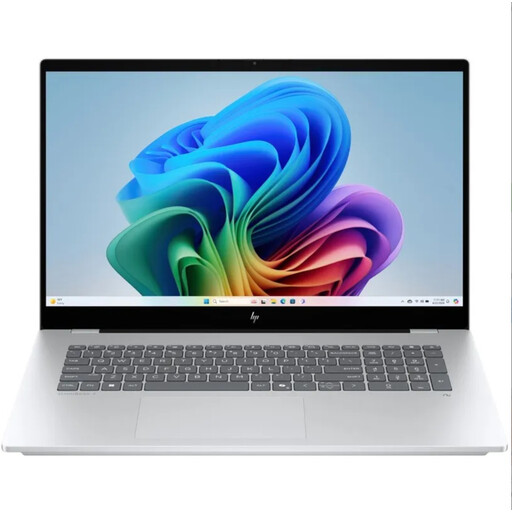 No image available
This Windows laptop is an option for assessing how enlarged text and sources appear in your own writing app; check the screen size of the variant you choose.
QWERTY keyboard.
Yes. Windows has settings for text size and display scaling, while macOS has accessibility settings for text and other on-screen elements. Also test how your writing app displays text, as system settings and the formatting of a shared script are two different things.
Set up a backup and check that you can restore files. Microsoft explains that regular backups can help if files are accidentally deleted or hardware fails. Choose a storage location that suits the sensitivity of any interview files.
No. According to ACM ConsuWijzer, your statutory guarantee depends on what you could reasonably expect from the product. If there’s a fault the seller is responsible for, they must offer an appropriate solution. For distance purchases, the cooling-off period is usually 14 days, according to the Dutch government. Check the terms and any exceptions before you buy.
Don’t assume you automatically have permission. The Dutch Data Protection Authority states that you need a lawful basis under the GDPR to process personal data; consent is one possible basis. According to the Dutch government, you need the creator’s permission to use copyright-protected texts, films, photographs and music. The rules and exceptions that apply to your production need to be assessed separately.