Who is this choice for?

Writer of long diary entries

You write a lot and want to move quickly between chapters or recurring sections. Try the keyboard and use proper heading styles in your word-processing software. Microsoft Support explains how heading styles can help with navigation and a table of contents.

Writer who works in different places

You take your diary with you and want to write without relying on a regular workspace or an internet connection. Compare the size and check that your files are available offline before you set off. Google Help explains how to set up offline access to documents.

Writer of confidential entries

You want to decide where your diary is stored and who can open it. Check the encryption, how you can recover access and your backup method. Microsoft Support and Apple Support explain device encryption and FileVault settings.

What should you look for in a laptop for diary writing?

Start with the keyboard and word-processing software, then consider portability, offline access and file protection. Microsoft Support explains how heading styles in Word can help with navigation and a table of contents. Google Help outlines the requirements for working with documents offline.

What to consider What should you check? Who is this most important for?
Typing and structure Try the keyboard and check whether your word-processing software offers heading styles, navigation and a table of contents. If I write long passages, I want to type comfortably and use heading styles to jump quickly to a section. Around 33% of consumers prioritise typing and structure.
Portability and offline access Compare the size of each model and test whether you can open a document without an internet connection. If I write in different places, I want to be able to open my diary even without a connection. Around 27% of consumers prioritise portability and offline access.
Privacy and recovery Check that encryption is enabled, where the recovery key is stored and how to restore a backup. If my diary contains confidential passages, I want to know how my files are protected and how to recover them. Around 20% of consumers prioritise storage privacy and recovery.
A suitable configuration Choose the memory and storage to suit your other programmes and files; check which word-processing software and accessories are included. If I mainly write text, I don’t want to choose a model based on features I won’t use. Around 20% of consumers tailor their configuration to their writing needs.

The Dutch Consumers' Association says 8 GB of RAM is enough for light use and recommends 16 GB where possible. This is a useful guide for basic word processing, but it’s no substitute for checking your own software and how else you’ll use the laptop.

Common mistakes when buying a writing laptop

  • Assuming a faster processor means a more comfortable typing experience

    Extra processing power won’t make the keyboard more comfortable or automatically give your diary a useful structure.

    Start by assessing the keyboard, screen and word-processing software. Only consider extra processing power if you need the laptop for other tasks too.

  • Assuming a cloud document will automatically be available offline

    To work offline, you need to set up access in advance and make sure the file is available on your device.

    Make your diary file available offline beforehand, then open it once without an internet connection to check.

  • Turning on encryption without a recovery plan

    Encryption helps protect your data, but you also need access to your recovery key and a usable backup.

    After setup, check the encryption setting, keep your recovery key somewhere safe and test how to restore a backup.

  • Assuming the charger and word-processing software are included

    What’s included can vary by model. HP states that the charger for the OmniBook X Flip 14-kc0620ndx is sold separately.

    Before buying, check what’s included with the exact model and whether it comes with the word-processing software you want to use.

Brands to compare

Lenovo

The IdeaPad Slim 3 14AHP10 is a possible Windows option if you’re looking for a compact screen for writing.

  • Lenovo lists several configurations for this model range, including versions with Ryzen 7 8840HS and expandable storage.
  • These are specifications for the range, not an assessment of typing comfort. Check the keyboard, screen and memory of the complete model. Source: Lenovo PSREF.

Apple

The 13-inch MacBook Air M5 is an option if macOS and a compact device suit your writing software.

  • For the 13-inch base model, Apple lists 16 GB of memory, a 512 GB SSD and a 13.6-inch screen.
  • The stated battery life is based on specific conditions and won’t tell you how long your own writing sessions will last. Also check which power adapter comes with the model on offer. Source: Apple.

HP

The OmniBook X Flip 14 is worth considering if you’d like to use a touchscreen or fold it into different positions as well as type.

  • HP lists an OLED touchscreen and 32 GB of RAM for the OmniBook X Flip 14-kc0620ndx.
  • These features describe one possible configuration; they don’t demonstrate an advantage for diary writing. HP says the charger for this model is sold separately. Source: HP.

Joybuy laptops for writing and organising your diary

This selection includes Windows laptops for writing locally, a 2-in-1 option with a touchscreen and a MacBook Air for those who want to use macOS.

HP OmniBook 3 14-hy0058ndx, 14-inch laptop

HP OmniBook 3 14-hy0058ndx

A Windows option if you’re looking for a laptop for writing locally.

14-inch; AMD Ryzen 5 7520U; 8 GB RAM; 512 GB SSD; Windows 11 Home.

The charger must be purchased separately.

View on Joybuy

HP OmniBook 5 Flip 14-fp0251ndx 2-in-1 with touchscreen

HP OmniBook 5 Flip 14-fp0251ndx 2-in-1

An option if you’d like to use a touchscreen as well as write.

14-inch touchscreen; Intel Core 5 120U; 8 GB RAM; 512 GB SSD; Windows 11 Home.

A compatible USB-C charger is not included and must be purchased separately.

View on Joybuy

Lenovo IdeaPad Slim 3 14AHP10 with QWERTY keyboard

Lenovo IdeaPad Slim 3 14AHP10

A Windows option for writing locally; check that the keyboard layout suits you.

14-inch; Ryzen 7 8840HS; 16 GB RAM; 1 TB PCIe SSD; QWERTY keyboard.

View on Joybuy
Lenovo ThinkBook 16 G8 IAL 21SK00EBMH with QWERTY keyboard

Lenovo ThinkBook 16 G8 IAL 21SK00EBMH

An option if you’d like a larger screen while you write.

16-inch WUXGA; Intel Core Ultra 5 135H 14-Core; 16 GB DDR5; 512 GB SSD; anti-glare IPS; Windows 11 Pro; QWERTY keyboard.

View on Joybuy
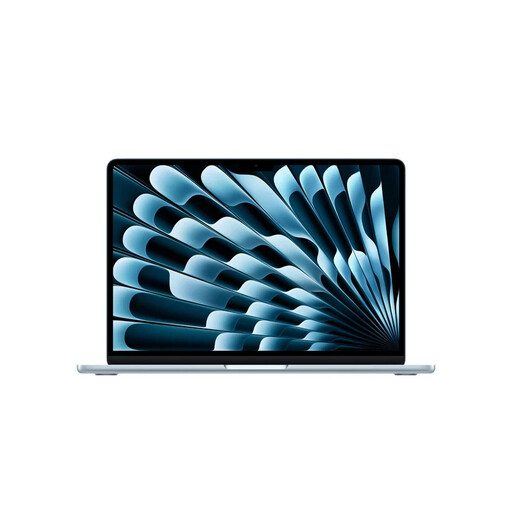
Apple MacBook Air 13-inch M5 with 16 GB memory and 512 GB storage

Apple MacBook Air 13-inch M5 16GB 512GB

A compact macOS option if your writing software works with this operating system.

M5 chip; 16 GB memory; 512 GB storage; QWERTY keyboard.

View on Joybuy

Frequently asked questions

How can I make the sections in my diary easy to navigate?

In Word, use proper heading styles rather than simply making the text larger or bold. Microsoft Support explains how heading styles can help with navigation and a table of contents.

Can I work on my diary in Google Docs without an internet connection?

Yes, provided you’ve set up offline access in advance and the file is available on your device. Google Help notes that your device needs enough storage space; check you can access the file before setting off without a connection.

Do I need 16 GB of RAM for a laptop I’ll mainly use for writing?

Not just for diary writing. The Dutch Consumers' Association says 8 GB of RAM is enough for light use and recommends 16 GB where possible. Also consider which other programmes you use at the same time.

What should I check before saving a confidential diary on my laptop?

Check that encryption is enabled and make sure you can find your recovery key. Microsoft Support says device encryption isn’t automatically enabled with a local account; Apple Support describes FileVault as an extra layer of security on a Mac.

What should I consider if I want to include other people’s writing or photos in a diary edition?

The Dutch government says that a private copy for personal use must not be distributed or made public. If you want to share or publish the edition, check the rights or ask for permission.
