What should you look for when choosing?
First, decide whether you mainly view files or also edit them locally. Then compare the exact screen configuration and how well it suits your meeting space.
| What to consider |
What should you check? |
Who is this most relevant to? |
| Readability by a window |
Check the finish of the exact screen variant and its stated SDR brightness. If possible, compare reflections in similar lighting conditions. |
If I review drawings beside a bright window, I want to reduce distracting reflections without losing sight of the details. Around 36% of consumers cite readability by a window as their main reason for buying. |
| Software and files |
Make a note of the file formats, editing tasks and required software version. Then check the operating system and configuration against those requirements. |
If I need to edit models myself using the specified software, I want to know in advance whether that workflow will work on my laptop. Around 29% of consumers prioritise software and file compatibility. |
| Detail and colour |
Compare the resolution, screen size and stated colour coverage for the full model number. For colour-critical work, look for a suitable screen rating. |
If I review lines and design images closely, I want the screen space and colour reproduction to suit my work. Around 21% of consumers cite reviewing detail and colour as their main reason for buying. |
| Portability and connectivity |
Compare the screen size and check which ports and external display support the configuration offers. |
If I discuss designs in different places, I want to know whether the built-in screen is large enough and whether I can connect my external display. Around 14% of consumers give portability and connectivity top priority. |
Laptop options at Joybuy
These Joybuy picks focus on viewing and discussing home designs, with an ASUS ProArt configuration also included for anyone considering creative work locally. Screen coatings and stated brightness are product specifications, not a guarantee of readability beside your window.
 No image available
HP OmniBook 3 16-by0058ndx
The 16-inch IPS screen with an anti-reflective coating is worth considering if you view design files on the built-in display; 300 nits is a stated specification, not a measurement taken by your window.
AMD Ryzen 5 7520U; 1,920 × 1,200 pixels and 16:10; 8 GB onboard memory, not upgradeable; 512 GB SSD; Windows 11 Home.
Charger not included.
View at Joybuy
 No image available
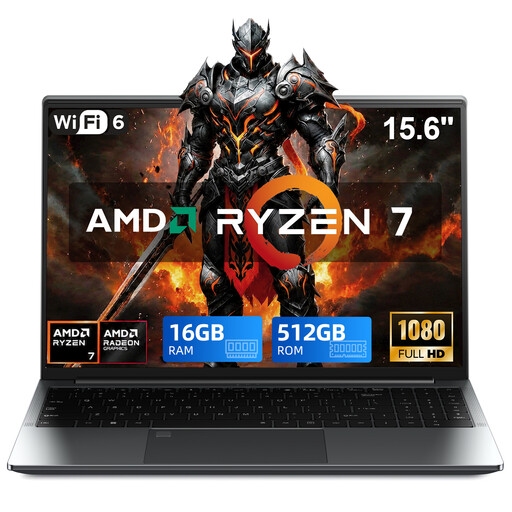
VANWIN GRT156R75825U
The 15.6-inch Full HD touchscreen rotates through 360°, which is useful if you want to view design files in different modes.
AMD Ryzen 7 5825U; 16 GB DDR4; 512 GB SSD; Windows 11 Pro; Radeon graphics.
View at Joybuy
 No image available
ASUS Vivobook S16 S3607QA-SH109W
The 16-inch WUXGA OLED screen with anti-reflective finish is worth considering if you want to discuss design images on a large built-in screen; check how visible it is in the lighting conditions in your workspace.
Snapdragon X; 16 GB LPDDR5X; 512 GB SSD; Windows 11 Home; Cool Silver.
View at Joybuy
 No image available
Lenovo V15 G5 IRL
This configuration has a 15.6-inch anti-glare screen; compare its stated 250 nits with the light levels where you review designs.
Full HD TN screen; Intel Core i5-13420H; 16 GB DDR5; 512 GB SSD; integrated Intel UHD graphics; Windows 11 Pro. The product information lists USB-C with DisplayPort.
View at Joybuy
 No image available
ASUS ProArt P16 H7607BA-SE030X
This configuration is worth considering if you review design images and also plan to do creative work locally. The screen specifications do not measure reflections beside your window.
16-inch 4K OLED touchscreen; 3,840 × 2,400 pixels; 100% DCI-P3 and factory calibration according to the product information; 64 GB LPDDR5X onboard memory, not upgradeable; 1 TB SSD; Windows 11 Pro.
The product information lists a weight of approximately 1.85 kg, USB4, HDMI and an SD card reader.
View at Joybuy
Frequently asked questions
Do you always need a powerful Windows laptop for an RVT or DWG file?
No, not if you only need to view a supported file. Autodesk describes a browser viewer for files including RVT and DWG, which lets you view and review designs. Check whether you also need to edit locally or use specific project features; a browser viewer is not automatically a full replacement for Revit.
Is a stated HDR peak brightness enough to read drawings by a window?
No. HDR peak brightness alone does not tell you how comfortably you can view standard drawings. Compare the relevant SDR specification and the finish of the exact screen variant. RTINGS explains that bright window reflections can remain visible even with nano-texture.
What should you check before opening a web-based 3D model during a meeting?
Check which browsers are supported, make sure your graphics drivers are up to date, and familiarise yourself with the model controls. SketchUp lists browser and hardware requirements for SketchUp for Web, and recommends a three-button mouse with a scroll wheel for precise navigation; this advice applies to that particular workflow.
Who can help if a product is faulty, and what is the cooling-off period for online purchases in the Netherlands?
For a consumer purchase from a business, the Dutch government says you are entitled to a product that works as it should; if there is a fault, the seller must provide a solution. There is no fixed statutory guarantee period for all products in the Netherlands. For a typical distance purchase from a business, you generally have 14 days to change your mind, with some exceptions. Check the rules for your specific purchase; these consumer rules do not necessarily apply to a business purchase.


