
Schema designer looking for a quiet laptop
You work in a quiet study and want to know first whether the software you need runs on a fanless laptop. Apple describes the MacBook Air as fanless; you should also check the requirements of your own tools.


Start with the software you need. SQL Server Management Studio 22 requires a supported Windows 11 computer, while DBeaver Community is available for Windows, macOS and Linux. If you use software that runs on macOS and want to avoid fan noise, a MacBook Air M5 is one option. For Windows software, more ports or a larger screen, compare the exact configuration of a Windows laptop.
You work in a quiet study and want to know first whether the software you need runs on a fanless laptop. Apple describes the MacBook Air as fanless; you should also check the requirements of your own tools.
You need SQL Server Management Studio, so your first priority is choosing a supported operating system, before screen size or other hardware features influence your decision. Microsoft Learn lists Windows 11 as a supported operating system for SSMS 22.
You want to view diagrams, SQL and documentation side by side, or you also run local development tasks. Screen space, memory and ports may all matter; specifications vary between configurations.
First, check the software and version you need. Then consider how important quiet operation, running several local tasks at once and screen space are to you.
| Consideration | What should you check? | Who might consider this more important? |
|---|---|---|
| A quiet working environment | Check that the software you need runs on your chosen operating system. If you’re considering a laptop with a fan, look for noise measurements for the exact configuration under a comparable workload. | I don’t want fan noise to distract me in a quiet study; around 29% of consumers prioritise a peaceful working environment. |
| Compatibility with your schema tool | Make a note of the exact tool and version, then check its supported operating systems and the diagramming or editing features you need. Microsoft Learn lists Windows 11 for SSMS 22; DBeaver Community is available for Windows, macOS and Linux. | If my work requires a specific tool, I want to make sure it works first; around 29% of consumers give software compatibility top priority. |
| Running local tasks at the same time | List the programmes and databases you’ll have open locally, then compare them with the memory and storage in the exact configuration. If the memory is upgradeable, check the specific model too. | If I use a diagram, editor and local database at the same time, available capacity matters more; around 24% of consumers prioritise capacity for local tasks. |
| On-screen workspace | Decide whether you’ll use the built-in screen or an external monitor. If you won’t be using a monitor, compare screen sizes and check that the ports suit your setup. | If I want to view diagrams and documentation side by side, the built-in workspace matters; around 18% of consumers prioritise having a clear view on screen. |
Apple describes the MacBook Air M5 as fanless, but Microsoft Learn lists Windows 11 as a supported operating system for SSMS 22. So a quiet laptop isn’t necessarily compatible with your software.
Make a note of the required tool and version, then check the official system requirements before weighing up your operating system options and preference for quiet operation.
DBeaver describes diagrams as read-only by default and lists ERD Edit Mode among its PRO features. Being able to view a schema doesn’t automatically mean you can edit it from the diagram.
Decide whether you only need to view diagrams or also want to change tables and relationships. Then check that the feature is included in the software edition you’ve chosen.
Lenovo notes that configurations can vary by region. The screen, memory and service details for the HP EliteBook mentioned here are linked to a specific product code.
Compare the full product code and check the details of the configuration you’re considering, including memory, screen, keyboard and service terms.
According to the stated specifications, the MacBook Air M5 is available in 13- and 15-inch configurations and has a fanless design.
The ThinkPad T14 Gen 6 AMD is a 14-inch business laptop worth comparing if ports or upgradeable memory are important to you.
The EliteBook 8 G1i is a Windows option to compare if you’re looking for a built-in 16-inch workspace and a business service package.
This selection includes Windows laptops with different screen sizes, plus a MacBook Air for those using macOS. Before you buy, check that the exact configuration suits your software, workspace and port requirements.
 No image available
The 16-inch screen is a good option if you want to view your schema and documentation on the built-in display.
WUXGA OLED screen; Snapdragon X processor; 16 GB LPDDR5X memory; 512 GB SSD; Windows 11 Home.
 No image available
This Windows laptop is an option for a desk-based setup; check that its ports are compatible with your monitor and peripherals.
15.6-inch FHD screen; Intel Core i5-13420H; 16 GB DDR5 memory; 512 GB SSD; Windows 11 Pro; USB-C with DisplayPort and Gigabit Ethernet.
 No image available
An option for a quiet workspace if your schema and database tools run on macOS; Apple describes the design as fanless.
15.3-inch screen; 16 GB memory; 512 GB storage; two Thunderbolt 4 ports. The description notes that a mains adaptor isn’t included.
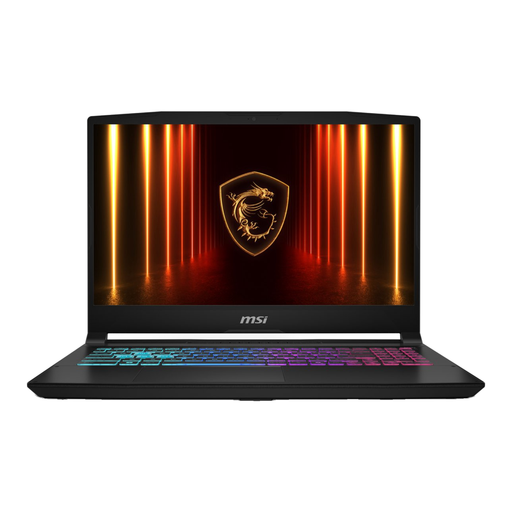 No image available
The 17.3-inch screen could be a good fit if you want to view diagrams and other windows on your laptop screen.
FHD screen; 16 GB DDR5 memory; 1 TB SSD; Windows 11 Home. The description notes that the charger must be purchased separately.
 No image available
This configuration is an option for a Windows workstation with ports for peripherals; check that they suit your setup.
15.6-inch FHD screen; Intel Core 7 150U; 16 GB RAM; 512 GB SSD; Windows 11 Home; HDMI, USB-C and Gigabit Ethernet.
No, it depends on the software you use. DBeaver Community is available for Windows, macOS and Linux, and pgAdmin has an ERD tool. For SSMS 22, Microsoft Learn lists supported versions of Windows 11. Also check that your software edition includes the design features you need.
For paid work from home, the Dutch government says that employers have a duty of care to provide a good and safe working environment. Discuss which equipment is suitable for your tasks; laptop specifications alone won’t make a workspace ergonomic.
For a standard online consumer purchase, ACM ConsuWijzer says you generally have a statutory cooling-off period of up to 14 days after delivery, with some exceptions. Check the applicable terms before buying; this doesn’t necessarily apply to a business purchase.
No. ACM ConsuWijzer distinguishes between a manufacturer’s or seller’s warranty and your statutory rights. If a product is faulty despite being used normally, the seller is responsible for providing an appropriate solution. In the Netherlands, there is no fixed time limit for the statutory guarantee.