
Vandaag of morgen in huis

Kwaliteit gegarandeerd

Welkomstaanbiedingen ontgrendelen: GRATIS bezorging | Tot 80% korting | Gratis 30 dagen JoyPlus-proefperiode
Download de app
A laptop case may seem like a simple accessory, but the wrong size or an impractical layout can cause daily frustration. A case that is too loose offers less stability. A bag without suitable compartments leaves the charger and mouse loose in the main compartment. And material described only as “water-resistant” will not automatically protect against a heavy downpour.
For students, professionals, commuters and travellers, three pitfalls are particularly important:
The terms 14-inch laptop case, 15.6-inch laptop case or 17-inch laptop case usually refer to the maximum screen diagonal. This is not the same as your laptop’s overall dimensions. Measure the device’s width, depth and thickness, then compare them with the case’s internal dimensions.
Also pay attention to the closure. A zip closure generally keeps a laptop enclosed all the way around, while a magnetic flap provides quick access and a minimalist look. With either type, the laptop should fit securely without putting pressure on the edges.
A case that is too small can put pressure on the corners. In a case that is too large, the device may shift around while you are walking. Include any protective hard case or thicker laptop base in your measurements.
Many laptop cases are made from polyester, nylon, neoprene or PU faux leather. The material choice says something about how the case can be used, but it does not tell you everything about its level of protection.
A water-resistant laptop case can help protect against splashes or light rain, but always check the manufacturer’s warnings. For example, the Kensington SP40 is explicitly not described as waterproof. A bag with a water-resistant outer material is therefore not automatically suitable for prolonged rain.
A laptop sleeve is suitable if you want to carry your laptop inside an existing backpack or shoulder bag. Its design is compact and usually offers little space for accessories. This suits users who mainly want to limit scratches and minor knocks.
A laptop bag often has a handle, extra compartments and sometimes a detachable shoulder strap. This is practical for commuting, meetings and short journeys. A laptop bag with a shoulder strap distributes weight differently from a backpack, so your preferred way of carrying it is important.
A backpack is useful if you cycle, walk or travel by public transport for longer periods. Look for a padded laptop compartment, sturdy zips and a layout that prevents heavier accessories from pressing directly against the laptop.
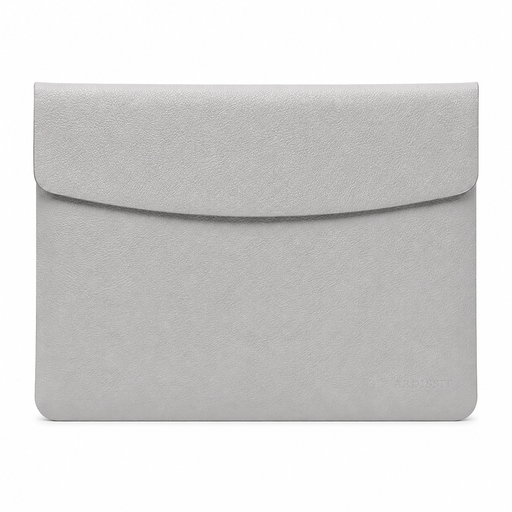
Why it suits this profile: This compact case is designed for 14-inch laptops and weighs 300 grams according to the product information. The magnetic flap and slim design make it suitable for students and users who carry their laptop inside a larger bag.
The stated size, material and closure are clearly included in the product description. However, check your laptop’s external dimensions before ordering.
PU faux leather, faux-suede lining, magnetic closure and a stated weight of 300 grams.
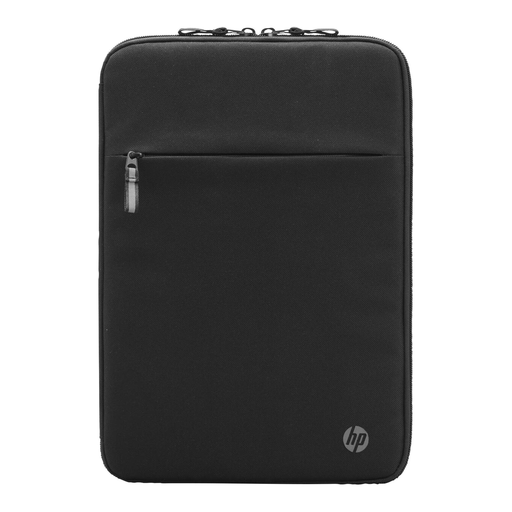
Why it suits this profile: This sleeve is aimed at business use, with a padded interior and an organiser compartment at the front. The product information states a maximum screen size of 14.1 inches.
The case combines laptop protection with a separate organiser compartment, so cables and small essentials do not lie loose next to the device.
100% ocean-bound plastic as the main material according to HP, padded interior, RFID compartment and multiple compartments for cables.
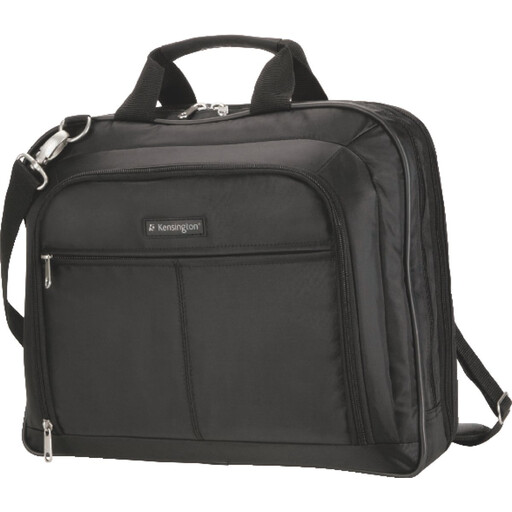
Why it suits this profile: The bag is suitable for laptops up to 15.6 inches and has several accessory compartments, a detachable padded shoulder strap and a trolley strap. This makes it suitable for commuters and travellers.
This is more than just a laptop case: the compartments and carrying options make it easier to transport accessories separately. Please note: the manufacturer does not describe this bag as waterproof.
1680 denier nylon, padded laptop compartment, multiple storage compartments and trolley attachment.
We have put together a complete, up-to-date list of products that fully meet these strict selection criteria and the applicable European safety regulations.
Check the following before ordering:
No. Screen size is only an indication. Check the case’s internal dimensions and your laptop’s external dimensions, including any hard case.
That depends on how you use it. If you are only carrying a laptop, a sleeve is often lighter. If you are also taking a charger, mouse, documents or cables, a laptop bag with compartments provides better organisation and protection against contact with the laptop.
Its lifespan depends on the material, zips, load and everyday use. Do not overfill a case, do not place sharp objects next to the laptop and clean the exterior according to the product instructions. A padded bag with sturdy seams may remain practical for longer with normal use, but wear and tear will always depend on the conditions.
