
Mobile report editor
You regularly take documents to a café and want to read and add comments without needing a fixed workspace or a power socket. ID.nl highlights weight and battery life as important considerations for laptops used on the go.


First, choose a laptop that runs your reporting software and files well. Then compare the screen, weight and battery life for your café visit. If you’ll mainly be reading and adding comments, you may not need extra processing power. Screen reflections, the included power adapter and reliance on cloud-based editing could matter more.
You regularly take documents to a café and want to read and add comments without needing a fixed workspace or a power socket. ID.nl highlights weight and battery life as important considerations for laptops used on the go.
You need to review draft reports in a specified format or programme and want to know in advance what will work offline. Google Support explains that working with Office files and Microsoft 365 on a Chromebook depends on the approach you choose.
You mainly use your laptop for documents and want to choose a configuration suited to those tasks. The Consumers' Association says 8 GB of memory is enough for light use and recommends 16 GB where possible.
Start with the report software you need and how you’ll work offline. Then weigh up readability, battery life and portability against the configuration you actually need.
| What to consider | What to look for | Who should pay extra attention? |
|---|---|---|
| Screen readability in café lighting | Check the screen finish and assess reflections in similar lighting. Balance screen space against size. | If I’m reading by a window or under lights, I want to follow the text without distracting reflections. Around 28% of consumers prioritise readability in café lighting. |
| Working without a power socket | Compare the test conditions behind battery life figures and check which power adapter is included with the exact model. | If you want to finish a report without relying on a power socket, consider battery life and the included power adapter. Around 22% of consumers give working without a power socket top priority. |
| Report and software compatibility | Check the file format, commenting features and apps you need. Also test how you plan to work offline. | If a report must be edited in a specific programme and sent back, the complete file workflow is crucial. Around 17% of consumers put compatibility first. |
| Portability and workspace | Compare the weight and screen size of the exact model with your bag and the space available on a café table. | If you often take your laptop with you but still want to view reports comfortably, weigh portability against workspace. Around 17% give this balance top priority. |
| A suitable configuration | Choose the memory and other specifications to suit your report software and the number of programmes you use at once. | If you mainly use your laptop for documents, you don’t want to choose a configuration that goes beyond what your tasks require. Around 16% of consumers prioritise a suitable configuration. |
A high resolution doesn’t tell you whether a screen is reflective. The Acer and Lenovo models reviewed have glossy screens, which could affect where you feel comfortable working.
Check the finish of the exact model and, if possible, view the screen in lighting similar to your usual café environment.
Maximum battery life depends on the test and how you use the laptop. Apple gives the MacBook Air reviewed a maximum of 15 hours of wireless internet use; Acer lists a maximum battery life of 12,50 hours for the Swift Go mentioned. These figures aren’t guarantees for a café session using report software.
Compare the test conditions described and allow for your own working habits and screen brightness.
Google says Office files can be opened and edited on a Chromebook. According to Google, editing with Microsoft 365 on a Chromebook requires OneDrive. This could affect offline work and the use of specified file storage.
Test a representative report in advance, including comments, saving and sending the file back.
The Joybuy listing reviewed for a MacBook Air stated that no charger was included. You may therefore need to buy a suitable power adapter separately. An extended warranty is also different from your statutory warranty.
Check what’s included with the exact model and compare any extended warranty with your statutory rights.
The MacBook Air could suit you if your report workflow works with macOS and you’re looking for a compact laptop. The specifications below are for the 13-inch Air with M5.
The Swift Go 14 is a compact Windows option. Check the exact product number, as specifications can vary between models.
The Yoga Slim 7 Gen 10 is a 14-inch Windows alternative. The details below apply to configuration 83JYCTO1WWNL2.
HP offers models with different screen sizes and intended uses. Assess each specific model individually.
This selection includes laptops with screens of 14 inches or larger for you to compare when reading and editing draft reports. Pay particular attention to screen reflections, weight, the included power adapter and the software you need.
 No image available
The description mentions documents and spreadsheets as intended uses; this 14-inch model has an anti-glare screen.
AMD Ryzen 5 7520U, 8 GB RAM, 512 GB SSD and Windows 11 Home. The resolution is 1920 × 1200 and the stated weight is around 1.42 kg.
The description says that no charger is included and the memory is onboard and cannot be upgraded.
 No image available
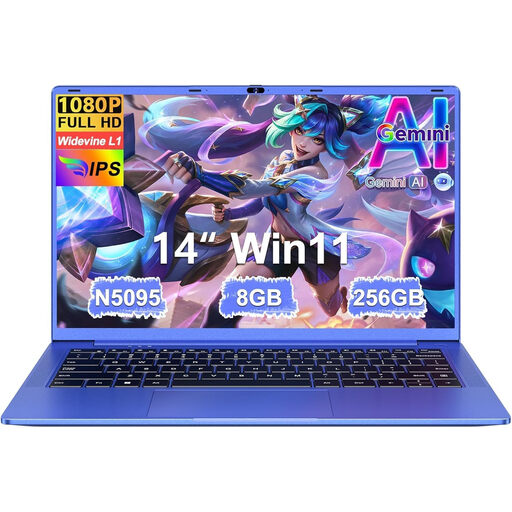
This 14-inch model is an option to take with you. Check in advance that the stated workflow and software suit your report.
FHD screen, N5095 processor, 8 GB RAM and 256 GB SSD. The description lists a weight of 1.39 kg and up to 7 hours of battery life.
The product name states that storage can be expanded up to 1 TB.
 No image available
The description lists Windows 11 Home and an anti-glare screen for this 14-inch laptop.
Intel Core 7 150U, 16 GB DDR4, 512 GB SSD and IPS-level Full HD screen. The stated weight is 1.40 kg.
 No image available
The 15.6-inch screen gives you a larger viewing area. Consider whether it suits your café table and how you plan to carry it.
Full HD IPS-level screen with 144 Hz, AMD Ryzen 9 270, 16 GB DDR5, 512 GB SSD and Windows 11 Home.
 No image available
The description lists an anti-glare screen for reading reports. Compare the larger size with the space in your bag and on the table.
15.3-inch WUXGA IPS screen, 16 GB of memory, 512 GB SSD and Windows 11 Home. The stated weight is around 1.50 kg.
According to the description, the USB-C power adapter isn’t included and the memory is soldered and cannot be upgraded.
Not necessarily. The Consumers' Association says 8 GB is enough for light use and recommends 16 GB if you want to use several programmes at once. Check the requirements of your report software.
Yes. Google describes ways to open and edit Office files on a Chromebook. The Microsoft 365 workflow described by Google requires OneDrive. Test in advance whether comments and file sharing work as you need them to.
Make sure you can open the file in advance and test your editing method offline. VeiligInternetten recommends using a VPN or your mobile data allowance on public Wi-Fi. This is security advice, not a legal requirement.
A laptop battery wears with use, so its runtime may decrease over time. The Consumers' Association points this out. When buying, compare the battery specifications for the exact model and consider how you’ll use it.
According to ACM ConsuWijzer, the seller is responsible for the statutory warranty if a product doesn’t meet what you could reasonably expect under normal use; a shorter manufacturer’s warranty doesn’t take away this right. Online purchases generally come with a statutory cooling-off period of up to 14 days after delivery, with some exceptions.