
Vandaag of morgen in huis

Kwaliteit gegarandeerd

Welkomstaanbiedingen ontgrendelen: GRATIS bezorging | Tot 80% korting | Gratis 30 dagen JoyPlus-proefperiode
Download de app
A laptop cable lock can provide a practical extra layer of security in the office or classroom, at a hot desk or while travelling. However, not every anti-theft laptop lock fits every device. The type of security slot, locking method and cable length are particularly important in determining whether the lock is convenient for everyday use.
Many purchases go wrong because of three common pitfalls:
Below, you’ll find out which specifications matter and which models suit different usage situations.
Look at the side of your laptop to identify the security slot it has. The most common types are:
A Kensington laptop lock is therefore not necessarily universal. Check your laptop’s manual, technical specifications or casing before ordering. If an organisation uses different laptop models, a universal model may be more practical, provided the manufacturer supports the slots available.
A 1.8-metre security cable is suitable for many desks, tables and fixed workstations. The length gives you room to loop the cable around a fixed part without having to place the laptop directly next to the attachment point. In a cramped workspace, however, measure the distance first.
Cable diameter varies by model. According to the product description, a thicker cable may offer greater resistance to cutting, but no laptop lock makes a device impossible to steal. Use the lock as a deterrent and combine it with good physical security, such as a locked room and supervision.
Also pay attention to the cable construction:
A keyed laptop lock is useful when several employees follow a formal key-management system. Kensington keyed models, for example, are supplied with two keys, depending on the version. For IT departments, it is important to decide in advance who will manage the spare keys.
A laptop combination lock works without a key and is practical for hot-desking areas, schools and shared offices. Some models use a four-digit code with 10,000 possible combinations. Store the code in a secure system and test the lock before leaving your laptop unattended.
Claims about resistance, durability or test results come from the manufacturer’s product information. According to Kensington’s own information, certain cable locks have been assessed for factors including tensile strength, torsion, corrosion and mechanism lifespan. Treat this as product information, not as a guarantee that theft is impossible.
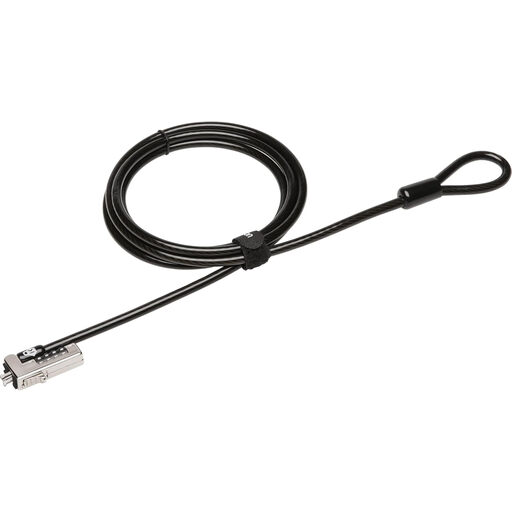
Why it suits this profile: This model combines a NanoSaver connection with key-free operation. That makes it practical for everyday use at home, in the office or on the go.
The combination lock means you do not need to carry a key every time you use it. However, check first that your laptop has a NanoSaver slot.
The product specifications list a 1.8-metre cable, a diameter of 6.5 mm and a weight of 219 grams.
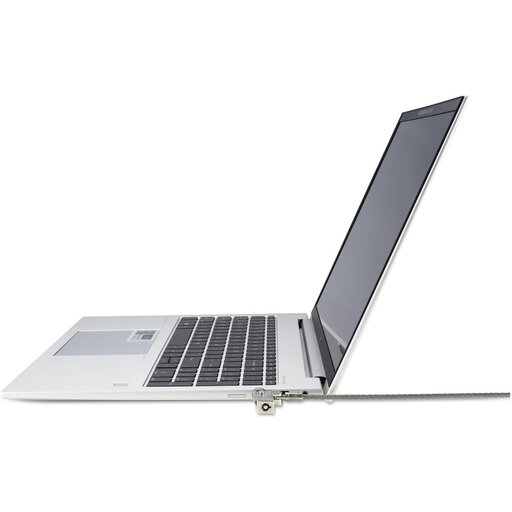
Why it suits this profile: A business user who wants to keep a slim laptop securely on the desk gets a keyed NanoSaver solution with easy access to the ports.
The slim lock head is designed to keep the laptop stable while allowing access to the ports. Check the connection before ordering.
The product specifications list a 1.83-metre stainless-steel cable, a diameter of 3.9 mm and two included keys.
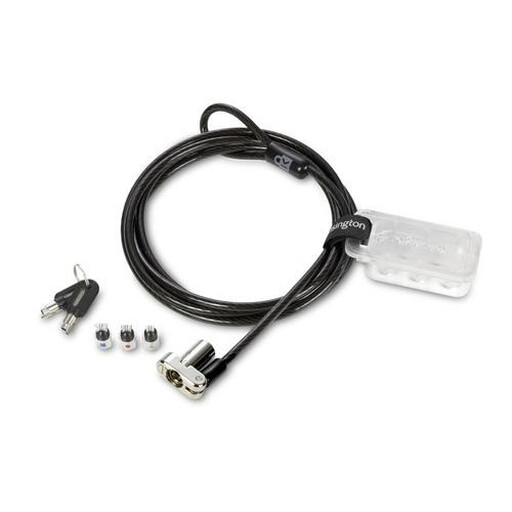
Why it suits this profile: This model is aimed at offices, schools and IT departments with laptops that use different types of security slots.
According to the product description, the 3-in-1 lock head is suitable for standard, Nano and wedge-shaped slots. Check compatibility for each laptop model.
Key operation and a 1.8-metre cable. This reduces the need to manage a different type of notebook cable lock for each laptop.
We’ve put together a complete, up-to-date list of products that fully meet these strict selection criteria and the applicable European safety regulations.
A laptop cable lock is not a replacement for access control, CCTV or a locked room. It is primarily suitable for temporarily securing a device to a workstation and making quick opportunistic theft more difficult.
No. Kensington uses different lock types, including standard, NanoSaver and universal 3-in-1 versions. Check the slot on your laptop and compare it with the product specifications.
That depends on the working environment. A combination lock eliminates key management and works well for individual use. A keyed model may be more convenient when an office or IT department centrally registers its keys.
Its lifespan depends on use, storage and exposure to moisture or damage. There is no fixed service life for every model. Check the cable and lock head regularly, and replace the lock if the mechanism no longer operates smoothly or the cable is damaged.
