
Vandaag of morgen in huis

Kwaliteit gegarandeerd

Welkomstaanbiedingen ontgrendelen: GRATIS bezorging | Tot 80% korting | Gratis 30 dagen JoyPlus-proefperiode
Download de app
Buying a laptop may seem straightforward until you start comparing specifications. A low price can be appealing, but a model with too little RAM, an impractical keyboard layout or limited software compatibility can quickly disappoint. Terms such as AI laptop, Copilot+ PC and “long battery life” do not tell the whole story either.
When comparing models, pay particular attention to these three common pitfalls:
For documents, video calls, browser windows and office software, 8GB RAM is suitable for basic use. If you are looking for a laptop for studying, working from home or multitasking, 16GB RAM is usually a better choice. It helps prevent slowdowns when several programmes are open at the same time.
Also check whether the memory can be upgraded. Models with integrated or soldered memory may not support a later upgrade. The ASUS Vivobook 14, for example, has 16GB LPDDR5X memory, but it cannot be upgraded. The Lenovo IdeaPad Slim 3 combines 16GB DDR5 with a 512GB SSD; according to the product specifications, it has one SO-DIMM slot, with a maximum memory capacity of 16GB.
A laptop with a 512GB SSD provides a practical amount of space for documents, apps and media. For large video files, photo libraries or lots of games, you may need an external SSD or cloud storage.
A 14-inch laptop is convenient for train journeys, lectures and working in different locations. A 15- or 16-inch screen gives you more room for spreadsheets and displaying two windows side by side. A 17-inch laptop is particularly suitable if you mainly work at home or in the office and portability is less important.
Do not just consider the diagonal measurement; pay attention to the aspect ratio as well:
For photo and video work, colour coverage, brightness and connectivity are more important than screen resolution alone.
A Windows 11 laptop with an AMD Ryzen 5, Ryzen 7, Intel Core Ultra or Snapdragon X can be suitable for office work, studying and communication. As well as the processor name, consider the number of cores, the amount of RAM and the type of software you use.
A Copilot+ PC has an NPU for supported AI features. The ASUS Vivobook 14 uses a Qualcomm Hexagon NPU with up to 45 TOPS. The Microsoft Surface Laptop 7 also has an NPU of up to 45 TOPS, along with 32GB RAM and a 1TB SSD. The availability of AI features depends on Windows updates, compatible applications, an internet connection and, in some cases, a Microsoft account.
A Snapdragon laptop runs Windows on Snapdragon. Many everyday applications are supported, but check in advance whether older programmes, specialist software, printer drivers and business accessories are compatible.
If you want to buy a MacBook, you will be choosing macOS instead of Windows. This may make sense if you already use an iPhone or rely on macOS software. However, check that the software required for your course or work is available for macOS.
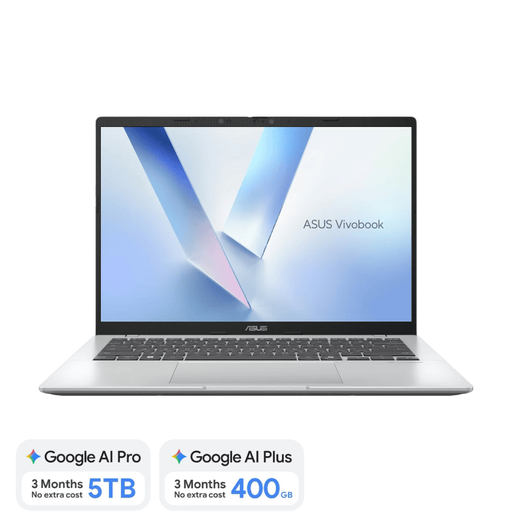
Why it suits this profile: A compact 14-inch laptop for studying, browsing, documents, streaming and video calls. At approximately 1.49kg, it is well suited to use on the go.
The product listing clearly states that it has a Dutch QWERTY keyboard, non-upgradeable 16GB RAM and no charger included.
16GB LPDDR5X, 512GB NVMe SSD, Wi-Fi 6E, two USB4 ports and Windows 11 Home.
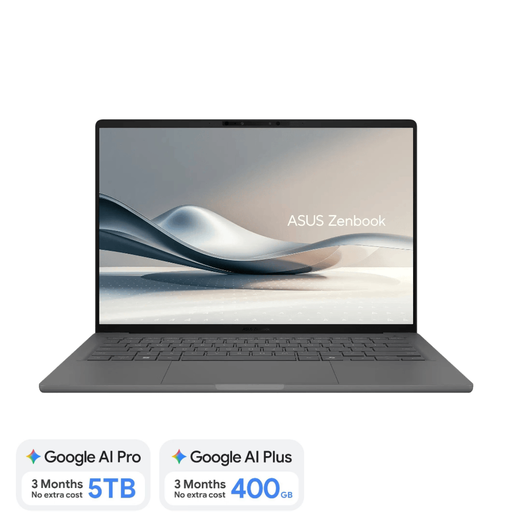
Why it suits this profile: For users looking for a lightweight laptop with a high-quality screen for work, study, travel and creative applications.
The specifications explicitly state that the 60Hz OLED screen is non-touch, the 16GB RAM cannot be upgraded and a separate 65W USB-C charger is required.
Approximately 0.98kg, 14-inch WUXGA OLED, 100% DCI-P3, 512GB SSD and a Dutch QWERTY keyboard.
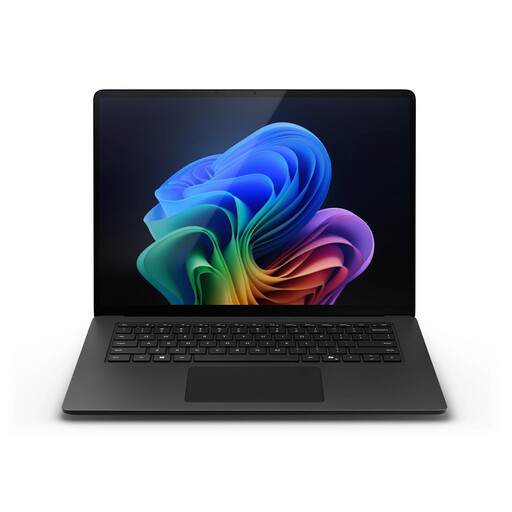
Why it suits this profile: A business or creative user who needs plenty of local file storage, room for multitasking and a large workspace.
This configuration goes beyond 8GB RAM and limited storage, but you should still check software compatibility with the Snapdragon platform before buying.
32GB LPDDR5X, 1TB SSD, 15-inch touchscreen, 120Hz dynamic refresh rate and Windows 11 Pro.
We have put together a complete, up-to-date list of products that fully meet these strict selection criteria and the applicable European safety regulations.
8GB may be enough for word processing, browsing the internet and video calls. For lots of browser tabs, spreadsheets, online meetings and multitasking, 16GB RAM is a more practical choice. Check whether the memory can be upgraded later.
Its useful life depends on software requirements, battery wear, maintenance and build quality. A model with 16GB RAM and an SSD will generally offer more room for future everyday applications than an entry-level model with 8GB. Also check the warranty and availability of updates.
Allow for a separate USB-C charger if one is not included, as well as accessories such as a sleeve, docking station, external monitor or storage. macOS and Windows may also involve different software and subscription costs.
