
Vandaag of morgen in huis

Kwaliteit gegarandeerd

Welkomstaanbiedingen ontgrendelen: GRATIS bezorging | Tot 80% korting | Gratis 30 dagen JoyPlus-proefperiode
Download de app
Buying a laptop seems straightforward until you start comparing specifications side by side. One laptop may have a larger screen, while another offers more RAM or an AI chip. Meanwhile, important details are sometimes less prominently displayed, such as a non-Dutch keyboard layout, non-upgradable RAM or the lack of a charger.
Use this practical checklist to compare laptops based on verifiable specifications. That way, you can find a suitable Windows 11 laptop, MacBook, ASUS laptop, HP laptop or Lenovo laptop for studying, working from home, entertainment or more demanding use.
More and more models are supplied without a mains adapter. This applies to several laptops in this selection, for example. You will then need a suitable USB-C Power Delivery charger with the correct power output. 45 watts is sufficient for some models, while other laptops require a 65-watt charger.
Before buying, check:
A laptop without a charger may appear attractively priced, but buying a separate charger increases the total cost.
A laptop with an AI chip, NPU or Copilot+ label does not automatically offer an advantage in every application. According to the relevant manufacturers’ product information, certain AI features depend on compatible software, Windows updates, an internet connection and, in some cases, a Microsoft account.
Also look at the amount of RAM. 8GB RAM is suitable for browsing, documents and basic video calls, but 16GB RAM gives you more room for running multiple programmes and browser windows. Bear in mind that the memory in many slim laptops is onboard and cannot be upgraded.
A 14-inch laptop is easy to carry around, but provides less workspace than a 15-inch laptop or 17-inch laptop. A large screen is useful for spreadsheets and multiple windows, but usually adds to the weight.
Look at more than just the screen size:
For studying, office work, video calls and streaming, a modern mid-range processor is usually sufficient. If you work with large spreadsheets, many tabs or light creative applications, it is better to look for a processor with more cores and threads.
An integrated graphics chip is suitable for everyday visual tasks and video. For demanding 3D work or intensive gaming, a laptop with a dedicated graphics card makes more sense. Also check software compatibility on ARM models with a Snapdragon processor. Windows supports many applications, but older programmes, drivers and specialist peripherals may work differently.
A laptop with 16GB RAM is a practical choice for multitasking, studying and working from home. If you mainly use email, word processing and the internet, 8GB should be sufficient. As memory is often not replaceable, your choice at the time of purchase is important.
A laptop with a 512GB SSD provides space for Windows, programmes, documents and photos. The actual available capacity is lower because of system and recovery files. Large video projects, extensive photo libraries or lots of locally stored games may require additional cloud or external storage.
Check the layout. A Dutch QWERTY layout differs from a Belgian AZERTY or US layout. Some models have a numeric keypad, which is useful for administration and spreadsheets but is mainly found on larger laptops.
Useful connections include:
A webcam cover or camera switch is a practical privacy feature. Its presence says nothing about image quality, so check the resolution and product information for that.
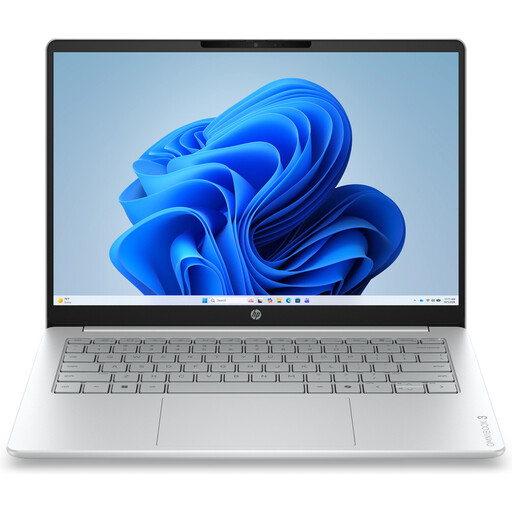
Why it suits this profile: This compact 14-inch laptop is designed for everyday tasks such as documents, browsing, email and online lessons. It weighs around 1.42 kg.
The product information clearly states that the charger must be purchased separately. The 8GB RAM and non-touch display are also shown in advance.
14-inch IPS screen with 1920 × 1200 pixels, 512GB NVMe SSD, webcam with privacy cover and Windows 11 Home.
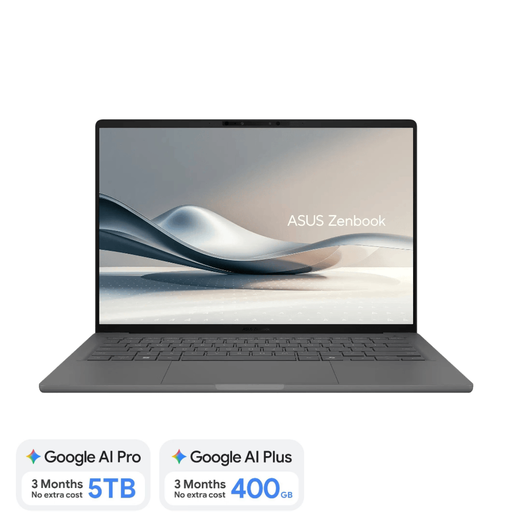
Why it suits this profile: For anyone looking for a lightweight model with 16GB RAM, an OLED screen and a professional look for working or travelling on the go.
The specifications state that it has 16GB of onboard memory, a Dutch QWERTY keyboard and no charger included. This means important purchase details can be checked in advance.
Approximately 0.98 kg, 14-inch WUXGA OLED, 512GB SSD and an NPU of up to 45 TOPS for supported Copilot+ features.
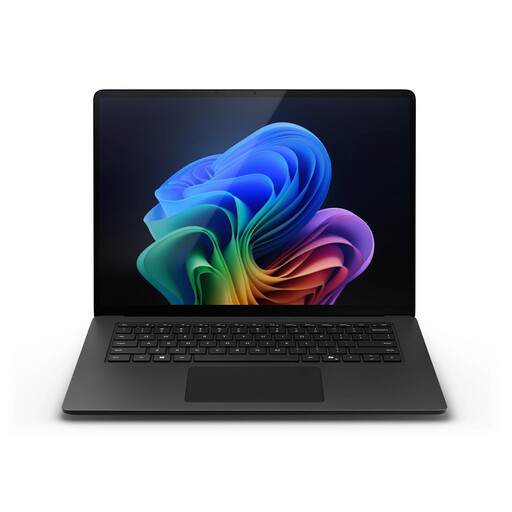
Why it suits this profile: The combination of 32GB RAM, 1TB storage and a touchscreen is aimed at business users and intensive multitasking.
The configuration makes it clear that this is not an entry-level model: it offers more generous memory and storage. However, check the compatibility of business software with Windows on Snapdragon beforehand.
15-inch PixelSense Flow touchscreen, 32GB LPDDR5X, 1TB SSD, Windows 11 Pro and support for Wi-Fi 7.
A 2-in-1 laptop with a 360-degree hinge is useful if you want to write in laptop mode and browse or present in tablet, tent or stand mode. The HP OmniBook 5 Flip 14-fp0250ndx has a 14-inch touchscreen, 8GB RAM and a 512GB SSD. The product information states that the stylus and USB-C charger are not included.
A traditional clamshell laptop is often simpler and lighter. If you do not use a touchscreen or tablet mode, you may be paying unnecessarily for features you rarely use. Also check whether a screen genuinely supports touch: the ASUS Vivobook 14 and ASUS Zenbook A14, for example, do not have touchscreens.
We have put together a complete, up-to-date list of products that fully meet these strict selection criteria and the applicable European safety regulations.
For word processing, browsing, email and basic online lessons, 8GB may be sufficient. If you use lots of browser tabs, make video calls and run programmes simultaneously, a laptop with 16GB RAM is a better choice. Check whether the memory can be upgraded later.
That depends on the required power output and the type of charger. In addition to the laptop price, allow for a suitable USB-C Power Delivery charger and possibly a cable. Do not use just any adapter: check the wattage and compatibility with the model.
Its lifespan depends on the battery, build quality, software requirements and whether the storage or memory can be upgraded. A model with 16GB RAM and a 512GB SSD generally offers more scope for future software than a basic configuration, but always check the current system requirements of your applications.
