
Vandaag of morgen in huis

Kwaliteit gegarandeerd

Welkomstaanbiedingen ontgrendelen: GRATIS bezorging | Tot 80% korting | Gratis 30 dagen JoyPlus-proefperiode
Download de app
Buying a new laptop can feel like navigating a maze of technical jargon and marketing promises. Brands throw specs and buzzwords at you, but what do you really need? As a Joybuy Product Recommendation Officer, I'm here to help you cut through the noise and focus on what matters. We'll look at the most common pitfalls so you can make a purchase you'll be happy with for years to come.
The laptop market is competitive, which can lead to misleading claims. Pay close attention to these three points to avoid overpaying for features you won't use.
AI laptop, but the term is vague. Often, it means little more than a dedicated key for Microsoft Copilot. A true AI laptop has an NPU (Neural Processing Unit), a separate chip that efficiently handles AI tasks without draining the battery. Without an NPU, you're paying extra for a marketing sticker.RTX 5060 laptop or higher is fantastic for a gaming laptop. But if you mainly study, watch shows, or edit documents, such a card is unnecessary and expensive. You're paying for performance you'll never use, which also comes at the cost of battery life.You don't need to be a tech expert to make the right choice. Focus on these three components, and you'll be well on your way.
The processor is the brain of your laptop. For most users—students, remote workers, and creatives—modern Intel Core and AMD Ryzen processors offer more than enough power. Don't just look at clock speed; also consider the number of cores. More cores are useful for multitasking.
Want a future-proof AI laptop? Then check if the model has an NPU (Neural Processing Unit). This chip accelerates AI applications, like background blur in video calls or smart features in photo editing software, and does so more power-efficiently than the main processor.
The graphics card (GPU) is crucial for gamers and video editors. For everyday use and a student laptop, the processor's integrated graphics chip is sufficient.
RTX 5060 laptop offers an excellent balance of price and performance for most modern games.MSI laptop and ASUS laptop are known for their powerful gaming models.You'll be looking at it constantly, so don't skimp here. A 16 inch laptop is currently a popular sweet spot: more screen real estate than a 14-inch model, but more portable than a 17-inch. Pay attention to the following specs:
Below are a few models that score well on the above criteria, matched to different user profiles.
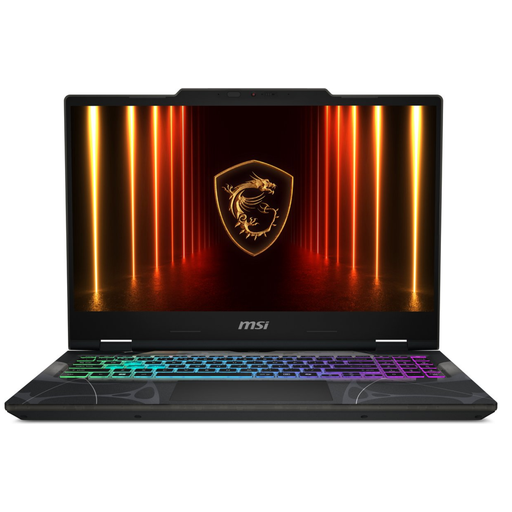
Why This Fits Their Persona: Ideal for students or first-time buyers looking for a capable laptop for studying, entertainment, and the occasional game. It perfectly balances price and performance.
This laptop features an RTX 5050 graphics card. It's an entry-level model powerful enough for light gaming and creative tasks, without the high cost of a top-tier card. You're not paying for unused power.
The 144Hz screen provides a smooth user experience, not just in games but also when scrolling through web pages. The combination of a modern Intel Core i5 and 16GB of DDR5 memory is more than enough for multitasking.
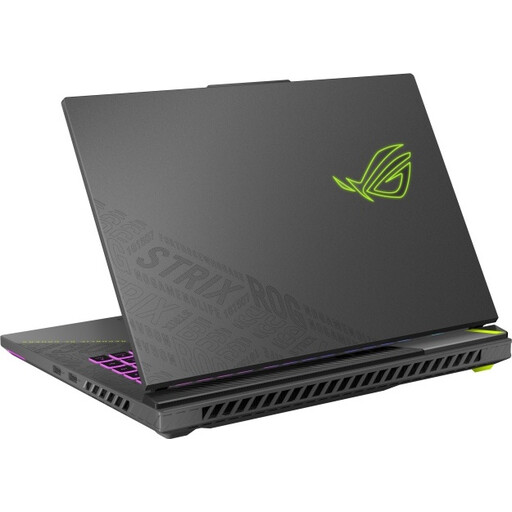
Why This Fits Their Persona: For those who refuse to compromise. This laptop is designed for maximum performance in the latest games and demanding creative software like video editing and 3D rendering.
Here, the powerful hardware is paired with an equally impressive screen. You're paying for a complete package where the components are balanced, avoiding the pitfall of a fast chip with a subpar display.
The combination of an AMD Ryzen 9 9955HX processor and an NVIDIA GeForce RTX 5070 Ti graphics card is extremely powerful. The WQXGA (2560x1600) screen with a 240Hz refresh rate delivers razor-sharp and ultra-smooth visuals.
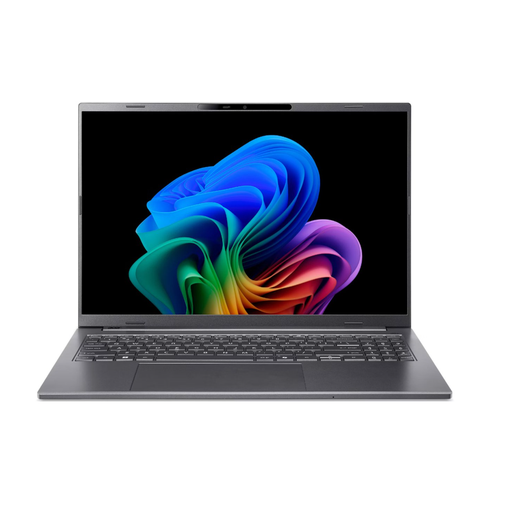
Why This Fits Their Persona: For the professional who is often on the go and wants to maximize productivity using smart technology. This laptop is lightweight, has a long battery life, and is built for the AI features of today and tomorrow.
This is a true AI laptop. The AMD Ryzen AI 300 series processor has a powerful, built-in NPU with 50 TOPS of computing power. This isn't a marketing gimmick, but hardware specifically designed for efficient AI performance.
Its slim and lightweight aluminum design makes it highly portable. The 16:10 screen offers more vertical space, which is ideal for productivity. The combination of an NPU and an efficient processor ensures long battery life.
We have compiled a complete, up-to-date list of products that fully meet these strict selection criteria.
For most users, 16 GB of RAM is the new standard. This allows you to comfortably run multiple programs and browser tabs simultaneously. Gamers, video editors, and other power users should opt for 32 GB to ensure smooth performance.
An NPU (Neural Processing Unit) is specialized hardware that performs AI tasks, such as real-time translations or image generation, much more efficiently than a standard processor (CPU). This means these tasks run faster and consume less power, resulting in longer battery life and a cooler-running laptop.
It depends on the model. Modern 16 inch laptop models often have very thin screen bezels, making their overall dimensions comparable to older 15-inch laptops. They offer a good balance between a comfortably large screen for productivity and a size that still fits in most backpacks. Pay attention to the weight: models under 2 kg (4.4 lbs) are generally considered comfortably portable.
