
Vandaag of morgen in huis

Kwaliteit gegarandeerd

Welkomstaanbiedingen ontgrendelen: GRATIS bezorging | Tot 80% korting | Gratis 30 dagen JoyPlus-proefperiode
Download de app
Buying a laptop seems straightforward until you start comparing specifications. Is 16GB RAM more important than a faster processor? Do you need a 512GB SSD? And is an English QWERTY keyboard suited to your everyday use?
Many disappointing purchases are not caused by a lack of features, but by unclear product information and unrealistic expectations. Use these checkpoints to compare a Lenovo laptop, Acer laptop, gaming laptop or portable laptop based on practical features.
A Ryzen 7 laptop sounds powerful, but the exact processor, number of cores and graphics chip determine how it performs in practice. An AMD Ryzen 7 8840HS with 8 cores and 16 threads is built differently from a Ryzen 7 model from another series. The same applies to an Intel Core laptop: always check the full model number, rather than just “Core 5” or “Core i7”.
For word processing, video calls and browsing the internet, mid-range processors are often sufficient. For video editing, programming with demanding development environments or gaming, a more powerful processor and dedicated graphics card are more relevant.
16GB RAM determines how many programmes and browser tabs you can use at the same time. A 512GB SSD mainly determines how much space you have for Windows, programmes, documents, photos and games. A large SSD does not automatically make a laptop faster at multitasking if it has very little RAM.
For a laptop for studying and work, 16GB RAM is a practical starting point. Gamers and creative users should also pay attention to the graphics card and whether the storage or memory can be upgraded later.
A laptop with a QWERTY keyboard can be useful for programming and international work, but check that the layout matches your preference. Some models have an English or US International layout and may include a numeric keypad.
Also check what is included in the box. Several models in this overview do not come with a charger as standard. This means a suitable adapter may need to be purchased separately. Only use an adapter that the manufacturer confirms is compatible with the laptop.
For everyday use, processors from the AMD Ryzen 5, Ryzen 7 and Intel Core series are common choices. Pay attention to:
A gaming laptop such as the MSI Cyborg 15 has an NVIDIA GeForce RTX 5060 with 8GB GDDR7 video memory. According to the product information, the Lenovo LOQ 15AHP11 uses an RTX 5070 with 8GB GDDR7. These are verifiable hardware specifications, but actual performance varies depending on the game, settings and software version.
A 14-inch laptop is easier to carry on the train, to lectures or to the office. A 15.3- or 15.6-inch screen provides more workspace. In addition to the diagonal measurement, look at:
A portable monitor can provide extra screen space while you are on the move, but check beforehand whether the laptop can connect via USB-C DisplayPort Alt Mode or HDMI. According to the product information, the TECLAST V16H has two USB-C ports and mini-HDMI.
A portable laptop weighing around 1.4 to 1.6 kilograms is practical for everyday travel. A gaming laptop often weighs more because of its dedicated GPU and cooling system. Also check for:
Pay particular attention to soldered memory. The Lenovo IdeaPad Slim 5 15ARP10 has 16GB LPDDR5X memory which, according to the product information, cannot be upgraded. This is important if you want to use the laptop for several years.
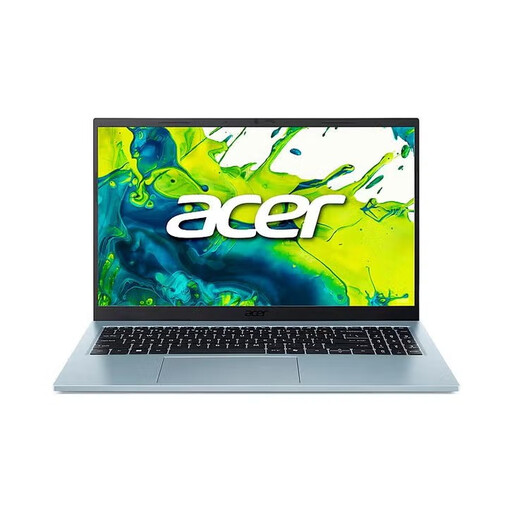
Why it suits this profile: This Acer laptop combines an Intel Core 5 120U, 16GB DDR4 memory and a 512GB SSD for studying, office work and everyday internet use.
The product information lists the screen resolution, RAM, storage and keyboard layout separately. Do check that the included 65W adapter is part of your retailer’s package.
15.6-inch IPS screen, numeric keypad, Wi-Fi 6 and 512GB PCIe NVMe SSD.
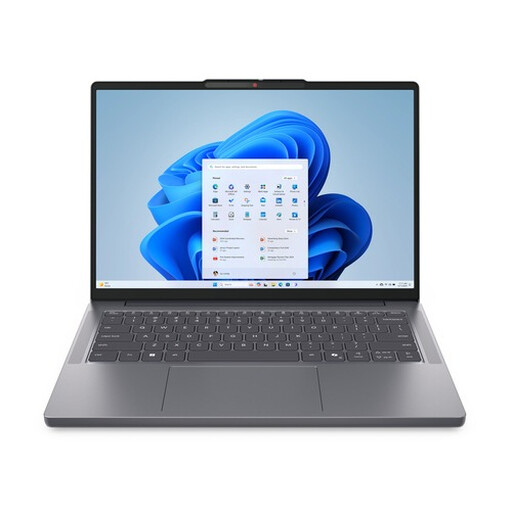
Why it suits this profile: The 14-inch format, starting weight of 1.39 kilograms and Ryzen 7 8840HS are ideal for users who want to combine performance and portability.
The combination of 16GB DDR5 and 512GB PCIe 4.0 NVMe makes the memory and storage capacity easy to verify, rather than relying solely on the Ryzen 7 name.
14-inch WUXGA IPS screen with a 16:10 aspect ratio, USB-C, HDMI, SD card reader and Windows 11 Home.
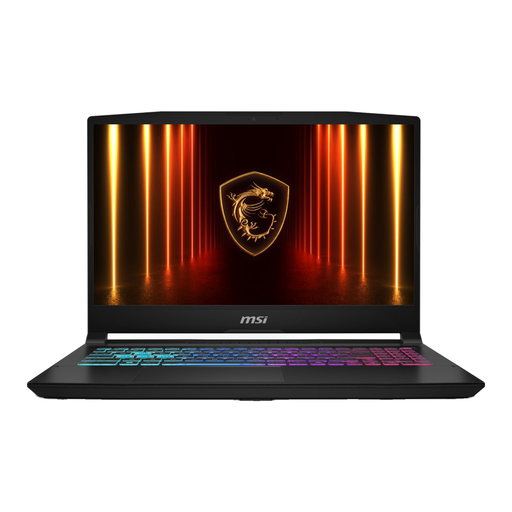
Why it suits this profile: This gaming laptop is designed for demanding games and graphics applications, thanks to its Intel Core i7-13620H and RTX 5060.
The dedicated graphics card is clearly listed alongside the processor, RAM and screen refresh rate. Bear in mind the weight of around 2.1 kilograms and check the charger.
RTX 5060 with 8GB GDDR7, 144Hz Full HD screen, 16GB DDR5 and Ethernet alongside Wi-Fi 6E.
A laptop backpack needs to fit more than just the screen size. Check the dimensions of the laptop compartment, the shoulder straps and the protection around the corners. The vintage canvas laptop backpack is designed for laptops up to 15.6 inches. Alternatively, the water-repellent roll-top laptop backpack is suitable for commuting, cycling and travelling.
If you work from home or often work with multiple windows, you could consider a TECLAST V16H portable monitor. Check your laptop’s connection options and use the monitor on a flat, stable surface with sufficient ventilation.
We have compiled a complete, up-to-date list of products that fully meet these strict selection criteria and the applicable European safety regulations.
For word processing, video calls, spreadsheets and multiple browser tabs, 16GB RAM is generally a practical amount. For intensive video editing, virtual machines or large 3D projects, more memory may be preferable. Check whether the memory can be upgraded; in some slim laptops, it is soldered to the motherboard.
Lifespan depends on battery wear, software, available storage and how you use the laptop. A model with a current processor, SSD and sufficient RAM will generally remain useful for everyday tasks for longer. Protect the laptop from moisture, blocked ventilation openings and heat. Have a damaged or swollen battery inspected by a qualified professional.
In addition to the purchase price, a charger, protective sleeve, laptop backpack, monitor and any storage upgrade may incur extra costs. A gaming laptop typically uses more electricity under heavy load than a lightweight office laptop. Before checking out, therefore, check which accessories are included and which connections you already have.
