First, choose a laptop that’s comfortable for typing longer pieces and runs the word processor you need. Then compare the screen, weight and battery use for your library visits. A Chromebook may suit a web-based workflow, but Microsoft confirms that the Windows and Mac desktop versions of Microsoft 365 can’t be installed on one. Check the exact configuration of each model and which adapter is included.
Who is this guide for?
If you type for long stretches
When you’re writing a book review, a comfortable keyboard and an easy-to-read screen matter. The Consumentenbond highlights memory and storage as things to consider for basic office software. You should also assess the keyboard and screen on the exact configuration you’re considering.
If you need specific software
If you use a particular word processor or other work software, check the operating system first and whether you need a desktop version. Microsoft and Google explain the options available for Chromebooks and web apps.
If you take your laptop with you regularly
If you travel between home and the library, weight, battery use and charging options may all be worth considering. Bibliotheek Nieuwegein lists power sockets for visitors with their own laptops, but check what’s available at the branch where you’ll be working.
What should you look for?
Windows laptop
A good fit if: you need a Windows programme for your review or want to work with text and sources in multiple windows.
Bear in mind: a processor or storage specification alone tells you nothing about the keyboard, screen or battery life.
Chromebook
A good fit if: you mainly write in a browser and Google Docs.
Bear in mind: Microsoft 365 works on a Chromebook via the web; the Windows and Mac desktop versions can’t be installed. Google says you can use certain Drive files offline if you set this up in advance.
MacBook
A good fit if: you want to use macOS and need a laptop you can take between home and the library.
Bear in mind: check that the software you need is available for macOS. Apple quotes battery life under test conditions for one configuration examined, and says that a power adapter isn’t included.
| What to consider |
What to look for |
Who is this important for? |
| Writing and reading comfort |
Try the keyboard and touchpad; compare the screen size, resolution and any anti-glare coating on the exact configuration. |
If I’m working on a review for a long time, I want to type comfortably and read the text clearly. Around 33% of consumers put writing and reading comfort first. |
| Software and files |
Check which programme and file format you need. If you’re considering a Chromebook and want to work without Wi-Fi, test in advance whether your documents will be available offline. |
If my workflow depends on a particular programme, I want to know in advance whether it works on the operating system I’ve chosen. Around 27% of consumers choose mainly based on software and access to files. |
| Portability and battery |
Compare the weight of the exact configuration, the conditions used for battery-life figures and the charging options at your library. |
If I often take my laptop with me and can’t always sit near a power socket, weight and battery use matter. For around 20% of consumers, getting between locations and working without a nearby power socket are top priorities. |
| Purchase and what’s included |
Compare memory, storage and keyboard layout, and check whether the adapter you need is included. The Consumentenbond cites 8 GB RAM and 256 GB storage as a benchmark for basic office software. |
If I’m mainly buying a laptop for writing, I want to know which configuration suits my work and what else I’ll need. Around 20% of consumers focus mainly on the total purchase and the items included. |
Common mistakes
-
Choosing a Chromebook without checking which version of Word you need
Microsoft says Microsoft 365 is used on a Chromebook via the web; the Windows and Mac desktop versions can’t be installed on one.
Check which version you need and try a relevant document in the web app you plan to use.
If a required desktop version won’t work, you may need a different device or a different workflow.
-
Assuming the maximum battery life means guaranteed writing time
Apple’s battery figures are based on specified test conditions; your usage, screen brightness and connection may differ.
Compare battery figures using the same conditions, and check where you can charge your laptop at the library.
-
Assuming a power adapter is always included
For the 13-inch MacBook Air configuration examined, Apple says that a power adapter isn’t included.
Check what comes in the box for the exact configuration and which charging standard it requires.
You may need a suitable adapter that isn’t included with the laptop.
-
Choosing a Chromebook based only on its purchase year
The end date for automatic updates varies by device. Google says that security and browser updates also stop after the final update.
Check the update schedule for the exact model before you decide.
Brands to consider
ASUS
The Vivobook 14 X1404 series is a Windows range worth exploring if you’re looking for a compact laptop for documents.
- ASUS lists a range of processors and configurations in the series.
- Features of one configuration don’t necessarily apply to every model. Check the full model number and screen specification.
Acer
The Chromebook Spin 514 CP514-1H-R5A4 is a ChromeOS option for anyone who can work with web-based documents.
- Acer specifies a 14-inch touchscreen and 8 GB of memory for this model.
- Acer describes the screen as glossy. Also check whether ChromeOS suits your software and how long this exact model will receive updates.
Apple
The 13-inch MacBook Air with M5 is a macOS configuration to consider if you want to use the Apple platform.
- For the base configuration examined, Apple specifies 16 GB of memory and 512 GB of storage.
- Apple quotes battery life under test conditions. For the silver configuration examined, Apple says that a power adapter isn’t included; check what’s in the box for the configuration you choose.
Lenovo
The IdeaPad Slim 3 14IRU8 is a Windows range with various 14-inch configurations to compare.
- Lenovo lists configurations with up to 16 GB of soldered memory and an IPS screen with a resolution of up to 1920 × 1080.
- Lenovo says that not all configurations are available in every region, so check the specifications using the full model number.
Joybuy products
This selection includes Windows laptops and a MacBook for writing and reviewing documents in the library.
 Image unavailable
ASUS Vivobook 15 X1504MA-BQ588W, 15.6-inch, Core 3 304, 8 GB RAM, 256 GB SSD, Quiet Blue, QWERTY
A Windows laptop for writing and working with documents; the listed specifications can help you compare the exact configuration.
Windows 11 Home, 8 GB RAM and 256 GB SSD. The 15.6-inch Full HD screen has an anti-glare coating, and the laptop has a full-size keyboard.
Joybuy
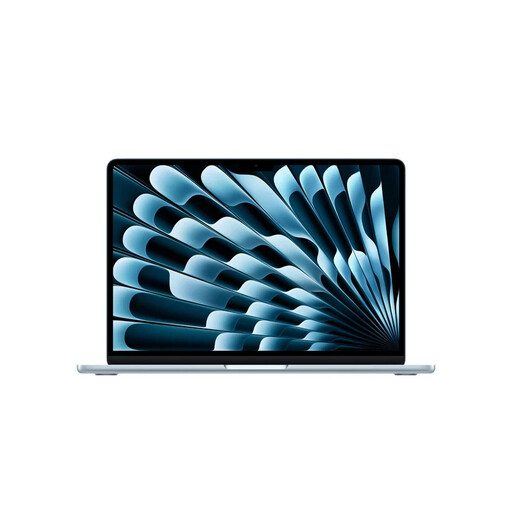 Image unavailable
Apple MacBook Air 13-inch M5, 16 GB, 512 GB, Sky Blue, QWERTY
A macOS option if the software you need works on that operating system and you want a lightweight laptop to take with you.
13-inch M5 chip, 16 GB of memory and 512 GB of storage. The listed weight is 1.23 kg.
Joybuy
 Image unavailable
Lenovo Yoga Slim 7 14Q8Y11 Copilot+ PC, Snapdragon X2P-42-100, QWERTY
A Windows laptop to consider if you want to use Windows for word processing and are looking for a relatively low listed weight.
Windows 11 Home (on ARM), 16 GB of memory and 512 GB SSD. The 14-inch WUXGA OLED screen has a backlit keyboard; the listed weight is 1.17 kg and a 65W USB-C adapter is included.
Joybuy
 Image unavailable
HP OmniBook 3 14-hy0058ndx, AMD Ryzen 5 7520U, 8 GB RAM, 512 GB SSD, Windows 11 Home
A Windows laptop for documents, if you want to compare a 14-inch screen with an anti-glare coating.
The IPS screen has an anti-glare coating and a resolution of 1920 × 1200. The configuration lists 8 GB RAM and 512 GB SSD; the weight is approximately 1.42 kg. No charger is included.
Joybuy
 Image unavailable
Lenovo IdeaPad Slim 5 15ARP10, Ryzen 5 7535HS, 16 GB, 512 GB SSD, Cloud Grey, QWERTY
A Windows laptop to compare if a larger screen and backlit keyboard suit your writing needs.
The 15.3-inch IPS anti-glare screen has a resolution of 1920 × 1200. The configuration lists 16 GB of memory and 512 GB SSD; the weight is approximately 1.50 kg. A USB-C power adapter isn’t included.
Joybuy
Frequently asked questions
Can I work on my review on a Chromebook without Wi-Fi?
Yes, you can work with certain Google Drive files, including Docs, if you set up offline access in advance. Changes will sync when the Chromebook reconnects; not every app works offline.
Can I install the desktop version of Microsoft Word on a Chromebook?
No. Microsoft says you use Microsoft 365 apps, including Word, on a Chromebook via the web; you can’t install the Windows or Mac desktop versions.
Does every library desk have Wi-Fi and a power socket?
Don’t assume so without checking. Bibliotheek Nieuwegein lists power sockets for visitors using their own laptops, but check what’s available and whether you can access a workspace at your local branch.
How can I check how long a Chromebook will receive updates?
Look up the automatic update end date for the exact model. Google says security and browser updates also stop after the final update; the purchase date isn’t the same as the update end date.


