Who is this buying guide for?

Cataloguer who needs large text

You want to read titles, printing details and form fields without making the form unusable. Screen space and how well magnification works in your own app are important considerations. Microsoft, Apple Support and Google Chromebook Help describe features for enlarging text or the screen.

Setting up a permanent cataloguing station

You enter information for extended periods and want to compare the laptop’s screen and keyboard with a possible setup using an external monitor and keyboard. Your workstation setup matters just as much as the laptop.

Cataloguer working in different locations

You want to record details alongside your books, then save or synchronise them later. Check your app, the connections you need and how you’ll back up your files. VeiligInternetten explains why it’s important to keep a recent backup.

What should you look for when choosing?

What to consider What should you check? Who is this important for?
Readable fields and a clear overview Try your preferred text size and screen zoom in a representative form. Check that labels, input fields and navigation remain usable. If I need enlarged text, I want to read the information without losing sight of the rest of the form. Around 36% of consumers give readable, usable fields their highest priority.
Software and data entry Check the system requirements for your catalogue app and try out its input fields and keyboard shortcuts. Also consider whether the built-in keyboard suits the way you work. When I’m entering records for long periods, I want my own software to work and the controls to remain comfortable to use. Around 29% of consumers put software and data entry first.
Keeping your files Decide how you’ll save and restore catalogue files and any photos. Check the connections if you use an external drive or camera. As my catalogue grows, I want to be able to save and restore files, even if the laptop stops working. Around 21% of consumers make keeping their files their top priority.
Working in different locations Try the screen where you’ll be cataloguing, and check whether the app and the information you need are available without an internet connection. When I’m working alongside the books themselves, I want to be able to use my laptop and catalogue there. Around 14% of consumers value working in multiple locations most.

Buying pitfalls

  • Assuming a large screen means an enlarged form will be easy to use

    The screen size alone doesn’t tell you how many catalogue fields will remain visible when you enlarge the text.

    Before choosing a model, try a representative form at your preferred magnification and check both the fields and the controls.

  • Assuming a Chromebook works like a desktop app

    Google Chromebook Help warns that some web apps don’t work fully without an internet connection. Screen magnification alone doesn’t tell you whether your catalogue software is suitable.

    Check the exact app and the features you need, and find out what happens when you work offline.

  • Keeping catalogue files only on the laptop

    A copy on the same device isn’t a separate backup. If the laptop is lost or stops working, you could lose your catalogue files too.

    As well as saving files on your laptop, plan a separate backup and check that you can restore files from it. VeiligInternetten offers advice on keeping backups.

  • Treating book photography as a standard laptop specification

    With fragile bindings, how you handle and support the book may matter more than the laptop’s speed.

    Assess the condition of the book and the equipment needed to photograph it separately from your choice of laptop. The Library of Congress describes points to consider when digitising library materials.

Brands to consider

Dell

Dell describes the Pro 16 Plus PB16250 as a business laptop with a 16-inch screen.

  • The stated screen size may be relevant if you’re looking for a larger built-in workspace.
  • Check the screen, ports and keyboard on the specific model, as these can vary by configuration. The product information isn’t an independent hands-on review.

HP

The HP ProBook 4 G1i 16 A23QQEA#ABH is a business laptop range with 16-inch models to compare for data entry.

  • HP lists a 16-inch (40,6 cm) screen for this product page.
  • Test separately how well your own catalogue app scales; the product description isn’t an independent assessment of the app.

Lenovo

The ThinkPad E16 Gen 3 (16-inch Intel) is another 16-inch business laptop range to compare for screen space and configuration.

  • Lenovo lists a 16-inch screen for this product range.
  • The range includes several configurations, so check the screen and ports on the specific one you’re considering.

Apple

The MacBook Air (15-inch, M5) is a macOS option if your catalogue workflow works on macOS.

  • Apple specifies a 15.3-inch display and two Thunderbolt 4 ports.
  • Check that your existing peripherals are compatible with the connections. The stated battery life is based on specific usage conditions, including wireless internet use, and isn’t a measure of cataloguing work.

Joybuy laptops for cataloguing

These Joybuy products are Windows laptops you can compare for screen size, magnification and data entry. Before deciding, test your catalogue app and preferred text size on the specific model.

MSI Stealth 16 AI+ B3WF-011NL laptop

MSI Stealth 16 AI+ B3WF-011NL

A Windows laptop to consider if your catalogue app runs on Windows; try your preferred magnification in a data-entry form.

16-inch QHD+ OLED screen; 16 GB DDR5; 1 TB SSD; Windows 11 Home; QWERTY keyboard.

View at Joybuy
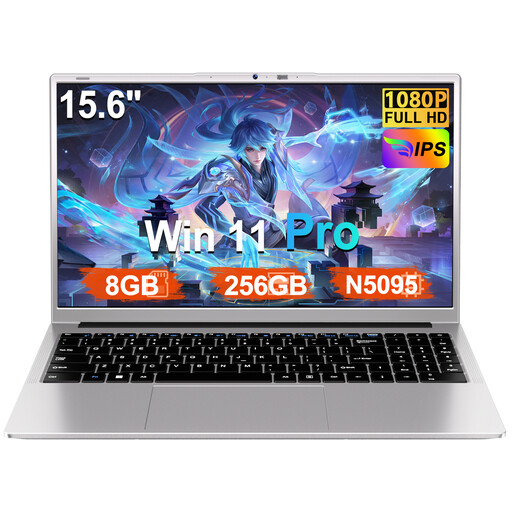
Ruzava 15.6-inch laptop with numeric keypad

Ruzava 15.6-inch laptop

This Windows model may suit a cataloguing workflow that works with Windows 11 Pro. Check the app and how easy the screen is to read at your preferred magnification.

15.6-inch FHD screen; 8 GB RAM; 256 GB SSD, expandable to 1 TB; numeric keypad.

View at Joybuy

HP OmniBook Ultra Next Gen AI 16-bk0004nd

HP OmniBook Ultra Next Gen AI 16-bk0004nd

A Windows model to compare if your catalogue app runs on Windows; try the form at the magnification you’d like to use.

16-inch 3K OLED touchscreen; Windows 11 Pro; QWERTY keyboard.

View at Joybuy

MSI Venture 16 AI A2HMG-068NL

MSI Venture 16 AI A2HMG-068NL

Compare this Windows laptop if your catalogue app works with Windows 11 Pro and you want to connect an external monitor; check that the connection is compatible with your monitor.

16-inch screen with a resolution of 1920 × 1200; Windows 11 Pro; HDMI and USB-C with DisplayPort, according to the product description.

View at Joybuy

Thunderobot Radiant S16 laptop

Thunderobot Radiant S16

The 16-inch screen is worth comparing if you’re looking for a spacious built-in workspace; also check that the operating system works with your catalogue app.

16-inch QHD+ screen; 16 GB DDR5; 1 TB SSD; USB-C, HDMI and Mini DisplayPort connections, according to the product description.

View at Joybuy

Frequently asked questions

Is a 16-inch screen big enough for highly enlarged catalogue text?

The screen diagonal alone won’t tell you. Try your preferred magnification in your own catalogue form and check how many fields remain visible and whether the controls are easy to read. Windows, macOS and ChromeOS offer magnification features, but that doesn’t establish how well your app will work.

How can I set up my workspace for long cataloguing sessions?

At your usual workstation, compare the laptop’s screen and keyboard with a setup that uses a separate monitor and keyboard. TNO’s Display Screen Work 2025 factsheet covers working posture and workstation setup; it isn’t a recommendation for a specific laptop model.

Can I scan fragile books with a standard scanner?

No. First assess the condition of the book and the risks involved in handling it. The Library of Congress explains that digitisation projects need to consider factors such as the condition of the material, how the object is supported and whether the equipment is suitable. This guidance isn’t a Dutch legal requirement to use a particular scanner.

How can I prevent my catalogue files from being lost?

Keep a recent, separate backup and check that you can restore files from it. VeiligInternetten suggests an external drive and cloud storage as possible places to keep a copy.

Will a Chromebook work offline for cataloguing?

That depends on the app you use and the features you need. Google Chromebook Help warns that some web apps don’t work fully without an internet connection, so check your catalogue app and test your offline workflow before relying on it.
