
Creator making frequent revisions
You often switch between edits and want to keep editable project files, earlier versions and original recordings well organised. Audacity Support distinguishes between saving a project and exporting audio.


Start with a laptop that runs your editing and transcription software, with enough memory and local SSD storage for your projects. When you make frequent revisions, a reliable workflow for editable project files and separate backups matters just as much. Then compare screen space, portability and connectivity. Descript supports Dutch and English, but according to the Descript Help Centre, it supports only one transcription language per file.
You often switch between edits and want to keep editable project files, earlier versions and original recordings well organised. Audacity Support distinguishes between saving a project and exporting audio.
You work with Dutch and English speech and want to check in advance how your transcription software handles language changes within a recording. The Descript Help Centre specifies one transcription language per file.
You take your laptop with you and may connect an audio interface, storage device or monitor. That means both the size and the number and type of ports matter.
Start with your software and the size of your projects. Then consider storage and revisions, before comparing screen size, portability and the connections you need in your different workspaces.
| What to consider | What should you look for? | Who should pay particular attention? |
|---|---|---|
| Project versions and storage | Check the SSD capacity, available space and how your editor saves projects and earlier versions. | If I often need to undo changes, I want access to editable projects and earlier versions. Around 31% of consumers prioritise project versions and reliable storage. |
| Editing while multitasking | Compare your software’s system requirements with the memory and available SSD space of the exact configuration. | If I use my editor, source files and other applications at the same time, I check the requirements for that combination. Around 25% of consumers prioritise editing while multitasking and project size. |
| Language processing | Test a representative clip and check whether the software processes language by file or by segment. | If my recordings switch between Dutch and English, I want to know how my chosen software handles this. Around 25% of consumers make bilingual transcription their top priority. |
| Size and connectivity | Compare the ports on the exact configuration with your interface, microphone and storage devices; also check which adapter is included. | If I work in different locations, I want to connect my equipment without having to carry too much. Around 19% of consumers prioritise portability and connectivity. |
Exporting an audio file is not the same as saving an editable project. If you want to undo changes later, you’ll need the project files and a suitable storage or backup process.
Before you buy, check how your editor saves projects and earlier versions. Audacity Support recommends storing active projects locally and organising backups separately.
A revision could take extra editing time if you can’t find the editable project.
Descript supports Dutch and English, but according to the Descript Help Centre, only one spoken language per file. A more powerful laptop won’t change this software limitation.
Test a bilingual clip using your intended workflow before choosing a laptop to suit it.
Language changes may mean extra work splitting and correcting the recording.
The Dutch Apple MacBook Air M5 and ASUS Zenbook configurations reviewed are sold without a mains adapter. The MacBook Air M5 has two Thunderbolt 4 ports, so you may need a hub to connect more devices at once.
Check what’s included in the box and compare the ports with your existing audio equipment.
Depending on your equipment, you may need a suitable power adapter or hub.
The MacBook Air M5 is a compact macOS range to consider if your software is compatible with macOS. For the configuration described, Apple Netherlands lists a 13.6-inch screen, 16 GB of base memory, 512 GB of base storage and two Thunderbolt 4 ports.
The Zenbook 14 OLED UX3405 is a compact Windows range. The Dutch configuration reviewed has 32 GB of memory and a 1 TB SSD.
The ThinkPad T14 Gen 6 (Intel) is a 14-inch business Windows range worth comparing if connectivity or memory configuration is important to you.
The HP ProBook 4 G1i is part of a business Windows range. The Dutch 16-inch configuration reviewed lists 16 GB of RAM and a 512 GB SSD.
The Dell 14 Plus DB14250 is a configurable 14-inch Windows laptop worth comparing if you want to tailor the configuration to your workflow.
These laptop options suit podcast projects and offer a range of screen sizes and configurations to compare for working at home or on the go.
 No image available
The 1 TB SSD is a storage option to consider if you want to keep project files on your laptop.
Intel Core i3-1000NG4 processor; 16-inch screen with 1920 × 1200 resolution; 16 GB DDR4 RAM; 1 TB PCIe SSD.
The description lists USB-C and mini-HDMI ports.
 No image available
This configuration has a 15.6-inch screen, giving you a screen size and form factor to consider.
The product name lists a 3050E processor, 16 GB DDR4 RAM and a 512 GB SSD.
The description mentions an FHD IPS screen and a 3.5 mm audio jack.
 No image available
The 14-inch size makes this configuration worth comparing if you’re looking for a smaller screen for working on the go.
The product name lists an Intel Core 7 150U with 10 cores, 16 GB DDR4 RAM and a 512 GB SSD.
The description lists a weight of 1,40 kg and USB-C, USB-A and HDMI ports. The RAM is listed as upgradeable.
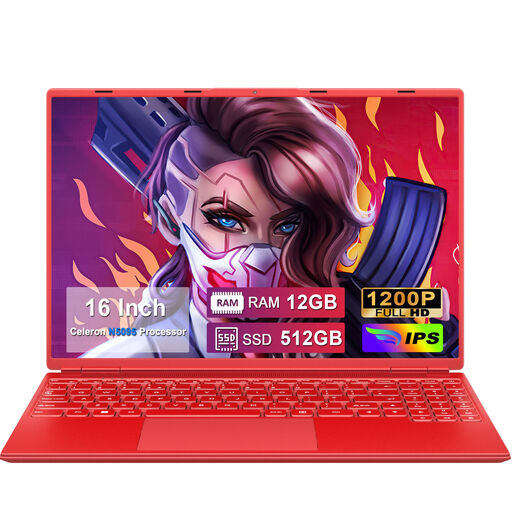 No image available
The 16-inch screen is worth considering if built-in screen space is important for your editing timeline and notes.
Celeron N5095 quad-core processor; 12 GB RAM; 512 GB SSD; 1920 × 1200 screen resolution.
The title lists a numeric keypad and support for storage expansion.
 No image available
This configuration is a compact macOS option worth comparing if macOS is compatible with your software and you want to keep your projects locally.
M5 chip; 24 GB memory; 1 TB SSD; 13.6-inch screen; weight of 1.23 kg.
The description lists two Thunderbolt 4 ports.
No. According to the Descript Help Centre, Descript supports one spoken language per file. Beforehand, consider how you want to split or correct a recording that switches between languages.
Audacity Support advises against storing active projects on external drives, USB sticks or network storage, as editing requires fast, uninterrupted access. Store the active project locally and organise backups or version control separately.
No. Audacity Support distinguishes between saving a project and exporting audio. Save the project if you want to continue editing later or be able to restore earlier changes.
For a standard online purchase, you usually have a statutory 14-day cooling-off period from delivery, according to ACM ConsuWijzer. Check for exceptions, for example if you order a made-to-measure or personalised product.
No. According to ACM ConsuWijzer, there is no fixed period for the statutory warranty in the Netherlands: a product must meet what you can reasonably expect under normal use. If a product is faulty, the seller is responsible for providing an appropriate remedy at no cost; the circumstances matter.