
Vandaag of morgen in huis

Kwaliteit gegarandeerd

Welkomstaanbiedingen ontgrendelen: GRATIS bezorging | Tot 80% korting | Gratis 30 dagen JoyPlus-proefperiode
Download de app
A laptop bag seems like a straightforward purchase, until your laptop does not fit properly, the zip rubs against the casing or you run out of space while travelling. Students, commuters and business travellers also have different requirements. A laptop sleeve is compact, while a laptop backpack offers greater carrying comfort and storage space.
So do not focus only on colour or a term such as “business”. Above all, check the dimensions, protection and layout. This helps you avoid paying for features you will not use or buying a bag that proves impractical after just a few months.
A 15.6-inch laptop will not automatically fit every 15.6-inch laptop bag. Manufacturers sometimes use different dimensions for the laptop compartment. The thickness of your laptop, a protective sleeve or a protruding battery can also make a difference.
Therefore, check the internal dimensions of the laptop compartment whenever they are available. For a 14-inch model, a 14-inch laptop sleeve is usually a sensible choice, but even then, the physical dimensions are more important than the number of inches alone.
A water-resistant laptop bag can help keep out light rain or splashes, but this does not mean that its contents will stay dry for an extended period during a heavy shower. Product descriptions use terms such as “water-resistant”, “water repellent” or “splash-proof”.
According to the product description, the HP Everyday 14-inch Laptop Bag is water-resistant and made from 600D polyester. The Case Logic Reflect REFMB114 is described as having a splash-resistant design. Treat these features as additional protection, rather than a reason to deliberately expose the bag to heavy rain.
A laptop bag with compartments is useful for a charger, mouse, documents and keys. However, numerous zips and compartments can make the bag heavier and less organised. A full bag can also put pressure on the laptop.
Choose a layout that suits the items you carry every day. For a short journey to lectures, a laptop sleeve may be enough. For commuting or business travel, a laptop backpack or business laptop bag with a padded compartment and separate space for accessories is more practical.
Use these terms as a starting point:
A sleeve that is too large allows the laptop to move around. A bag that is too small can put strain on the zip, corners or casing. Always place the laptop in the designated compartment and close the zip fully.
A soft polyester or neoprene sleeve generally protects against scratches and minor knocks. This is different from a hard protective case or a bag with extra-reinforced walls. So look at the description of the level of protection, rather than relying only on words such as “protective”.
A padded compartment is useful for everyday transport on a train, in a cycle pannier or in a backpack. However, avoid placing heavy objects on top of the laptop. A laptop sleeve also cannot protect against every type of impact or pressure damage.
These features are useful for everyday use:
Also check the weight of the bag. A lightweight laptop sleeve is easy to carry, while a business bag with numerous compartments may offer more options but also add extra weight.
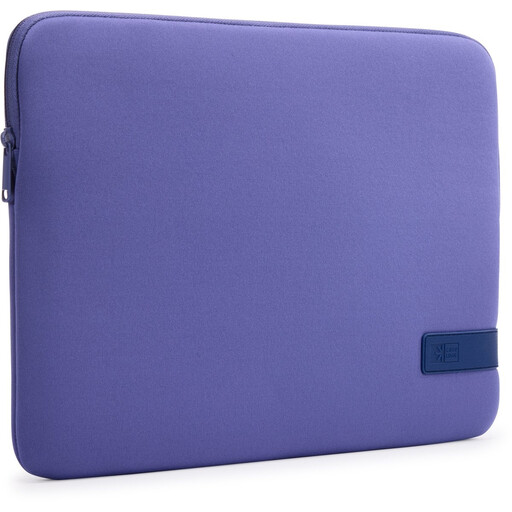
Why it suits this profile: This compact sleeve is suitable for students or anyone who carries their laptop in an existing backpack or work bag. It closes with a zip and has a lightweight design.
The stated maximum screen size is 15.6 inches, and the product information mentions protection against scratches and minor knocks. However, check your laptop’s dimensions before buying.
Polyester construction, zip closure, lightweight design and suitable for carrying on its own or inside another bag.
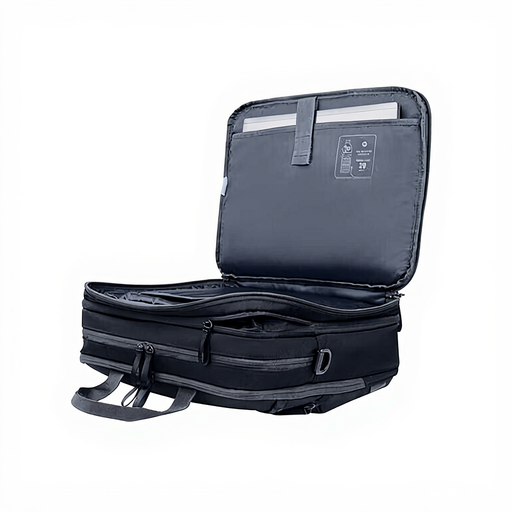
Why it suits this profile: This business laptop bag is designed for commuters and travellers who want to carry documents, accessories and clothing in one bag.
The bag has three compartments, various pockets and a padded laptop compartment. Its stated capacity is expandable from 15 to 20 litres.
180-degree opening, water-resistant 750D recycled polyester, RFID-protected compartment and adjustable shoulder strap.
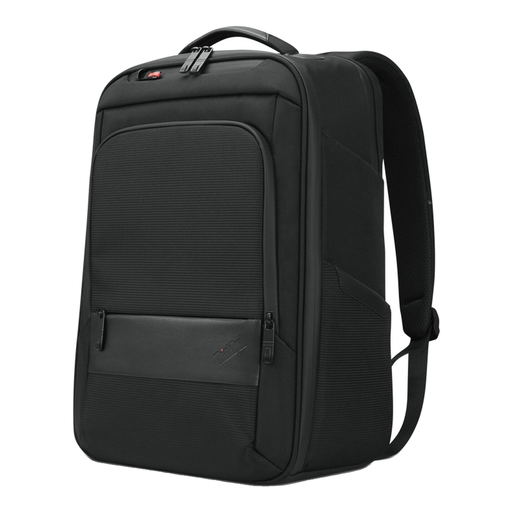
Why it suits this profile: This backpack is ideal for daily commuting, studying and travelling when you need to carry a laptop, documents and accessories together.
The model has a laptop compartment, zipped pockets and a handle. The stated maximum screen size is 16 inches; check the fit if you have a thicker model.
Dimensions of 30 × 43.5 × 18.5 cm, a laptop compartment, zipped pockets and, according to the product information, 70% recycled material.
We have put together a complete, up-to-date list of products that fully meet these strict selection criteria and the applicable European safety regulations.
No. The screen size is only an indication. Check the internal dimensions of the laptop compartment and compare them with the width, depth and thickness of your laptop. Allow for any protective sleeves or protruding components.
A laptop sleeve may be sufficient if you carry your laptop inside another bag and mainly want protection against scratches and minor knocks. A laptop bag or laptop backpack is more practical if you also need to carry a charger, documents and other items. When cycling or travelling, a bag with a padded compartment and sturdy carrying structure is more convenient.
Remove dust with a soft brush or cloth and always follow the washing or care label. Many models can be cleaned with a slightly damp cloth, but are not suitable for machine washing. Allow a water-resistant laptop bag to air-dry and avoid harsh cleaning products.
