
Vandaag of morgen in huis

Kwaliteit gegarandeerd

Welkomstaanbiedingen ontgrendelen: GRATIS bezorging | Tot 80% korting | Gratis 30 dagen JoyPlus-proefperiode
Download de app
A laptop bag needs to do more than look smart. Anyone travelling to the office, lectures or a flexible workspace every day mainly needs a good fit, practical compartments and comfortable carrying options. However, there are several common pitfalls that can make a bag less useful than expected.
A common mistake is to look only at the screen size. A 14-inch laptop can have different dimensions depending on the brand. Terms such as “protection” and “water-repellent” are not always used in the same way either. According to Case Logic’s own product information, for example, a particular sleeve offers light protection against knocks and has a splash-resistant design. That does not mean the bag is suitable for heavy rain or falls from a height.
An attractively compact laptop bag may also offer too little space for a charger, mouse, documents or lunch. So check not only the laptop compartment, but also the layout and carrying options.
A 14-inch laptop bag is designed for a laptop with a certain screen size, but the device’s external dimensions are what ultimately matter. So measure the width, depth and thickness of your laptop. A laptop case that is too loose will shift around during transport, while a sleeve that is too tight may put strain on the zip or corners.
Also pay attention to the difference between a 15.6-inch laptop bag and a model for 16-inch laptops. These sizes are not automatically interchangeable.
A padded compartment, EVA foam or soft inner lining can help protect against light scratches and knocks. However, the level of protection depends on the construction and how the bag is used. A laptop sleeve is mainly suitable when you carry the laptop inside a larger bag. For everyday transport on its own, a briefcase or laptop backpack is often more practical.
Also, do not use a splash-resistant bag as a rain cover. Close all zips fully and avoid prolonged exposure to water.
A black laptop bag or business laptop bag can easily complement workwear, but style says little about comfort. Look for:
A laptop briefcase is useful for short distances and formal working environments. A laptop backpack distributes the weight across both shoulders and may be more comfortable for cyclists and commuters.
First, check the dimensions of the laptop compartment. A manufacturer may describe a bag as suitable for a 14-inch laptop, while your model may not fit because of its wider casing. For example, the Case Logic Era ERACV-116 lists a notebook compartment measuring 385 × 265 × 31 mm. Measurements like these are more useful than the inch size alone.
For a 13-inch laptop or MacBook, a compact laptop sleeve is often sufficient. If you carry accessories and documents, it is better to choose a bag with additional compartments.
Many models are made from polyester or nylon. Polyester is lightweight and easy to clean with a damp cloth. Nylon is often used for a flexible, professional finish. Always check the care instructions and do not use harsh cleaning products, as they may damage the fabric or coating.
Some products combine leather and polyester. If this is the case, check the material specification if you want to avoid animal-based materials or are specifically looking for a particular finish.
A sleeve generally protects only the laptop. A laptop bag with a shoulder strap provides extra space for accessories. A backpack can also hold a tablet, documents, water bottle and personal belongings.
Make a quick list beforehand:
This makes choosing between a laptop case, briefcase and backpack much easier.
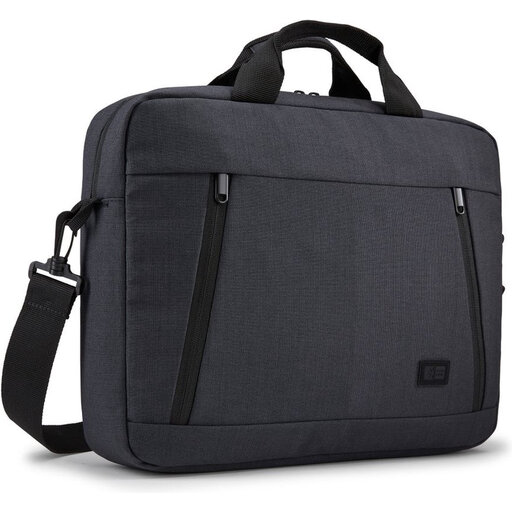
Why it suits this profile: This compact 14-inch laptop bag is suitable for anyone looking for a simple bag for work, study or short journeys. The handle and removable shoulder strap provide two carrying options.
The two front pockets and integrated compartments reduce the chance of your charger and small accessories moving loose around the main compartment. However, check your laptop’s dimensions beforehand.
Polyester, size suitable for up to 14 inches, two front pockets and a weight of 430 grams.
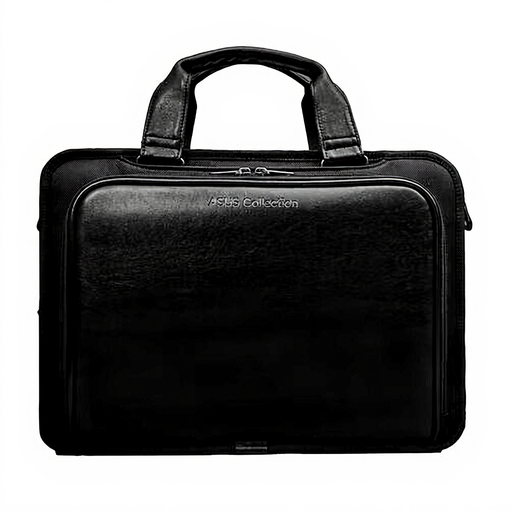
Why it suits this profile: This black business laptop bag is aimed at professionals who want to use a smart briefcase with a separate laptop compartment and front pocket.
The product description lists a dedicated laptop compartment and a front pocket. This makes the layout clearer than that of a single open main compartment.
Combination of leather and polyester, laptop compartment for 15.6 inches, handle and black finish.
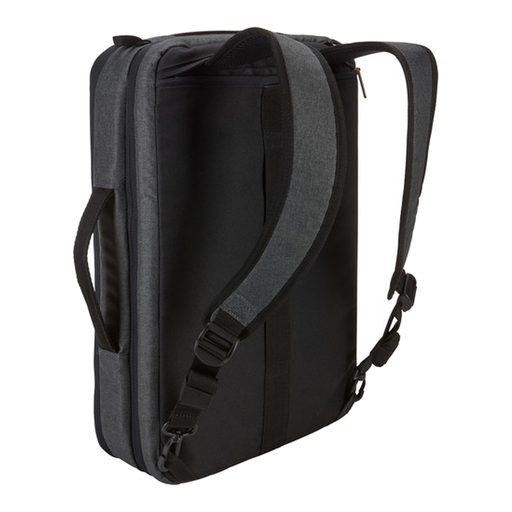
Why it suits this profile: This hybrid bag is suitable for commuters who want to switch between using a laptop briefcase and a laptop backpack. It has room for a 15.6-inch laptop, tablet and documents.
The bag combines several carrying styles and has separate compartments. This means you do not have to use one large, disorganised space for your laptop, tablet and accessories.
Storage space for a 10.5-inch tablet, adjustable padded shoulder strap and stowable backpack straps.
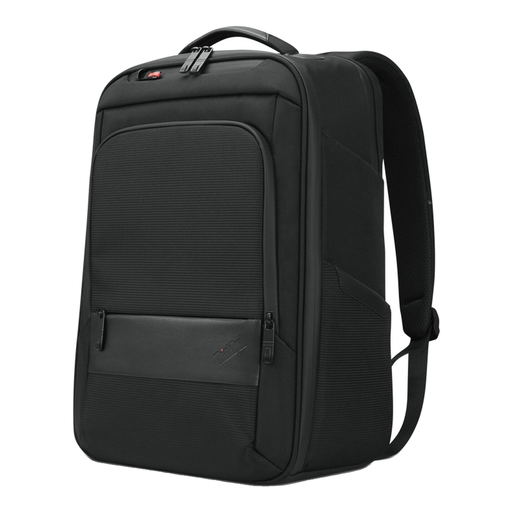
Why it suits this profile: This black laptop backpack is designed for laptops up to 16 inches and offers space for documents and accessories. That makes it suitable for daily commuting and longer days of travel.
The separate notebook compartment keeps the laptop away from other belongings. The zip fastening and handle are practical details for everyday use.
Suitable for up to 16 inches, notebook compartment, accessory storage, handle and stated use of 70% recycled material.
We have put together a complete, up-to-date list of products that fully meet these strict selection criteria and the applicable European safety regulations.
A laptop sleeve or laptop case is practical if you want to carry your laptop inside an existing backpack or work bag. It remains compact and lightweight, but usually offers no room for accessories. For a 13-inch MacBook or 14-inch laptop, this can be a sensible choice.
A laptop briefcase is suitable for the office, client visits and short trips. Choose a model with a shoulder strap if you do not want to carry it by hand all the time. If you cycle every day or travel by public transport, a laptop backpack with padded shoulder straps is often a better option.
If you carry a 15.6-inch laptop, tablet and documents, look for a bag with multiple compartments. Also check the overall size: more storage space often means a larger bag.
No. The screen size is a guideline. Check the dimensions of the laptop compartment and compare them with the width, depth and thickness of your laptop. Also allow room for the zip and any protective padding.
Its lifespan depends on the material, how heavily it is loaded and how well it is maintained. A bag will generally remain usable for longer if you do not exceed its maximum capacity, store sharp objects separately and remove stains with a damp cloth. A warranty period is not a promise of a fixed lifespan; it sets out your statutory rights and any additional manufacturer’s terms.
The price depends on factors including size, material, brand, lining and carrying options. A simple sleeve is usually cheaper than a leather briefcase or a spacious hybrid backpack. So first compare the specifications you actually need, rather than judging solely by appearance or a marketing claim.
