
Vandaag of morgen in huis

Kwaliteit gegarandeerd

Welkomstaanbiedingen ontgrendelen: GRATIS bezorging | Tot 80% korting | Gratis 30 dagen JoyPlus-proefperiode
Download de app
A laptop bag needs to do more than look smart. Students often want room for books and accessories, commuters look for carrying comfort and protection against a full bike pannier, while business travellers value a professional appearance and a trolley strap. The right choice therefore depends on your laptop size, how you use the bag and how much you carry.
The product descriptions and specifications below form the basis of this selection. Always check your laptop’s exact dimensions before buying. A screen size of 15.6 inches does not always indicate the device’s total width and thickness.
A 15.6-inch laptop bag or 16-inch laptop backpack can still be too tight if your laptop has a wide bezel, sturdy casing or an extra-thick underside. Measure the laptop itself and compare these measurements with the laptop compartment. A sleeve that is too roomy offers less protection against movement; one that is too tight puts strain on zips and seams.
Terms such as “water resistant”, “splash-proof” and “water-repellent” do not automatically guarantee protection during prolonged rain. According to the product description, the Case Logic Reflect REFMB114 is splash-resistant, and the instructions advise against using the sleeve in heavy rain. A water-resistant finish is also listed for the HP Prelude Pro. On a long cycle ride in poor weather, consider using a separate rain cover and never leave your laptop in a wet bag for an extended period.
A laptop bag with compartments is useful for a charger, mouse, documents and phone. However, the protective laptop compartment is more important than the number of zips. Sharp accessories, a full water bottle or heavy books can put pressure on the laptop. Look for a padded compartment, a fastening that closes fully and enough space to keep accessories separate.
First choose between a laptop case, laptop sleeve, shoulder bag or backpack. A sleeve is compact and fits easily inside a larger bag. For a MacBook Pro or another laptop around 14 inches, the Case Logic Reflect REFMB114 may be a lightweight solution. According to the specifications, the sleeve weighs 213 grams and has a zip. Make sure your laptop’s dimensions match the stated size.
Larger devices are available in models for 14 inches, 15.6 inches and 17 inches. A 17-inch laptop bag is often roomier and heavier. This can be useful for documents and accessories, but less suitable if you walk or cycle a lot every day.
Polyester, nylon and neoprene are commonly used in laptop bags. The material alone does not determine how much protection your laptop receives. Pay particular attention to:
According to the product details, the Kensington SP25 uses 1680-denier nylon and has a reinforced laptop compartment. The HP Everyday 14-Inch Laptop Bag is made from 600D polyester and is listed as having water-resistant properties in the specifications.
For commuting, a backpack is usually practical because the weight is distributed across both shoulders. A business laptop bag with a handle and detachable shoulder strap is better suited to formal meetings. If you travel by train or plane, look for a trolley strap, an easily accessible compartment and zips that are not constantly under tension.
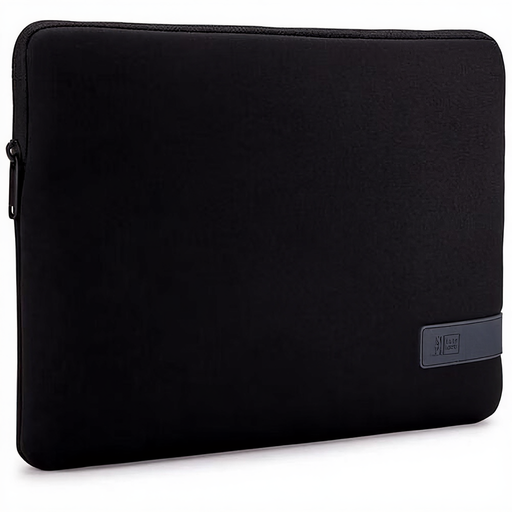
Why it suits this profile: A lightweight sleeve is ideal for students or users who mainly carry their laptop in an existing backpack.
The zip closes the sleeve fully, and the product description mentions light protection against knocks. Do not use it instead of a rain cover in heavy rain.
Polyester, 213 grams, zip fastening and suitable for 14-inch laptops according to the product specifications.
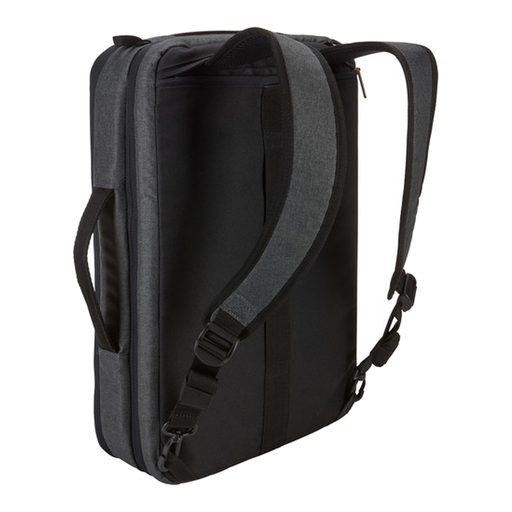
Why it suits this profile: This hybrid bag is ideal for professionals who switch between carrying it as a briefcase and using it as a backpack.
The laptop compartment is padded, and there is a separate compartment for a tablet. This helps keep your laptop and accessories organised during transport.
Suitable for up to 15.6 inches, with room for a 10.5-inch tablet, a document compartment and two carrying options. The laptop compartment measures 385 x 265 x 31 mm.
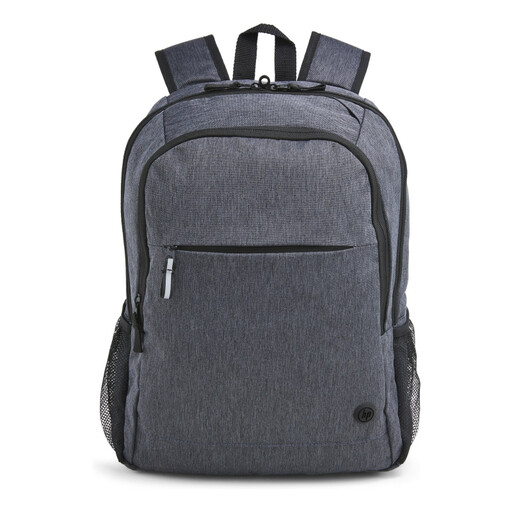
Why it suits this profile: A practical laptop bag for work and travel, with room for everyday accessories and useful features for life on the go.
The bag has a padded 15.6-inch laptop compartment, several zipped compartments and a trolley strap. The product details mention a water-resistant layer; this does not guarantee protection if the bag is submerged.
Weighing 480 grams, it has adjustable padded shoulder straps, lockable zips and, according to the product description, an outer material made from 95% recycled content.
We have put together a complete, up-to-date list of products that fully meet these strict selection criteria and the applicable European safety regulations.
Use this quick checklist:
Do not look only at the screen size. Measure the laptop and compare the measurements with the laptop compartment. A bag for laptops up to 15.6 inches is not automatically suitable for every model with that screen size.
A laptop sleeve mainly protects against scratches and light knocks. For cycling, travelling on public transport or carrying several accessories, a sturdy laptop backpack or padded laptop bag is often more practical. A sleeve can also be used as an extra protective layer inside a larger bag.
Follow the care label and the product instructions. For many models, wiping the bag with a slightly damp cloth and mild soap is sufficient. Do not use harsh cleaning products, and allow the bag to dry completely before putting your laptop back inside.
