
Vandaag of morgen in huis

Kwaliteit gegarandeerd

Welkomstaanbiedingen ontgrendelen: GRATIS bezorging | Tot 80% korting | Gratis 30 dagen JoyPlus-proefperiode
Download de app
Carrying a laptop in an ordinary backpack may seem like a budget-friendly solution, but it can quickly become impractical. Your laptop may slide around among books, the charger can get damaged and an unexpected rain shower can cause serious problems. However, not every laptop bag is automatically a good choice. Specifications such as “water-resistant”, “shock-resistant” and “suitable for 15.6-inch laptops” only become meaningful when you know what they actually imply in everyday use.
As a Joybuy Product Recommendation Officer, I filter product information based on verifiable details. This helps you identify which laptop bag best suits your laptop, daily commute and collection of accessories.
A 14-inch laptop will not necessarily fit every 14-inch laptop sleeve. Screen size is measured diagonally, while the laptop’s external dimensions can vary from one model to another. Always check the internal dimensions of the laptop compartment as well.
This is particularly important when choosing a 15.6-inch laptop sleeve. Some models have a slim chassis and will fit comfortably, while a thicker gaming laptop with the same screen size may be too large.
A waterproof laptop bag sounds appealing for cycling and commuting. However, product descriptions often use terms such as “water-resistant”, “splashproof” or “water-repellent”. These generally indicate protection against light rain or splashes, not prolonged exposure or submersion.
According to the product description for the Case Logic Reflect REFMB114, the design is splash-resistant, but use in heavy rain is not recommended. Always check the precise wording and consider using an additional rain cover in poor weather.
A soft laptop sleeve can help protect against scratches and minor knocks. That is different from protection against falling from a table or pressure from heavy items. A padded laptop bag with a separate compartment generally offers more structure than a thin laptop sleeve, but careful packing is still essential.
Pay attention to the closure as well. A zip generally keeps the laptop more securely in place during transport than an open compartment. A magnetic flap provides quick access, but make sure the laptop fits snugly inside.
Measure your laptop’s width, depth and thickness. Compare these measurements with the bag or sleeve’s internal dimensions. Pay attention to wording such as “up to 14 inches” or “up to 15.6 inches”; this is an indication, not a guarantee that every laptop model will fit.
The external dimensions listed for the VoxorAI 14-inch models are 35 × 25.3 × 0.5 cm. This makes them suitable for a slim laptop, but a thicker model with a large battery may feel cramped. The HP Travel Plus has a laptop compartment measuring 33 × 23 × 3.5 cm, making its fit more clearly defined.
Consider the construction:
A polyester exterior is lightweight and easy to clean with a damp cloth. Nylon can also offer strong abrasion resistance, depending on the construction. PU faux leather creates a different look and feel, but always check the care instructions.
For everyday use, a padded shoulder strap, sturdy handles and a trolley strap are practical features. A laptop shoulder bag without sufficient padding can become uncomfortable on longer walks. Also check how much room remains for a charger, mouse, headset and documents.
A separate accessory compartment prevents cables from pressing against the laptop. Overfilling a bag places unnecessary strain on zips and seams. An anti-theft pocket is not a guarantee against loss either; it simply keeps valuables less visible and easier for the wearer to access.
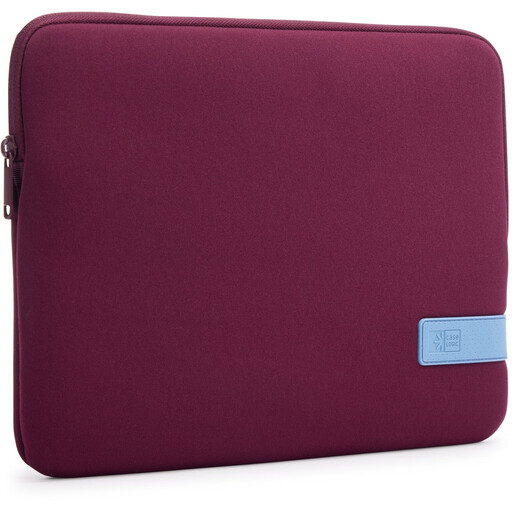
Why it’s a good fit: A slim sleeve for students and remote workers who carry their laptop inside a backpack or larger bag.
The sleeve has a zip and an internal pocket. Do not treat it as a hard protective case, and check your laptop’s dimensions beforehand.
Polyester construction, a lightweight design and scratch protection according to the product description.
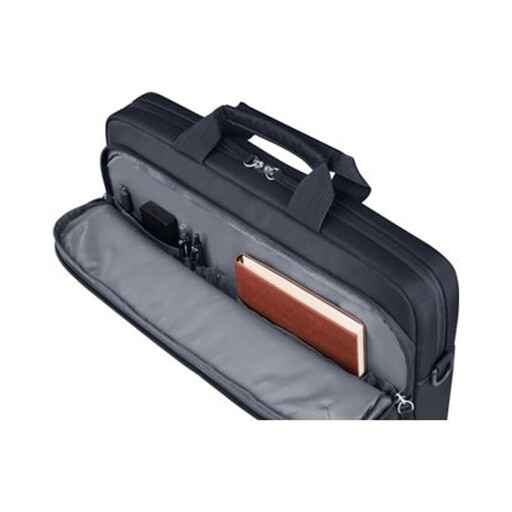
Why it’s a good fit: For anyone who wants to carry a laptop, documents and accessories to the office in one compact bag.
The bag is described as water-resistant, but this does not mean it is fully waterproof. Use additional protection in heavy rain.
A padded laptop compartment, 9-litre capacity, detachable shoulder strap and trolley strap.
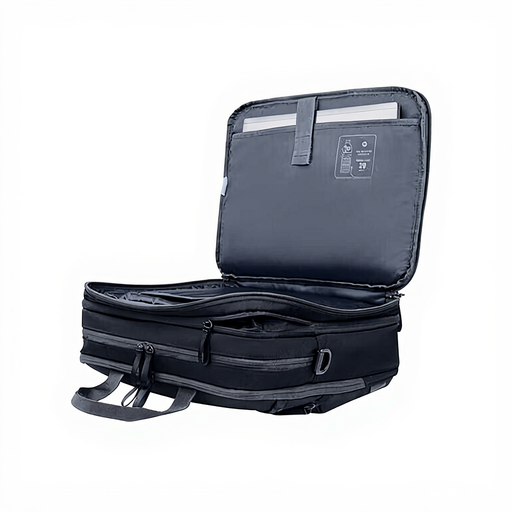
Why it’s a good fit: For train journeys, business trips and days when you need to carry clothing or plenty of accessories alongside your laptop.
The bag is larger and heavier than a sleeve. Choose it only if you will genuinely use the additional organisation and capacity.
Three compartments, 15-litre capacity expandable to 20 litres, padded sections and an opening angle of up to 180 degrees.
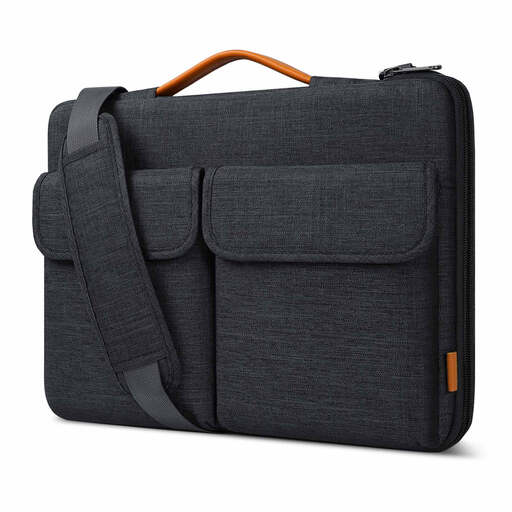
Why it’s a good fit: For users who want to carry a 15.6-inch laptop, charger, mouse and cables in an organised way.
The bag is described as splash-resistant; that is not the same as being fully waterproof. Also check the internal dimensions of 38.5 × 26.5 × 3 cm.
Velvety lining, a protective strip alongside the zip, two carrying options and a trolley strap.
Explore a current selection of laptop bags, laptop cases and sleeves in a range of sizes, carrying styles and storage configurations.
Measure the laptop itself and compare its width, depth and thickness with the internal laptop compartment. A product labelled as a 14-inch laptop sleeve or 15.6-inch laptop sleeve will not automatically fit every device with that screen size.
For everyday cycling, water-resistant materials can be useful. However, check whether the bag is described as waterproof, splash-resistant or water-repellent. An additional rain cover is advisable during prolonged rain. When you get home, leave a wet bag open so the moisture can evaporate.
Its lifespan depends on usage, load and maintenance. Overfilled compartments place strain on seams and zips. Clean the bag according to the care instructions, avoid machine washing when it is not permitted and regularly inspect the shoulder strap, zip and lining. If a defect occurs, statutory warranty rights apply in the EU; contact the seller after purchase for assistance.
