
Vandaag of morgen in huis

Kwaliteit gegarandeerd

Welkomstaanbiedingen ontgrendelen: GRATIS bezorging | Tot 80% korting | Gratis 30 dagen JoyPlus-proefperiode
Download de app
Buying a new laptop bag seems simple—until your purchase proves disappointing after just a few weeks. The zipper snags, the bag is too small, or worse: your laptop gets damaged after a sudden downpour. Many bags are advertised with features that offer little real-world value.
As a Joybuy Product Recommendation Officer, I see where things go wrong every day. Before you make a choice, it's wise to consider a few common pitfalls:
laptoptas 15.6 inch is not a universal fit for every 15.6-inch laptop. The laptop's thickness and the borders around the screen (bezels) determine if it will actually fit. This often leads to bags that are too snug or too loose, causing the laptop to shift and get damaged.A thoughtful choice not only saves you money but also protects your valuable equipment.
To avoid a bad purchase, there are a few specifications you should always check. These determine the functionality and longevity of your bag.
Your laptop's inch size is a marketing term for the screen diagonal. It says nothing about the device's physical dimensions.
laptoptas 14 inch or laptoptas 17 inch will clearly list these specifications.laptopsleeve or laptop hoes offers basic protection and is meant to be carried inside a larger bag. A schoudertas laptop is practical for the daily commute, while a laptop rugzak distributes weight better and offers more space for books and accessories, making it ideal for students and travellers.The degree of protection depends directly on the material and construction.
waterdichte laptoptas often has sealed zippers and is made from materials like PVC or Tarpaulin, but these are rarer and more expensive. For most users, a good water-repellent bag is sufficient.A good zakelijke laptoptas or a bag for daily use is more than just a shell.
Not everyone needs the same bag. Below are a few recommendations, tailored to specific use cases.
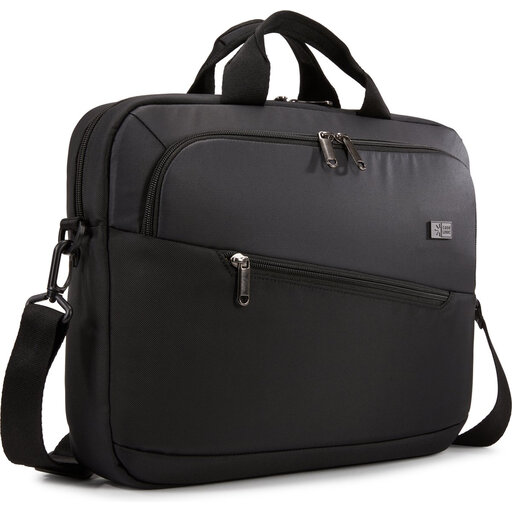
Why This Fits Their Persona: Ideal for those who travel to the office or campus daily. This bag combines a professional look with a practical layout, without unnecessary bulk. It's lightweight and comfortable for short to medium distances.
This bag has multiple compartments, including a separate tablet pocket, which avoids the pitfall of a cluttered bag causing scratches. The 'splash-proof' specification is honest and prevents false expectations about it being fully waterproof.
Lightweight design (520 g) and a smart layout for accessories and documents. The bag can be carried by its handle or with the shoulder strap.
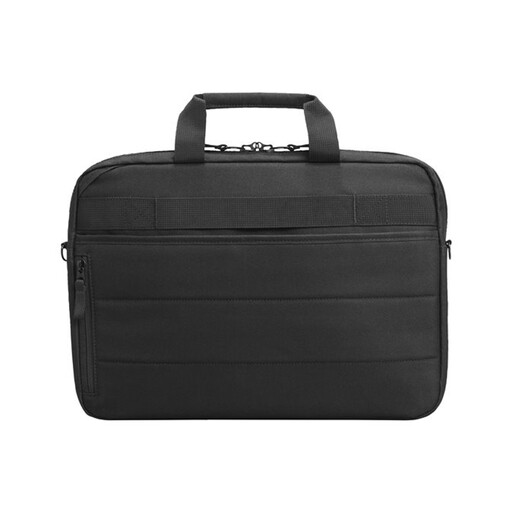
Why This Fits Their Persona: For the professional who is frequently on the road and carries a large laptop (up to 17.3 inches) and many accessories. Security and organization are top priorities here.
This bag tackles the pitfalls of poor organization and lack of security with an RFID-blocking pocket to prevent skimming, lockable zippers, and a Bluetooth tracker pocket. The clear sizing for 17.3-inch laptops prevents fit issues.
Extensive security features and a luggage strap for travel. Additionally, the bag is made from materials partly derived from ocean-bound plastics.
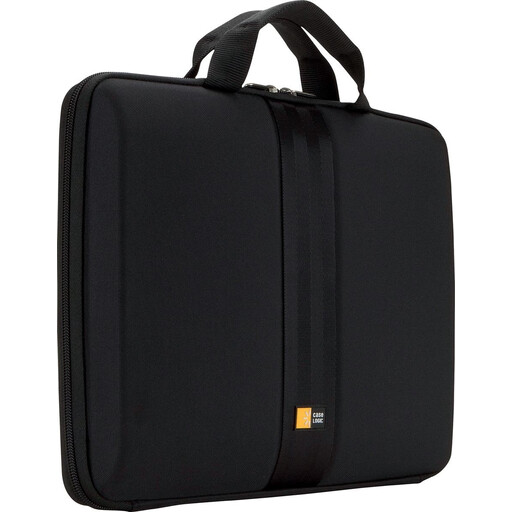
Why This Fits Their Persona: Perfect for those who already have a favourite backpack or bag but want extra protection for their laptop. This sleeve offers robust protection without the weight and bulk of a full laptop bag.
This hardshell sleeve focuses on one thing: protection. It forces you to check the internal dimensions (33 x 3.8 x 23.9 cm), thus avoiding the pitfall of an incorrect size. It is a pure laptop sleeve, not a bag for accessories.
The rigid EVA exterior offers protection against impacts and pressure, which is superior to a soft sleeve. The clamshell design allows you to use the laptop while it's still in the sleeve.
We have compiled a complete, up-to-date list of products that fully meet these strict selection criteria and local regulations.
The only reliable method is to measure the physical dimensions of your laptop (length x width x thickness in cm) and compare them to the internal dimensions of the laptop compartment of the bag. Do not rely solely on the inch size. Manufacturers usually list these specifications on the product page.
Most polyester or nylon laptop bags can be cleaned with a damp cloth and a mild detergent. Avoid the washing machine, as this can damage the protective padding and water-repellent coatings. Let the bag air dry completely. Regularly check the zippers for dirt and periodically treat a leather laptop tas heren with a suitable care product to keep the material supple.
