
Vandaag of morgen in huis

Kwaliteit gegarandeerd

Welkomstaanbiedingen ontgrendelen: GRATIS bezorging | Tot 80% korting | Gratis 30 dagen JoyPlus-proefperiode
Download de app
A laptop bag needs to do more than simply fit your laptop. Students often carry a charger and documents too, commuters travel through rain and crowded public transport, while travellers need a luggage strap or extra compartments. Yet it is often only after buying a bag that you discover whether it is genuinely practical.
The most common pitfalls:
Don’t just look at the designation on your laptop. If possible, measure the device’s width, depth and thickness. Manufacturers use screen sizes such as 14, 14.1 or 15.6 inches as a guide. The actual external dimensions vary from model to model.
A 14-inch laptop bag or 14-inch laptop sleeve is suitable when its internal dimensions match those of your laptop. For larger devices, a 15.6-inch laptop bag is a sensible choice. An excessively roomy sleeve offers less protection against movement, while one that is too tight could damage the zip or laptop.
Also consider the type:
A soft polyester sleeve can protect against scratches and minor knocks. A bag with padded laptop compartments generally provides more structure. Check whether the base and sides are padded too; a padded inner compartment alone does not automatically mean the entire bag is shock-resistant.
Each material has its own practical qualities:
According to HP’s own information, the HP Everyday 14-Inch Laptop Bag contains at least 60% recycled post-consumer plastic. This is a product specification provided by the brand and is not a general guarantee regarding the bag’s environmental impact.
A bag with lots of compartments is not automatically more practical. Consider what you carry every day: charger, mouse, cables, A4 documents, water bottle and personal items. A 9-litre bag may be sufficient for work, while a 25-litre rucksack may be more convenient for clothing, lunch or travel essentials.
Also check:
A built-in USB port is simply a pass-through or connection point; you will generally need to provide your own power bank. So don’t regard it as a self-contained charging function.
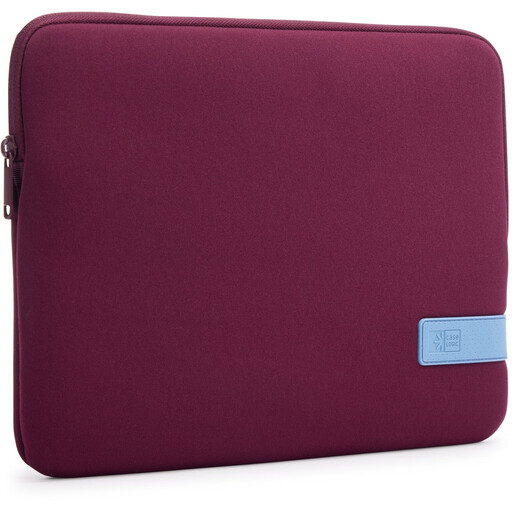
Why it suits this profile: This slim sleeve is suitable for laptops up to 14 inches and can be carried on its own or placed inside a larger bag. That makes it a good choice for students and users who mainly want straightforward laptop protection.
The laptop is placed in a separate inner compartment and secured with a zip. The product information states that it protects against scratches and minor knocks. Do not use the sleeve as your only protection when carrying heavy luggage.
Polyester material, zip fastening, lightweight design and suitable for use inside a larger bag.
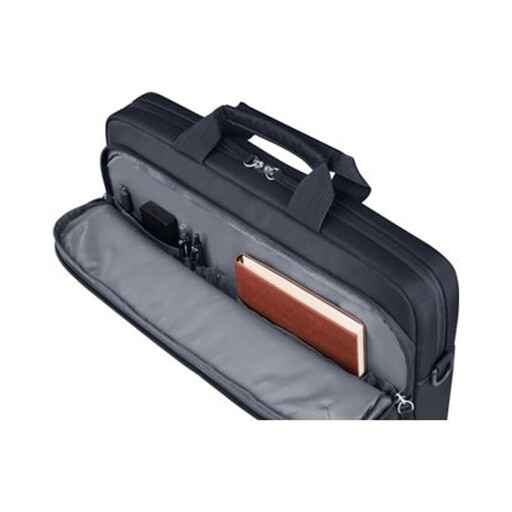
Why it suits this profile: This business laptop bag combines a padded laptop compartment with 9 litres of storage space. It is suitable for professionals who want to carry documents, accessories and a laptop in an organised way.
The product description specifies water-resistant 600D polyester fabric, a padded compartment and separate accessory pockets. Water-resistant does not mean that the bag is suitable for prolonged heavy rain.
9-litre capacity, removable shoulder strap, luggage strap, key ring and two-year statutory guarantee of conformity.
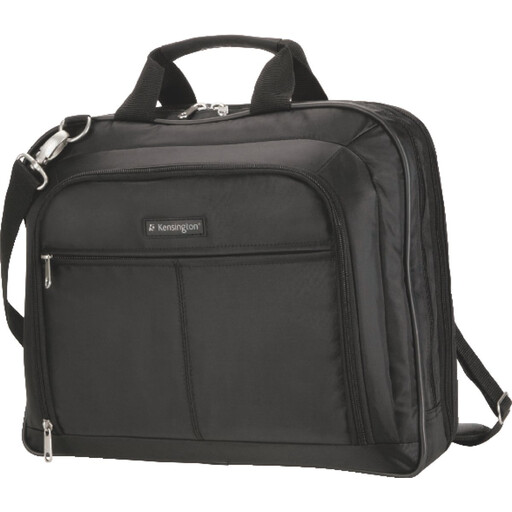
Why it suits this profile: This bag is designed for laptops up to 15.6 inches and has room for accessories and documents. The removable padded shoulder strap and luggage strap are practical for commuters and air travellers.
The layout prevents the laptop and accessories from moving loosely around a single compartment. The manufacturer explicitly states that the bag is not waterproof; extra protection is needed in heavy rain.
1680D nylon, multiple compartments, handles, removable shoulder strap and integrated luggage strap.
We have compiled a complete, up-to-date list of products that fully meet these strict selection criteria and the applicable European safety regulations.
No. The screen size is only a guide. Check the sleeve’s internal dimensions and compare them with the external dimensions of your laptop. Pay particular attention to the thickness if your laptop has a sturdy casing or protective film.
A water-repellent laptop bag can help repel splashes and light rain, depending on the material and fastening. This is not the same as being waterproof. If you cycle regularly, you may want to consider a rain cover or an additional waterproof protective layer.
Its lifespan depends on daily use, the load it carries, zips, seams and storage. Don’t overload the bag, don’t place sharp objects directly next to the laptop compartment and clean the material according to the instructions. Under European consumer rules, a faulty product is covered by the statutory guarantee of conformity; the seller must then offer an appropriate solution if the product does not meet the contract.
If you want to buy a laptop bag, it is worth first noting down your laptop’s size, your preferred carrying style and how much storage space you need. This will help you choose a sleeve for compact transport, a shoulder bag for work or a laptop rucksack for longer days and travel.
