
Vandaag of morgen in huis

Kwaliteit gegarandeerd

Welkomstaanbiedingen ontgrendelen: GRATIS bezorging | Tot 80% korting | Gratis 30 dagen JoyPlus-proefperiode
Download de app
A laptop backpack may seem simple at first glance: choose the right size, add a few compartments and you’re done. In practice, protection, comfort and organisation vary considerably from one model to the next. A bag that works well for a short cycle to the office may be awkward on a flight or during a long day at school.
So don’t focus solely on terms such as “business”, “waterproof” or “extra large”. The following three pitfalls are particularly common:
Screen sizes are measured diagonally. Two 15.6-inch laptops can still differ in height, width and thickness. So check your laptop’s dimensions and compare them with the internal dimensions of the laptop compartment.
For a 15.6-inch laptop backpack, a padded compartment with sufficient clearance is important. Soft lining helps reduce scratches, while extra padding offers some protection against minor knocks. This is not a guarantee against damage if the bag is dropped: always place your laptop carefully in the compartment and prevent heavy objects from pressing directly against it.
Using a more compact device? A 14-inch laptop sleeve may be more convenient than a large backpack. A sleeve takes up very little space and can, if necessary, be carried inside a regular work or school bag.
Nylon, polyester and reinforced synthetic fabrics are commonly used for laptop backpacks. Look at the density of the material, the quality of the stitching and zips, and how the base has been finished.
When assessing water resistance, pay close attention to the exact product description:
For example, the NINETYGO backpack is described as water-repellent and not intended for prolonged exposure to heavy rain. This is an important distinction from a fully waterproof construction.
A business laptop backpack for commuting has different priorities from a laptop backpack for school. Commuters often look for a trolley strap, padded shoulder straps and quick access to a public transport card or phone. Students and school pupils are more likely to need space for books, a water bottle and a lunch box.
Also check:
A USB laptop backpack usually only contains a cable port or connection for a power bank. The power bank itself is generally not included. Check this before assuming that you can charge your devices independently while on the move.
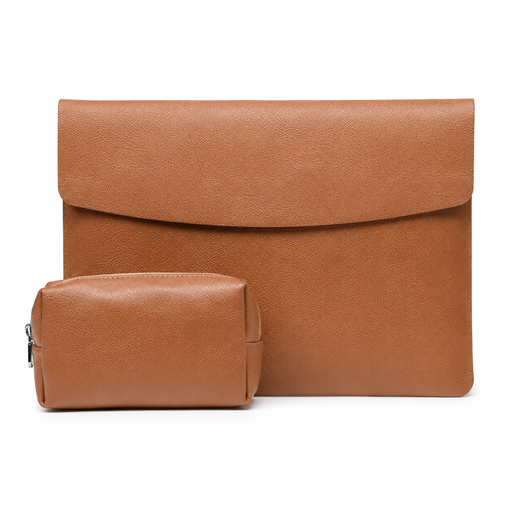
Why it suits this profile: This compact sleeve is suitable for anyone who mainly wants to carry a 14-inch laptop, charger and mouse without using a large backpack.
The stated dimensions are 35 × 25,3 × 0,5 cm. However, check that your laptop, including its battery, fits within these measurements. The product description mentions water resistance, but do not use the sleeve as complete protection from rain.
360 grams, PU faux leather, faux suede lining and a separate pouch for your mouse and charger.
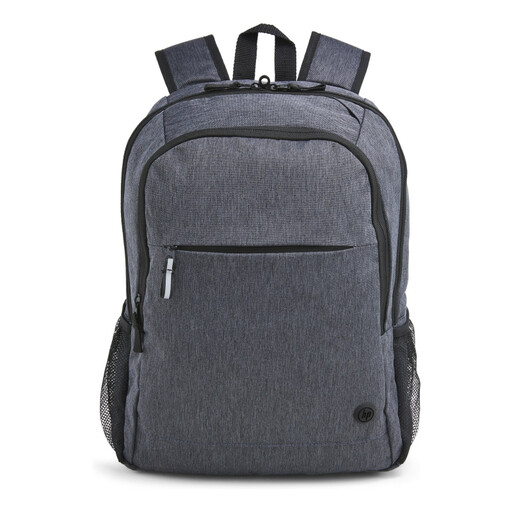
Why it suits this profile: A business laptop backpack for anyone who wants to combine everyday organisation, laptop protection and travel convenience with a understated look.
The bag has a padded laptop compartment for laptops up to 15.6 inches and several zipped pockets. The manufacturer states that it is water-resistant; this does not mean that the backpack is fully waterproof.
Reflective accents, lockable zips, a trolley strap and an outer fabric that, according to the product information, consists of 95% recycled material.
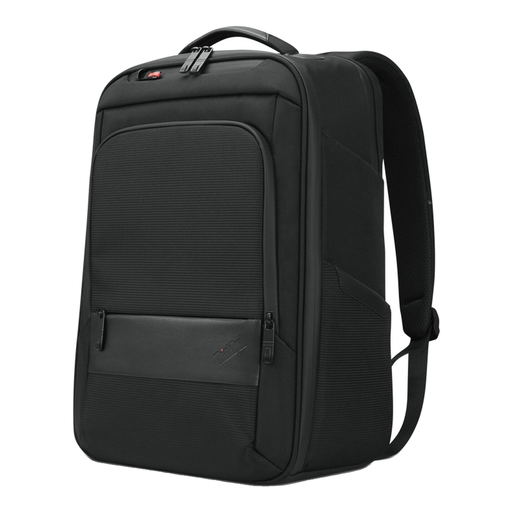
Why it suits this profile: Suitable for commuters and professionals who want to carry a laptop, documents and accessories in a single backpack.
The specifications mention a separate notebook compartment, zipped pockets and a recommended load for normal use. Always place the laptop correctly in the padded compartment and do not overload the bag.
Dimensions of 30 × 18,5 × 43,5 cm, a handle and 70% recycled material according to the product specifications.

Why it suits this profile: A practical choice for train journeys, flights and weekend trips when you need to carry clothing or other belongings alongside your laptop.
The capacity is stated as 25 litres and can be expanded to 30 litres. When fully packed, check that the backpack is still comfortable to carry and does not become impractically heavy.
Chest straps, a concealed RFID pocket, lockable zips and a laptop compartment for laptops up to 15.6 inches, according to the product information.
We’ve put together a complete, up-to-date list of products that fully meet these strict selection criteria and the applicable European safety regulations.
No, not automatically. Screen size is only one measurement. Check the height, width and thickness of your laptop and compare them with the stated dimensions of the laptop compartment. If in doubt, a slightly roomier compartment is more practical, provided the laptop cannot move around freely inside it.
Its lifespan depends on the material, stitching, zips, load and everyday use. A backpack that is consistently overfilled will wear out more quickly. Distribute the weight evenly, do not place sharp objects next to the laptop and clean the bag according to the care instructions. A light shower is also very different from prolonged exposure to water.
Often, yes, but pay attention to the layout. For work, a separate laptop compartment, document compartment and trolley strap are useful. For school, extra space for books and a water bottle is important. For travel, lockable zips, a chest strap and expandable capacity are helpful. Choose based on what you carry every day, rather than solely on appearance or the brand name.
