
Vandaag of morgen in huis

Kwaliteit gegarandeerd

Welkomstaanbiedingen ontgrendelen: GRATIS bezorging | Tot 80% korting | Gratis 30 dagen JoyPlus-proefperiode
Download de app
At first glance, a laptop backpack seems straightforward: choose the right screen size, add a few compartments and you’re done. In practice, disappointment is usually caused by a laptop compartment that is too tight, inadequate protection or an impractical layout. A bag may look spacious, yet offer little usable room once your laptop, charger, lunch and documents are inside.
As a Joybuy Product Recommendation Officer, I filter the most important product specifications from popular choices. This helps you assess marketing terms more effectively and select a laptop backpack that suits your everyday use in the Netherlands.
A 15.6-inch laptop backpack is not automatically suitable for every 15.6-inch laptop. Manufacturers measure screens diagonally, while the casing varies from model to model. So make sure you also check the width, height and thickness of your laptop. The same applies to a 16-inch laptop backpack. A protective compartment should not be too loose, but it should not be so tight that you have to force your laptop in.
For larger devices, a 17.3-inch laptop backpack is the more logical choice. However, check that the laptop compartment is actually designed for this size. A larger exterior does not always mean a larger padded compartment.
A water-repellent laptop backpack can help repel light rain or splashes. That does not automatically mean the bag can withstand a heavy downpour for an extended period. Pay attention to the wording used:
If you cycle or take long walks in changeable weather, practical features to look out for include a covered zip, a sturdy flap and, where appropriate, a rain cover.
A spacious laptop backpack is only useful when the space is divided logically. Check whether it has a separate laptop compartment, document compartment and smaller pockets for cables and accessories. A laptop backpack with a USB port can be useful when you’re out and about, but the USB connection is generally only a pass-through. You will usually still need a power bank; the backpack will not charge your phone independently.
According to the product description, an RFID pocket may be intended to shield cards and certain data from scanners. Treat this as one security feature, not a guarantee against theft.
Measure your laptop with the screen closed. Note down:
Compare these measurements with the product specifications. The technical information for the Lenovo ThinkPad Professional 2nd Generation mentions a maximum screen size of 16 inches, while the product description refers to protection for devices up to 15 inches. If you have a 16-inch laptop, check the physical dimensions of your device particularly carefully.
For daily commuting, wide, adjustable shoulder straps and a stable back panel are more important than simply having a high litre capacity. A carry handle is useful when you want to lift the bag for a short time. A luggage strap comes in handy at the station or airport, allowing you to slide the backpack over the telescopic handle of a suitcase.
Also consider the empty weight. A bag weighing around 1 kg feels different from a lightweight model once you add your laptop, power supply, books and accessories. Keep heavy items close to your back and avoid consistently overloading the bag.
A business laptop backpack for the office requires a different layout from a travel backpack for a laptop and clothing. For the office, a slim profile, document compartment and cable pockets are practical. For travel, a wider opening, luggage strap and expandable capacity are more useful.
An expandable laptop backpack provides extra space when you are carrying clothing or other items. Use the additional capacity thoughtfully: more volume can also mean more weight and a less comfortable carrying position.
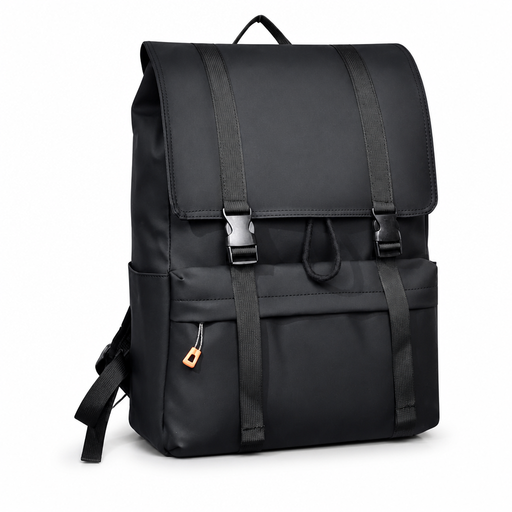
Why it suits this profile: This model is designed for everyday use at school, work and when travelling around town with a laptop of up to 15.6 inches, according to the product name. The drawstring closure and large capacity make it suitable for users looking for one bag for a range of situations.
The product title mentions water resistance and a large capacity. Before buying, check the exact dimensions and the level of protection provided by the laptop compartment.
15.6-inch category; designed for school, work and travelling around town; spacious daypack according to the product information.
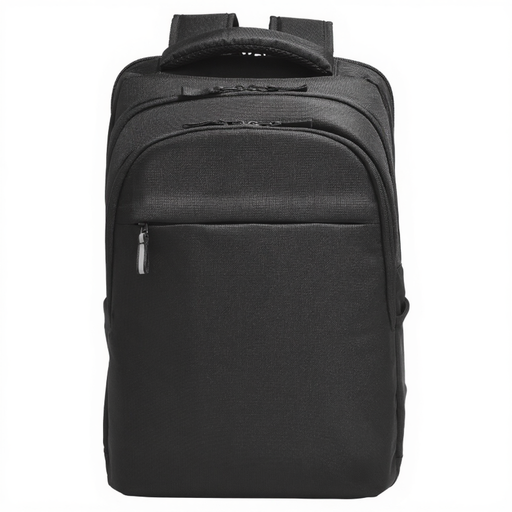
Why it suits this profile: Suitable for users with a larger laptop who need organised storage. The product description mentions an RFID pocket, tracker pocket, double zips, cable pass-through and luggage strap.
The description mentions several separate compartments and a water-resistant design. Check the dimensions if your laptop has a thick casing or protective sleeve.
Suitable for up to 17.3 inches according to the specification; the product description mentions an RFID pocket and trolley strap.
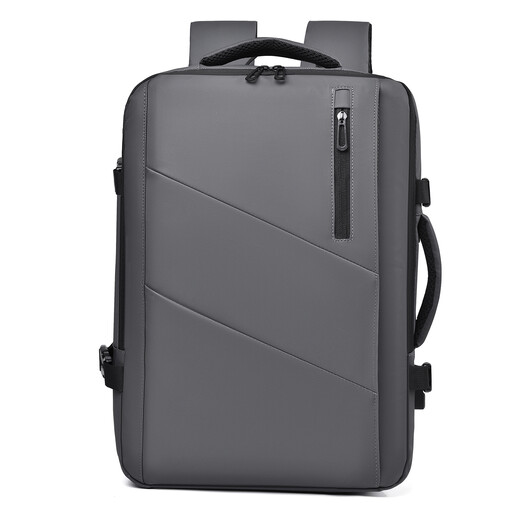
Why it suits this profile: This travel backpack for laptops is designed for commuters, business travellers and weekend trips. According to the product name, the capacity can be expanded from 25 to 35 litres.
The expandable capacity means you do not have to travel with an unnecessarily large bag as standard. Before setting off, check the dimensions and permitted hand-luggage sizes specified by your carrier.
Expandable from 25 to 35 litres according to the product name; designed as a waterproof business travel backpack with multiple compartments.
We have compiled a complete, up-to-date list of products that fully meet these strict selection criteria and the applicable European safety regulations.
No. The size shown on the packaging usually refers to the screen diagonal. Measure the entire laptop and compare it with the laptop compartment. Allow for a protective sleeve and the thickness of the laptop.
Its lifespan depends on the material, zips, seams, weight and frequency of use. A bag that is heavily loaded every day will wear out faster than one used occasionally. Check the shoulder straps, zips and seams regularly. Do not carry sharp objects loose next to your laptop.
That depends on how you use it. A USB port can be useful when you want to use a power bank inside the bag while you are out and about. However, check whether the power bank is included and whether the connection is sturdy enough for your cable. If you rarely charge devices while travelling, you may get more value from a well-padded laptop compartment and comfortable shoulder straps.
