
Vandaag of morgen in huis

Kwaliteit gegarandeerd

Welkomstaanbiedingen ontgrendelen: GRATIS bezorging | Tot 80% korting | Gratis 30 dagen JoyPlus-proefperiode
Download de app
A laptop backpack might seem easy to choose at first. In practice, though, many models turn out to be too small, uncomfortable or less rainproof than their product name suggests. If you only look at the colour or number of compartments, you could find yourself stuck with an impractical bag after just a few weeks.
So, watch out for these three common pitfalls:
Measure your laptop before you order. Check its width, depth and thickness, then compare these measurements with the stated compatibility. A 15.6-inch laptop backpack will suit many office and school laptops, but a bulky gaming model may still be a tight fit because of its larger casing.
For larger devices, a 17.3-inch laptop backpack is a more suitable choice. According to its product specifications, the HP Professional 17.3-Inch Laptop Backpack fits laptops up to 17.3 inches. The bag measures approximately 47 × 32 × 14 cm and weighs around 740 grams. This makes it suitable for a larger workstation, but it may be less compact for your daily cycle commute.
Polyester, nylon and recycled plastic can all be practical, but the construction also affects how well a bag stands up to everyday use. Check things like:
According to the product description, the HP Prelude Pro 15.6-Inch Backpack has an outer fabric made from 95% recycled material and a water-repellent coating. The Kensington SP25 uses 1680D nylon and has reinforced internal compartments. These are verifiable material specifications, but they don’t automatically mean a bag will be wear-free or fully waterproof in all conditions.
A business laptop backpack often needs room for documents, a mouse, a charger and perhaps a headset. For school, a laptop backpack for school with space for books, a water bottle and lunch is more practical. If you travel by train or plane every day, look for a travel backpack with a laptop compartment, a luggage strap and lockable zips.
Comfort is important too. Adjustable, padded shoulder straps help the backpack sit comfortably. A chest strap can be useful when the bag is full or you’re walking longer distances. Also consider how the weight is distributed: keep your laptop close to your back and avoid letting heavy items press loosely against the laptop compartment.
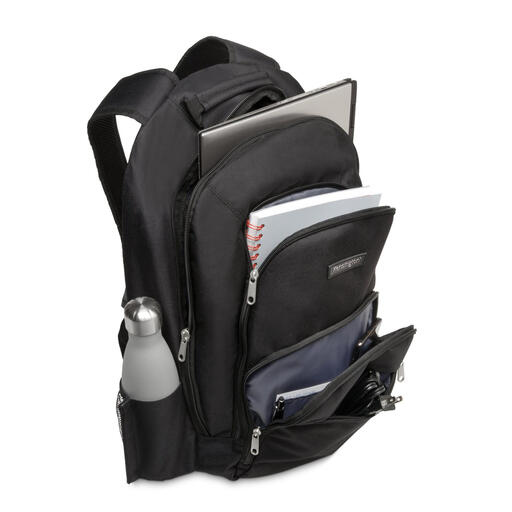
Why it suits this profile: A practical choice for students and commuters looking for a well-organised 15.6-inch bag without extra travel features.
The stated compatibility up to 15.6 inches and the padded laptop compartment make the sizing clearer than on models with only a general size label.
1680D nylon, several accessory pockets, reinforced shoulder straps and a weight of around 710 grams.
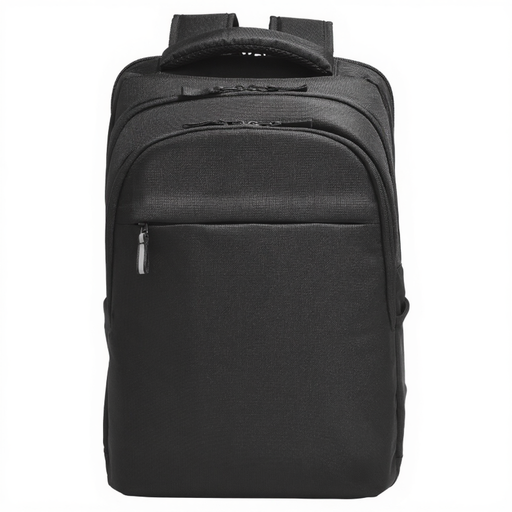
Why it suits this profile: Ideal for business users with a large laptop, plenty of peripherals and regular trips between the office, home and train.
Its generous size and range of zipped and slip pockets reduce the risk of ending up with a bag that’s too tight for your accessories.
Fits laptops up to 17.3 inches, RFID pocket according to the product description, luggage strap, cable pass-through and water-resistant construction.
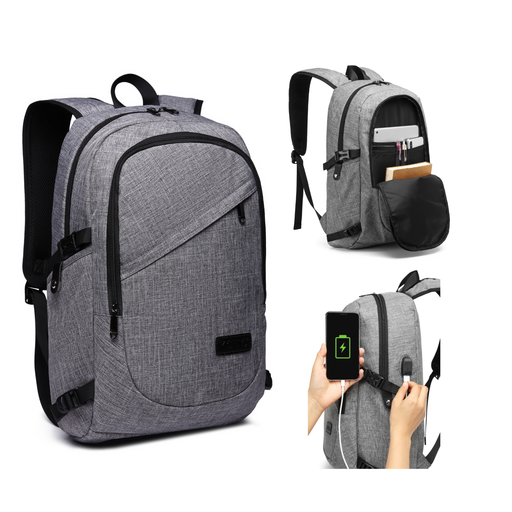
Why it suits this profile: A handy option for commuters, students and travellers who want a laptop backpack with USB, lockable zips and plenty of organiser space.
The USB port only works with your own power bank, which is clearly stated. The bag is water-repellent, not fully waterproof.
Laptop compartment fits laptops up to 15.6 inches, main compartment measures approximately 50 × 30 × 14 cm, breathable shoulder straps and a removable combination lock.
We’ve put together a full, up-to-date list of products that meet these strict selection criteria and the applicable European safety regulations.
No. The inch measurement refers to the screen diagonal, not the entire casing. So, check the laptop compartment’s maximum dimensions too, and compare them with your laptop.
Its lifespan depends on the load, how often you use it and how well you care for it. A bag with sturdy zips, padded straps and hard-wearing nylon or polyester can be suitable for everyday use. Overloading it will speed up wear to the seams and shoulder straps. Many products are also covered by a minimum two-year legal guarantee under European consumer rules.
A USB port in a backpack is usually a cable pass-through. You’ll need your own suitable power bank and cable. Only connect compatible equipment, and treat the port as a handy feature rather than a built-in battery.
