
Vandaag of morgen in huis

Kwaliteit gegarandeerd

Welkomstaanbiedingen ontgrendelen: GRATIS bezorging | Tot 80% korting | Gratis 30 dagen JoyPlus-proefperiode
Download de app
At first glance, choosing a laptop backpack seems simple: pick a size, pop your laptop in, and you’re done. In reality, models vary significantly in protection, organisation, comfort and weather resistance. A bag that looks suitable for your laptop on paper can end up being too snug or, conversely, take up unnecessary space.
For students, professionals, commuters and business travellers, these three pitfalls are particularly important:
Alongside the stated size, also check the internal dimensions of the laptop compartment. Many models are labelled as a 15.6-inch laptop backpack, 16-inch laptop backpack or 17.3-inch laptop backpack. These sizes are based on the screen diagonal and don’t tell you everything about the outer dimensions of your device.
So measure:
A 17.3-inch laptop backpack generally offers more room, but can be larger and heavier when cycling or travelling. For a compact work or study laptop, a backpack for laptops up to 14 or 15.6 inches is often sufficient. If in doubt, a slightly roomier compartment is more practical than a tight fit, as long as the laptop doesn’t slide around loosely.
Also watch out for conflicting product information. With the Lenovo ThinkPad Professional 2nd Generation, the product description mentions protection up to 15 inches, while the specifications state a maximum screen size of 16 inches. So check your own laptop’s dimensions before ordering.
A padded laptop compartment helps limit scratches and light bumps. Extra protection around the base and sides is useful if you regularly put the bag on the floor or walk through busy stations. A zip keeps the contents together, but is no guarantee against theft.
Some models have additional features, such as lockable zips, an RFID pocket or a separate compartment for a Bluetooth tracker. According to the product description from HP, these features are designed to make carrying and organising devices and personal belongings safer. They do not offer guaranteed theft prevention. So in busy public spaces, also rely on your own vigilance.
A durable laptop backpack can be appealing when you use the bag daily. Don’t just look at words like “durable”, but at verifiable data:
According to the product information, the exterior material of the HP Prelude Pro is 95% recycled material and the outside has a water-repellent coating. That makes the bag suitable for normal commuting, but in heavy rain, protect your electronics further with a cover or waterproof packaging.
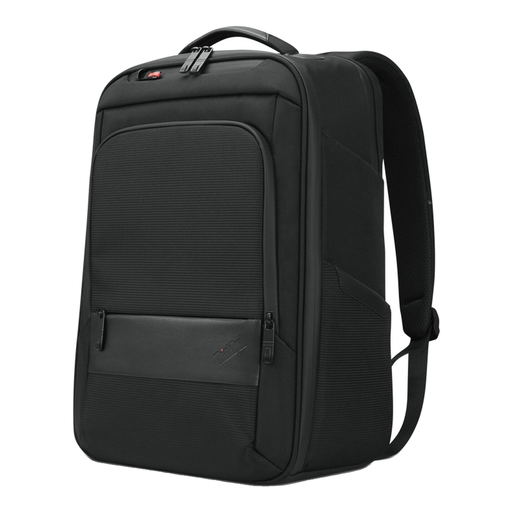
Why this fits the profile: This black laptop backpack is designed for daily use and offers space for a laptop, documents and accessories. The handle provides a second carrying option.
The model has a separate notebook compartment and zip pockets. Do check your laptop dimensions, as the product description mentions different maximum sizes.
Dimensions of 30 x 43.5 x 18.5 cm, handle, zip pockets and, according to the specifications, 70% recycled material.
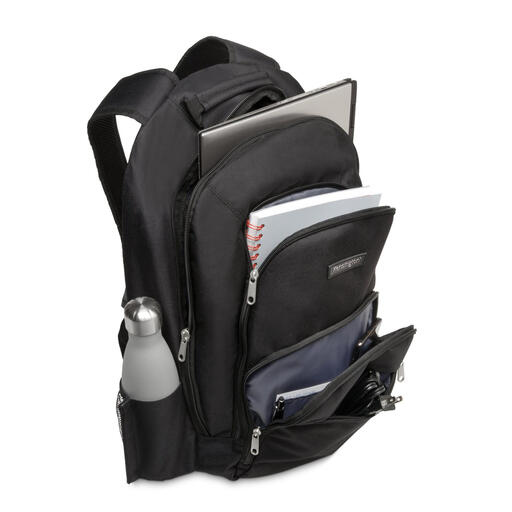
Why this fits the profile: The layout is ideal for professionals who want to carry their laptop, documents and accessories separately to the office or client meetings.
The padded compartments limit direct contact with accessories. The multiple zip and accessory pockets prevent small items from ending up loose at the bottom of the bag.
Suitable for laptops up to 15.6 inches, 1680 denier nylon, dimensions of 33 x 48 x 18 cm and padded shoulder straps.
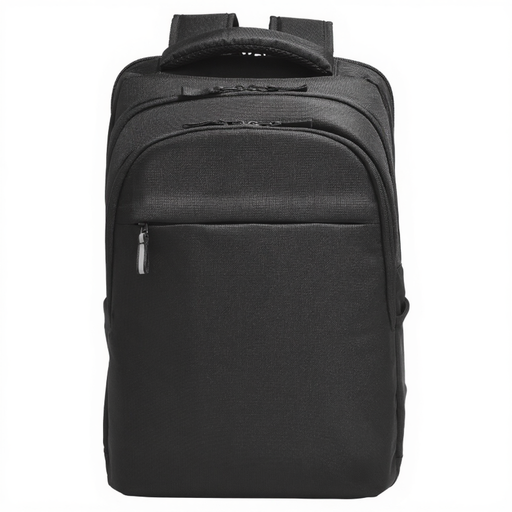
Why this fits the profile: This model suits business travellers and users of larger laptops who carry many accessories, cables and documents.
The bag has multiple compartments, double zips, an RFID pocket and a separate compartment for a Bluetooth tracker. The stated water resistance is protection against moisture, not full waterproofing.
Suitable for up to 17.3 inches, water-resistant finish, handle and dimensions of 32 x 47 x 14 cm.
A laptop backpack for work and travel doesn’t have to have the largest capacity. Pay attention to how you travel. A trolley strap is useful at airports and stations. A chest strap can help when you’re walking longer distances with a full bag. For documents, flat pockets are more practical than one large main compartment.
According to the product information, the Dell CP3724 16-inch backpack has a capacity of 18 litres, a 360° foam cushion around the laptop compartment and a splash-proof and dirt-repellent finish. The bag weighs approximately 500 grams. That makes this type of model interesting for commuters looking for a 16-inch laptop backpack without too much extra bulk.
For more flexibility during business trips, the HP Travel 25L 15.6-Inch Blue Laptop Backpack offers a capacity that can be expanded from 25 to 30 litres. The HP Travel Plus 15L 14-Inch Laptop Bag can be expanded from 15 to 20 litres, but is designed as a bag with a detachable shoulder strap rather than a classic backpack. So check whether the carrying style suits your daily routine.
A laptop backpack will last longer if you don’t overload it consistently. Distribute heavy items across multiple compartments and don’t place a charger loose against the laptop. Clean nylon and polyester according to the product instructions, usually with a damp cloth and mild detergent. Avoid harsh cleaners, as they can damage the coating or colour.
The statutory warranty for the products mentioned is at least two years according to the product information and applicable EU consumer regulations. This is separate from normal wear and tear, damage from overloading or misuse. Keep your purchase details and check the zips, seams and shoulder straps upon receipt.
We’ve put together a full, up-to-date list of products that fully meet these strict selection criteria and comply with current European safety regulations.
No. The stated size is a guideline based on the screen diagonal. Check the internal dimensions of the laptop compartment and compare them with the width, depth and thickness of your laptop.
For daily cycling in changeable weather, a water-repellent or water-resistant laptop backpack can be sufficient in light rain. If you’re outdoors for longer periods, it’s better to choose a rain cover or protective case. Check whether the manufacturer states “waterproof” or only “splash-proof” and “water-resistant”.
For a laptop, charger, documents and a few accessories, around 15 to 20 litres is often practical. For clothing, lunch and travel essentials, 25 litres or more is handier. An expandable model offers flexibility, but can become fuller and heavier. So don’t just look at the capacity, but also at the comfort and weight of the bag.
