
Vandaag of morgen in huis

Kwaliteit gegarandeerd

Welkomstaanbiedingen ontgrendelen: GRATIS bezorging | Tot 80% korting | Gratis 30 dagen JoyPlus-proefperiode
Download de app
A laptop backpack may seem straightforward at first: choose a model that’s big enough and you’re all set. In practice, most problems arise from a laptop compartment that doesn’t fit, poor carrying comfort or a material that offers less protection than the product name suggests. A business backpack should also look professional while offering space for a charger, documents and everyday essentials.
This buying guide helps students, professionals, commuters and travellers look beyond marketing claims and focus on features they can check.
A 15.6-inch laptop backpack isn’t automatically suitable for every laptop of that size. Manufacturers measure screens diagonally, while each laptop compartment has its own width, height and depth. So check your laptop’s dimensions and compare them with the internal measurements of the compartment, if available.
The same applies to a 16-inch laptop backpack. Some models state a maximum screen size but leave little room for a thick laptop or protective case.
A water-resistant laptop backpack can help repel light rain or a spilled drink. That doesn’t mean the contents will stay dry for long in a heavy downpour. Check the wording used, the quality of the zips and seams, and the care instructions.
For example, the NINETYGO backpack is described as having a water-resistance level of 4, but the product information also states that the material isn’t fully waterproof and shouldn’t be exposed to heavy rain for long periods.
A laptop backpack with several pockets can help you stay organised, but extra zips and compartments add weight and create more potential wear points. Think about what you carry every day. A student may need room for books and lunch, while a commuter may mainly carry a laptop, charger, headset and documents.
Look at three things:
According to the product information, the Kensington SP25 is suitable for laptops up to 39.6 cm, or 15.6 inches. It has padded internal compartments and is made from 1680 denier nylon. These are specific, verifiable features to look for if you want a laptop backpack with a dedicated laptop compartment.
A lightweight laptop backpack is handy if you cycle every day, travel by public transport or walk longer distances. As well as the net weight, look for:
According to the product specifications, the Kensington SP25 weighs 710 grams and measures 48 × 33 × 18 cm. The Lenovo ThinkPad Professional has a handle and measures 30 × 18.5 × 43.5 cm, with a stated weight of around 1 kilogram. A lighter weight doesn’t automatically mean greater comfort: the fit and weight distribution still matter.
Nylon and polyester are commonly used for business backpacks and backpacks for work and travel. Check whether the description includes information about the lining, reinforcement, care and water resistance. A larger laptop backpack is useful if you also carry clothes, books or sports kit, but a bigger bag can end up heavier when full.
The HP Travel has a capacity of 25 litres and can be expanded to 30 litres, according to the product information. It has several compartments and a laptop compartment for laptops up to 15.6 inches. Check the recommended load and pack heavy accessories as close to your back as possible.
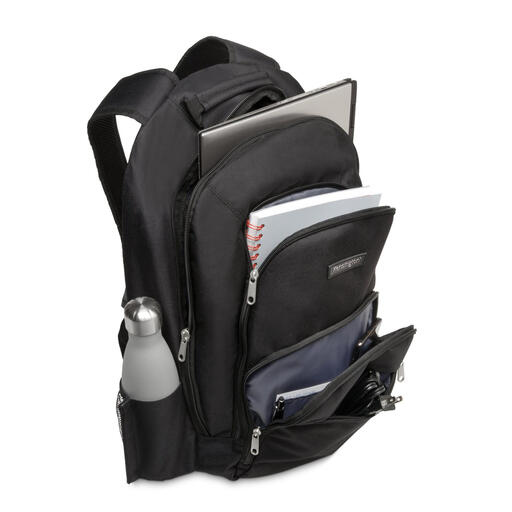
Why it suits this profile: This model has a straightforward layout and is designed for laptops up to 15.6 inches. Its classic black design works well for school, the office and everyday commuting.
The product information specifically mentions padded internal compartments, zipped pockets and several accessory pockets. That means you don’t have to rely on a general claim about inch size alone.
1680 denier nylon, laptop protection for devices up to 15.6 inches, a weight of 710 grams and padded shoulder straps.
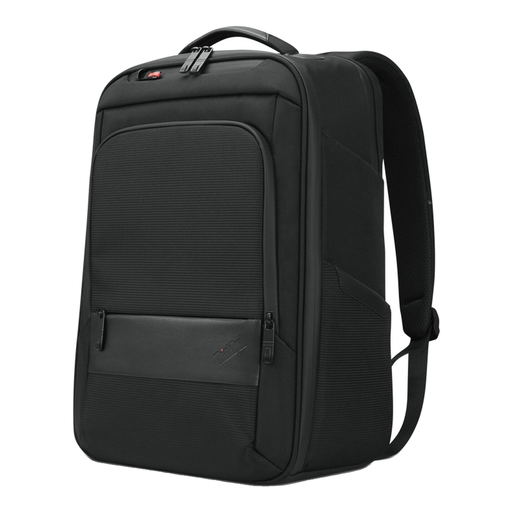
Why it suits this profile: Its professional look, carry handle and separate space for accessories and documents make it a good choice for professionals who use their bag in the office and when travelling.
The stated dimensions and notebook compartment make this model easier to assess than a bag with only a general description.
Suitable for a device up to 16 inches according to the product specifications, measures 30 × 18.5 × 43.5 cm, has a carry handle and is made with recycled materials.

Why it suits this profile: This model is designed for commuters and travellers who carry clothes, accessories or other everyday essentials as well as a laptop.
Its capacity is clearly stated: 25 litres, expandable to 30 litres. This makes it easier to get a realistic idea of how much space is available.
Laptop compartment for devices up to 15.6 inches, 25-litre capacity, expandable volume, chest strap and several storage pockets.
We’ve put together a complete, up-to-date list of products that meet these strict selection criteria and comply with current European safety regulations.
A laptop backpack with a USB port may seem handy when you’re out and about, but check exactly what’s included. Often, it’s just a pass-through or connector; a power bank isn’t automatically included. Also check cable compatibility and whether the port is easy to reach.
An anti-theft pocket, luggage strap or RFID pocket can be useful when travelling. Treat these as extra features, not a guarantee against theft. A water-resistant outer layer won’t replace separate protection in heavy rain either.
No. Screen size is only one indication. Compare your laptop’s width, height and depth with those of the laptop compartment. Allow for a protective case if you use one.
That depends on the material, load, frequency of use and care. Overfilled compartments put extra strain on zips and seams. Clean the bag according to the manufacturer’s instructions, dry wet fabric thoroughly and distribute heavy items evenly. Consumers in the Netherlands are also covered by the statutory guarantee; the Kensington, Lenovo and HP models mentioned here come with a stated statutory guarantee period of at least two years.
It depends on how you use it. If you often charge devices while travelling, a cable pass-through can be handy. Check in advance whether the bag includes a power bank and what type of connection it uses. If you mainly travel between home and the office, a well-fitting laptop compartment, carrying comfort and enough space are usually more important.
