
Vandaag of morgen in huis

Kwaliteit gegarandeerd

Welkomstaanbiedingen ontgrendelen: GRATIS bezorging | Tot 80% korting | Gratis 30 dagen JoyPlus-proefperiode
Download de app
A good laptop backpack is essential, whether you're commuting to the office daily, attending classes, or exploring the world as a digital nomad. But the search can be frustrating. The market is flooded with bags that promise a lot but don't always deliver. Before you invest in a new bag, it's wise to know what to look for to prevent your purchase from needing replacement after just a few months.
As a Product Recommendation Officer at Joybuy, I see a lot of products. I'm here to help you see through the marketing jargon and focus on what really matters. Let's go over the most common pitfalls and the key specifications.
Many backpacks look great online but fall short in practice. Here are two common problems:
To avoid a bad purchase, focus on the following three points. These are the specifications that make the difference between a useful companion and a source of frustration.
The material determines durability and protection. Most backpacks are made of polyester or nylon. Both are strong and light, but nylon often has higher tear and abrasion resistance. More important are the coating and the quality of the zippers. Well-covered zippers prevent water from getting in directly. A lightweight backpack is nice, but not at the expense of sturdiness.
You'll be wearing your backpack often and for long periods. Therefore, pay attention to:
A good school bag with a laptop compartment or business backpack has more than just a main compartment. A separate, well-padded laptop compartment is a must. A bonus is a "false bottom," where the laptop sleeve ends slightly above the bottom of the bag. This prevents your laptop from hitting the ground when you set the bag down. Also, check if there are enough pockets for your charger, a portable monitor, a water bottle, and possibly an adjustable laptop stand.
Not everyone needs the same bag. Below are a few options highlighted, linked to specific user profiles.
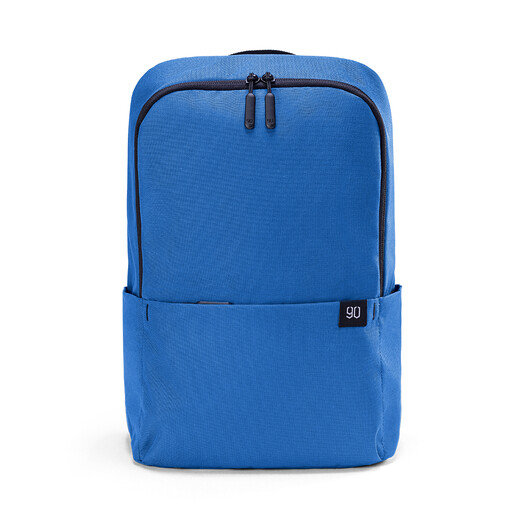
Why This Fits Their Persona: Perfect for those who only carry the essentials. Ideal for a tablet or small laptop, a book, and some personal items. Its minimalist design and ultra-light weight make it a comfortable choice for daily use.
This bag doesn't pretend to be more than it is. It's compact and has a simple, functional layout. The fabric is water-resistant, which is sufficient for short trips through a shower.
Extremely light: At 194 grams, it weighs less than a bottle of water. Compact yet spacious: 12L capacity with convenient side and front pockets.
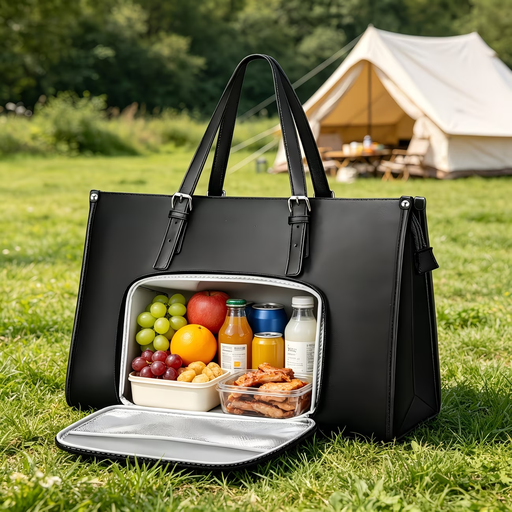
Why This Fits Their Persona: This bag combines the look of a handbag with the functionality of a laptop bag. The ideal solution for professionals seeking a stylish yet practical bag for a day at the office, including a separate space for lunch.
The layout is this bag's strength. The separate, padded laptop compartment protects a 15.6-inch laptop, while the unique, insulated lunch compartment prevents your food from being crushed or leaking.
Unique lunch compartment: Keeps food warm or cool. Professional look: Made of waterproof PU leather, suitable for a business environment.
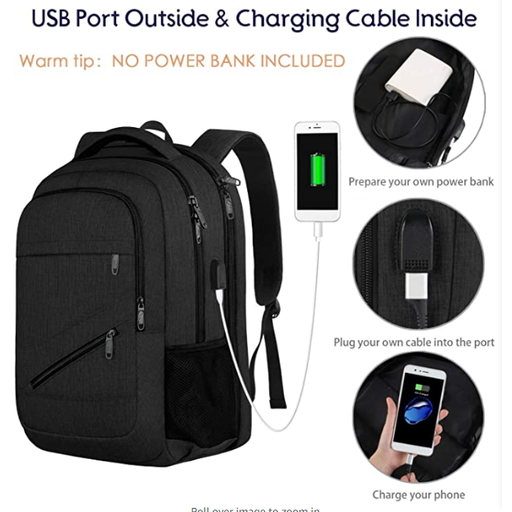
Why This Fits Their Persona: For those who travel with a lot of gear. This bag has room for a large 17-inch laptop, multiple compartments, and handy travel features like a TSA-friendly design and a USB charging port.
The smart layout with multiple compartments keeps all your tech organized and protected. The hidden anti-theft backpack pocket on the back is a simple but effective addition for valuable items.
TSA-friendly: Can open 180 degrees for quick security checks. Large capacity: Fits laptops up to 17 inches and plenty of accessories.
We have compiled a complete, up-to-date list of products that fully meet these strict selection criteria and local regulations.
The screen diagonal (e.g., 15.6 inches) is a guideline, not a guarantee. Laptop dimensions vary. The best method is to measure your laptop yourself (length x width x thickness) and compare these dimensions with the laptop compartment specifications provided by the manufacturer. This will prevent the bag from being too tight or too loose.
For those who are on the go a lot, it can certainly be practical. You connect your own power bank to the built-in cable on the inside of the bag. Then, you can easily charge your phone or other device via the port on the outside without having to fumble with the power bank itself. Note: the power bank is almost never included with the purchase of the bag.
To maintain its water-resistant properties, it's best to clean the bag with a damp cloth and mild soap. Avoid the washing machine and harsh cleaning agents, as they can damage the protective coating. Always let the backpack air dry after cleaning and do not put it in the dryer.
