
Vandaag of morgen in huis

Kwaliteit gegarandeerd

Welkomstaanbiedingen ontgrendelen: GRATIS bezorging | Tot 80% korting | Gratis 30 dagen JoyPlus-proefperiode
Download de app
A 15.6-inch laptop backpack might seem straightforward to choose, but product titles don’t always tell the whole story. For example, a bag may be described as “waterproof” when the product description only mentions water-repellent nylon. And a 15.6-inch laptop won’t necessarily fit every compartment labelled for that size: laptop dimensions vary by make and model.
Whether you’re commuting, going to school, attending business meetings or catching a flight, three things matter most: the right internal dimensions, protection for everyday use and a carrying style that suits your routine. Here are the key things to check, along with a few practical options.
Screen size is only one measurement. The laptop’s overall dimensions, including its casing and thickness, determine whether it will actually fit in the compartment. So check your laptop’s dimensions and compare them with the bag’s stated internal measurements. A 15.6-inch laptop with a wide casing may fit more snugly than a slim business model.
Pay attention to the zip position, too. A laptop compartment with a narrow opening at the top may be less practical than one that opens wide.
A waterproof laptop backpack sounds appealing for cycling in the Netherlands, but check what the product actually claims. Nylon or polyester with a water-repellent finish can help keep out light rain. That doesn’t necessarily mean the bag can withstand prolonged heavy rain or being submerged.
A rain cover, covered zips and a laptop compartment that doesn’t sit directly against the outer panel can offer extra protection in practice. If the manufacturer doesn’t state a waterproof rating, always use a suitable protective case for valuable equipment.
A large number of compartments is only useful if they’re laid out sensibly. Look for space for your charger, mouse, documents, keys and water bottle. Too many narrow compartments can actually make a backpack awkward to use. Check the bag’s weight before adding your accessories, too.
A laptop backpack with a USB port usually has a cable pass-through that lets you connect a power bank inside the bag. The power bank, and sometimes the cable, aren’t included as standard. Check the product contents to see exactly what’s included.
Choose a compartment with padding on the bottom and sides. This helps with everyday use, such as when you put your backpack beside a chair or under a desk. Padding doesn’t guarantee protection if the bag is dropped. A secure fastening and a compartment that holds your laptop firmly in place are just as important.
A separate document compartment, trolley strap and handle are also useful features in a business laptop backpack. If you mainly cycle to lectures or the office, a well-ventilated back panel and adjustable shoulder straps may be more useful.
A lightweight laptop backpack won’t feel heavy before you’ve even packed it. Don’t just look at the overall capacity; check for:
A larger bag can hold more, but it can also become too heavy more quickly. For everyday commuting, a well-organised layout is often more practical than maximum capacity.
If you’re looking for a Ryanair cabin bag backpack, check the airline’s current baggage rules before you travel. Dimensions may vary depending on your ticket type and route conditions. A model measuring 40 × 30 × 20 cm may be described in the product information as suitable for a personal item, but the external dimensions may differ from the internal capacity.
Measure the bag once it’s full, and allow for side pockets, handles and any parts that stick out. A travel backpack with a laptop compartment needs to meet the size limits and be easy to slide under the seat.

Why it suits this profile: This backpack is designed for everyday use at the office or school, and for commuting. The product title mentions a USB charging port and a lightweight, slim design for men and women.
The stated laptop size makes it easier to narrow down your options. Still, check your laptop’s dimensions and whether the USB feature is just a pass-through; a power bank isn’t listed as an included accessory.
Compatible with 15.6-inch laptops according to the product title; USB charging port and a design suited to the office, commuting and travel.
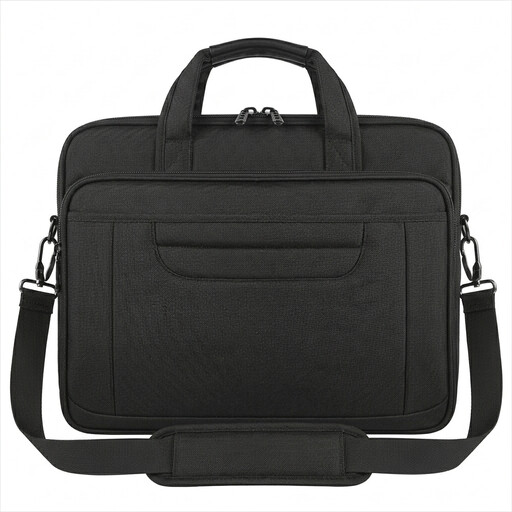
Why it suits this profile: This business laptop bag is a good fit for people who prefer a briefcase or shoulder bag to a backpack. It’s designed for work meetings, the office and business travel.
The stated dimensions of 40,6 × 30 × 7,5 cm and weight of 800 grams make it easy to check the size and carrying weight. The fabric is described as water-repellent, not fully waterproof.
Water-repellent nylon; detachable shoulder strap, handles, luggage strap and concealed back pocket.
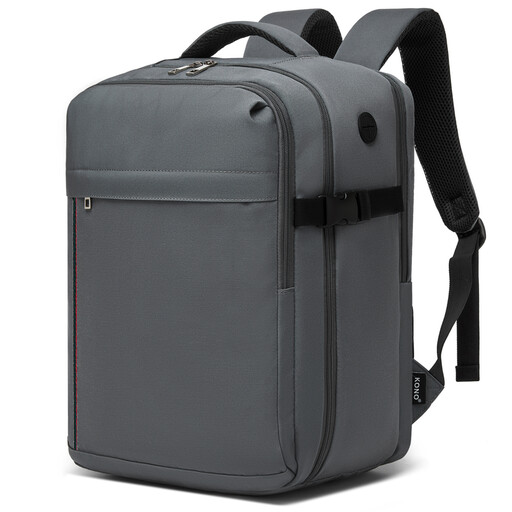
Why it suits this profile: This travel backpack is designed for short trips, business flights and commuters who want to stow their bag under the seat. According to the description, it has a capacity of around 24 litres.
The external dimensions of 40 × 30 × 20 cm and weight of 0,5 kg are clearly stated. Even so, check your airline’s current rules and avoid overpacking.
Weighs 0,5 kg; padded compartment for a 15.6-inch laptop; three compartments, compression straps and trolley strap.
We’ve put together a full, up-to-date list of products that meet these strict selection criteria and current European safety regulations.
No. The size usually refers to the maximum screen size, not to a standard laptop dimension. Measure your device’s height, width and thickness, then compare them with the laptop compartment. Leave a few extra millimetres so the zip isn’t under strain.
Follow the manufacturer’s care instructions. For the models mentioned, cleaning with a slightly damp cloth is recommended. Don’t use harsh cleaning products or machine-wash the bag unless this is expressly permitted. Leave it to air-dry and avoid prolonged exposure to direct heat.
A USB port in a bag is usually a pass-through connection between a power bank and a cable on the outside. The backpack itself doesn’t use any power. Check whether the cable and power bank are included, and use a power bank that’s suitable for your phone or other devices. A USB port doesn’t replace protection from moisture or a secure laptop case.
