
Vandaag of morgen in huis

Kwaliteit gegarandeerd

Welkomstaanbiedingen ontgrendelen: GRATIS bezorging | Tot 80% korting | Gratis 30 dagen JoyPlus-proefperiode
Download de app
A laptop backpack needs to do more than just carry a laptop. In the UK, your bag has to cope with rain, crowded bike racks, busy public transport and everyday use. Yet many models look much the same at first glance. The difference often lies in the details: the actual dimensions, the protection offered by the laptop compartment and how the pockets are arranged.
If you focus only on a low price or a standout feature, you may run into practical problems later. Read on to find out what to look for before buying a laptop backpack, and which models suit different needs.
The “15.6-inch” label refers to the screen’s diagonal measurement, not the laptop’s overall dimensions. A laptop with a wider casing may therefore be a tight fit in a compartment that looks suitable on paper. As well as checking the screen size, check the internal dimensions of the laptop compartment if they’re available.
A backpack for a 15.6-inch laptop is most suitable when the manufacturer explicitly states that it fits this size and the compartment has enough room for your specific model.
Terms such as water resistant, water repellent and waterproof are often used interchangeably. A water-resistant laptop backpack may keep out light rain for a while, but that doesn’t necessarily mean your belongings will stay dry during a heavy downpour.
Check the material, zip construction and seams. If a product doesn’t have a clear IP rating or waterproofing standard, don’t assume the bag is fully waterproof. A rain cover can be a useful extra if you cycle every day.
A USB port or anti-theft zip may sound handy, but it won’t automatically make a bag suitable for commuting. First, check that there’s enough room for a charger, documents, lunch and perhaps some clothes. If you choose a laptop backpack with a USB port, you’ll also need a suitable power bank. The port won’t charge your devices by itself.
It’s still important to stay alert when using an anti-theft backpack. A lock or hidden zip can make it harder to get into, but it won’t provide complete security. Don’t leave valuables unattended.
Check the external dimensions if you’ll be taking the bag on a plane, on your bike or on a packed train. A compact backpack may be more comfortable for everyday journeys, while a larger model offers more room for work or a short trip.
Also look for:
A lightweight backpack isn’t automatically comfortable if the straps are thin or the bag quickly pulls to one side. Distribute the weight evenly and use both shoulder straps.
A laptop compartment should keep your computer separate from hard objects such as keys, water bottles and chargers. A raised base can offer extra protection when you put the bag down. Also check whether the compartment fastens with a hook-and-loop strap, zip or another type of closure.
A business backpack often has a simple design, with separate compartments for A4 documents, accessories and a laptop. A school or travel backpack is usually more flexible, but may be less neatly organised.
Think about what you’ll actually carry. A slim model is enough for a laptop, mouse and charger. For commuting, extra compartments for a lunchbox, bottle, headphones and documents are more useful. If you travel frequently, look for a roomy main compartment and an interior that can also accommodate clothes or personal belongings.
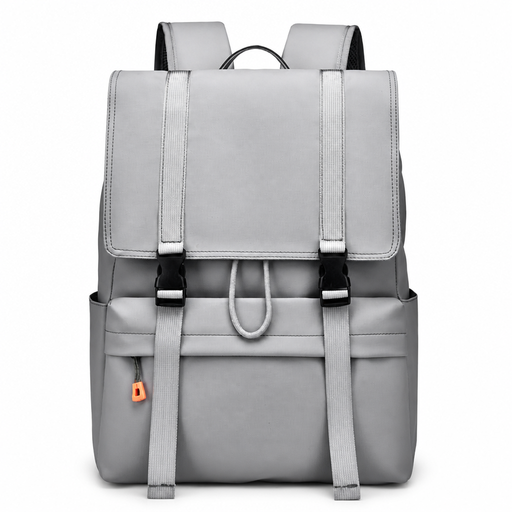
Why it suits this user: This model is designed for school, work, everyday use and travel, and is listed as supporting laptops up to 15.6 inches. The flip-top closure gives you quick access to the main compartment.
The product title specifies both the laptop size and water resistance. Before buying, check your laptop’s dimensions and what ‘water resistant’ means in this case.
Fits laptops up to 15.6 inches according to the product name; suitable for school, work and city use.
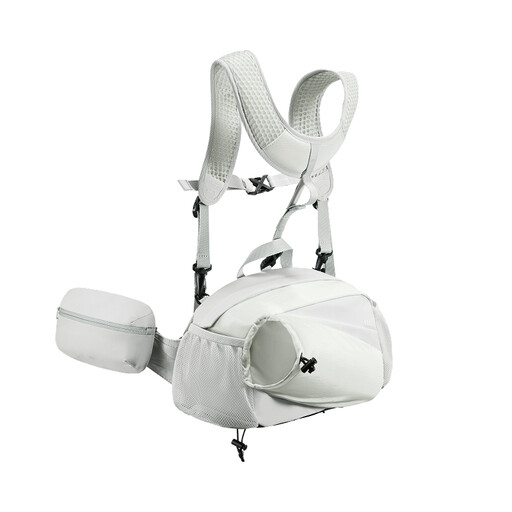
Why it suits this user: According to the product description, the bag features an adjustable design, a 2:8 compartment layout and a protection system made with polycarbonate panels and outdoor fabric.
The adjustable capacity means you don’t have to carry a large, empty bag all the time. Don’t overfill it; the manufacturer recommends doing so to preserve its structure and protective features.
Foldable design; adjustable shoulder strap; protective panels and removable phone pocket according to the product information.
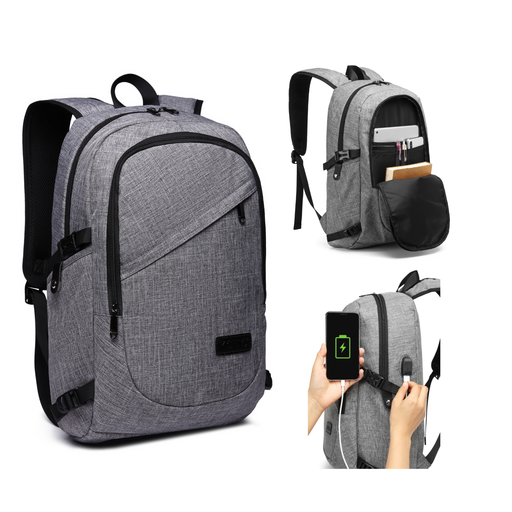
Why it suits this user: According to the product description, this model measures 50 x 14 x 30 cm, weighs around 0.73 kg and fits laptops up to 15.6 inches. Its layout is designed for the office, commuting, business trips and school.
The key features are clearly described: a laptop compartment, several storage pockets, a USB connection and a removable combination lock. The USB port requires your own power bank.
Laptop compartment for laptops up to 15.6 inches; USB charging port; removable 3-digit lock; padded, breathable shoulder straps.
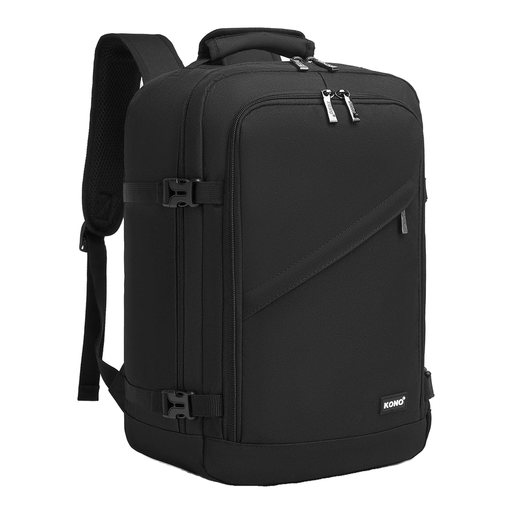
Why it suits this user: Measuring 40 x 20 x 25 cm and with a capacity of 20 litres, this bag is designed for trips with limited hand luggage space, such as when you need to stow it under an aircraft seat.
The external dimensions are clearly stated. Always check your airline’s current baggage rules and make sure your laptop can be stored safely and fits inside.
Compact 40 x 20 x 25 cm size; 20-litre capacity; designed as under-seat hand luggage.
We’ve put together a complete, up-to-date list of products that meet these strict selection criteria and the applicable European safety regulations.
No, not always. Screen size is only one measurement. Also compare your laptop’s length, width and thickness with the dimensions of the laptop compartment. A laptop case may need extra room too.
Its lifespan depends on the material, zips, seams, how much it carries and the conditions in which you use it. A bag that’s packed heavily every day will wear out faster than one used only for a laptop and charger. Clean your backpack according to the product instructions, avoid overfilling it, and check the shoulder straps and zips regularly.
Only use a suitable, certified power bank and cable. The USB port acts as a pass-through for power and usually doesn’t have a built-in battery. Follow the manufacturer’s safety warnings and don’t leave devices charging unattended.
