
Vandaag of morgen in huis

Kwaliteit gegarandeerd

Welkomstaanbiedingen ontgrendelen: GRATIS bezorging | Tot 80% korting | Gratis 30 dagen JoyPlus-proefperiode
Download de app
A laptop backpack may seem easy to choose at first glance. Yet many models prove less practical in everyday use than expected. The laptop does not fit the compartment properly, the shoulder straps dig in, or there is not enough room for a charger, lunch and documents. With the right checks beforehand, you can avoid making the wrong purchase.
A 15.6-inch laptop backpack will not automatically fit every 15.6-inch laptop. The external dimensions of a laptop can vary by brand and model. Therefore, check the maximum laptop size in centimetres as well as the dimensions of the laptop compartment. A compartment that is too tight can damage the zip or laptop, while one that is too spacious offers less stability.
Also look out for conflicting product information. Some product descriptions, for example, may mention a backpack for 15.6-inch laptops, while the specifications list a smaller compatible size. If in doubt, use the product page as your guide and measure your laptop carefully.
A water-repellent backpack can help keep out light rain or splashes, but this does not mean that its contents will remain dry during a heavy shower. Look for clear terms such as water-repellent, water-resistant or waterproof, and check exactly what the manufacturer states.
A model with a roll-top or flip-top fastening can offer extra protection, as less water flows directly towards the zip. However, seams, zips and the base remain vulnerable areas. In heavy rain, consider using a separate rain cover and carrying electronic devices in a protective sleeve.
A business backpack or school backpack should not only look smart. A thin back panel, narrow shoulder straps or poor weight distribution become particularly noticeable during a long train journey or cycle ride. Therefore, check whether the backpack has:
A backpack with a laptop compartment is only practical if the compartment fits properly and provides sufficient protection. A padded compartment helps keep the laptop separate from books, keys and other hard objects. Ideally, place the laptop in the designated compartment and avoid allowing heavy items to press directly against it.
For a 15.6-inch laptop backpack, models such as the Kensington SP25 Classic and HP Travel 25L are designed for devices up to 15.6 inches. The Eastpak Out Of Office specifies a padded laptop compartment for most devices up to 14 inches, making it more suitable for smaller laptops.
Do not just look at the number of litres; consider how the space is organised too. A spacious backpack without internal compartments can quickly become untidy. For work and study, a separate laptop compartment, document space and small zipped pockets are useful.
A capacity of around 20 to 25 litres is often suitable for everyday essentials such as a laptop, charger, A4 documents, water bottle and lunch. For clothing or travel accessories, an expandable model may be more convenient. According to its product specifications, the HP Travel has a capacity of 25 litres and can be expanded to 30 litres.
Polyester and nylon are often used for laptop backpacks because they are lightweight and easy to maintain. However, the thickness and construction are at least as important as the name of the material. The Kensington SP25, for example, uses 1680 denier nylon, while the NINETYGO College-Style backpack is made from 900D tear-resistant fabric, according to the product information.
Also check the care instructions. Many models can be wiped clean with a slightly damp cloth, but are not designed to be soaked in water for long periods or washed in a machine. A protective spray may be suitable according to some product descriptions, but always follow the manufacturer's instructions.
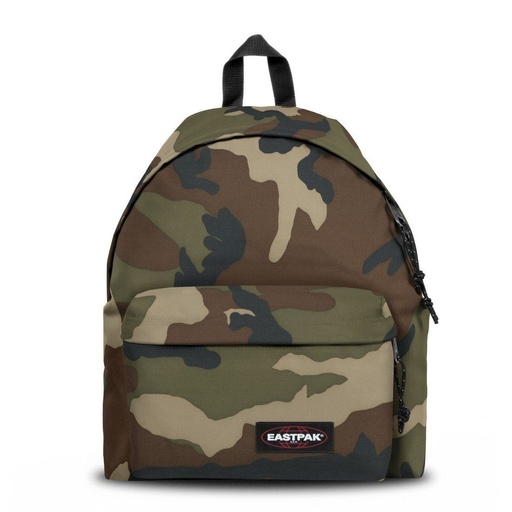
Why it suits this profile: A well-organised everyday backpack for school, short commutes and leisure. With a capacity of around 24 litres, it has room for books and daily essentials.
The dimensions and capacity are clearly stated. However, check for yourself that your laptop fits in the main compartment, as a specific padded laptop compartment is not listed.
24-litre capacity, padded back and adjustable padded shoulder straps; suitable for A4 documents and everyday use.
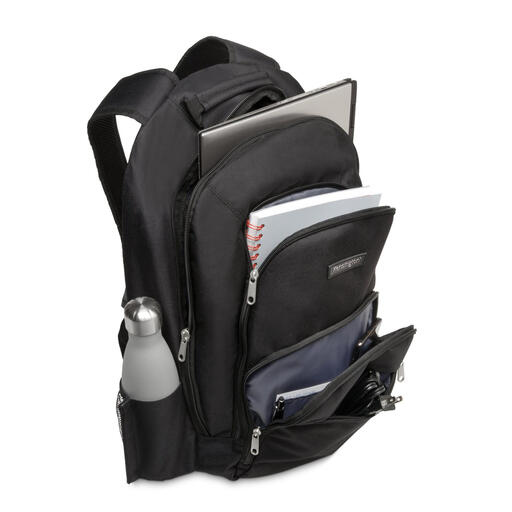
Why it suits this profile: A business backpack for professionals who value laptop protection, well-organised compartments and a neutral appearance.
Compatibility with laptops up to 15.6 inches, the dimensions and the weight of 710 grams are all stated. This allows you to compare the size and carrying weight in advance.
1680 denier nylon, reinforced laptop compartments and multiple zipped accessory pockets.
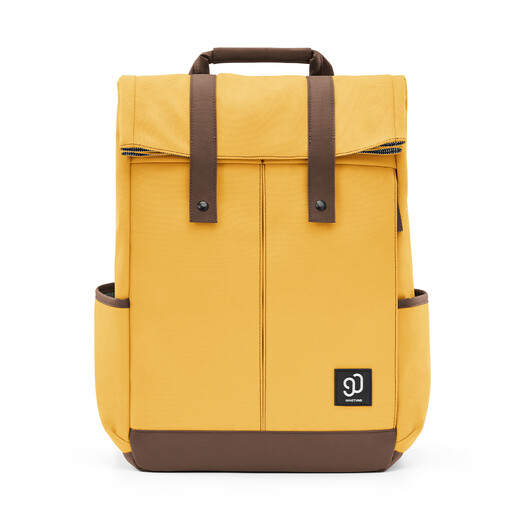
Why it suits this profile: Designed for students, school pupils and commuters who need a spacious backpack for a laptop, books, water bottle and accessories.
The manufacturer states that it uses 900D tear-resistant fabric and has a water-repellency rating of 4. At the same time, the description warns that the backpack is not completely waterproof.
Three front compartments, a side zip for quick access to the laptop and reinforced side pockets for a bottle or umbrella.
We have put together a complete, up-to-date list of products that fully meet these strict selection criteria and the applicable European safety regulations.
Use these points before ordering a backpack for work, school or travel:
A USB port may seem useful in a business backpack, but check whether it is simply a pass-through or whether a power bank is included too. You will often need to purchase the power bank separately. The same applies to RFID pockets, luggage straps and rain covers: check that these features are actually listed in the specifications.
Choose a model whose manufacturer states compatibility with laptops up to 15.6 inches, and compare this with your laptop's actual dimensions. According to their product specifications, the Kensington SP25 and HP Travel 25L are suitable for laptops up to 15.6 inches. Before buying, also check the width, height and thickness of your device.
Its lifespan depends on the material, stitching, zips, load and conditions of use. Daily cycling, heavy books and frequent placing on the ground put more strain on a backpack than occasional use. Clean the bag according to the instructions, avoid overloading it and allow wet fabric to dry thoroughly. A guarantee or statutory warranty gives you rights in the event of defects, but does not automatically cover normal wear and tear or incorrect use.
First, remove everything from the bag and shake or brush out any loose dirt. Wipe the outside with a slightly damp cloth. For stubborn stains, you can use a mild neutral cleaning solution and a soft cloth if the product instructions allow it. Avoid bleach, prolonged soaking, harsh cleaning products and tumble drying. Hang the backpack up to dry, away from direct sunlight.
