
Vandaag of morgen in huis

Kwaliteit gegarandeerd

Welkomstaanbiedingen ontgrendelen: GRATIS bezorging | Tot 80% korting | Gratis 30 dagen JoyPlus-proefperiode
Download de app
A laptop backpack needs to do more than simply carry a computer. Students, school pupils, commuters and business travellers often also carry a charger, mouse, documents, water bottle and personal belongings. Yet many models look remarkably similar. A low price says little about the fit, while terms such as “anti-theft” or “waterproof” do not always mean what you might expect.
With this practical buying guide, you can compare a laptop backpack based on verifiable features. This helps you avoid a poor purchase and find a laptop backpack suited to your daily routine in the Netherlands.
A 15.6-inch laptop backpack will not automatically fit every 15.6-inch laptop. A computer’s external dimensions, thickness and screen-bezel design can vary. Always check the dimensions of the laptop compartment and compare them with those of your own device.
For larger models, you will need a 17.3-inch laptop backpack. A compartment described only as “up to 17.3 inches” without internal dimensions deserves extra scrutiny. An overly spacious compartment can allow a laptop to shift while you are walking.
A water-repellent laptop backpack can help keep out light rain or splashes. That is not the same as long-lasting protection against a downpour or immersion. Pay close attention to the wording used in the product information. “Water-resistant” or “water repellent” is not a blanket guarantee that the contents will remain completely dry.
If you cycle every day, look beyond water-repellent material for features such as a covered zip, a roll-top closure and a separate laptop sleeve. Even in bad weather, keep important electronics in an additional protective case.
A large number of pockets is convenient, but not every compartment is padded. A padded laptop compartment with a sturdy base and secure closure matters more than the total number of compartments. Heavy accessories, such as a power adapter or power bank, can press against the laptop if the interior is poorly organised.
Features such as RFID protection, a tracker pocket or a hidden compartment should also be assessed realistically. According to the product description, RFID material may block certain scanner signals; it does not prevent every form of theft. An anti-theft laptop backpack remains a useful aid, not a complete security solution.
Measure your laptop in centimetres: width, depth and thickness. Then consider:
A compact laptop backpack for commuting is ideal if you carry only a few essentials. For a business trip or weekend away, an expandable model is more practical. A bag that expands from 25 to 35 litres offers greater flexibility, but may also become heavier and bulkier when fully packed.
Nylon, polyester and canvas are widely used. The thickness or denier rating can provide additional insight. For example, the Kensington SP25 uses 1680D nylon and, according to the product description, features reinforced internal compartments. These are more concrete details than a general claim such as “extra strong”.
Also pay attention to the construction:
Do not interpret a material claim about sustainability more broadly than the source allows. For example, HP states that the HP Professional’s main material consists of 100% recycled plastic, while the labels, cords and lining are biodegradable. This information comes from HP’s product description; it is not an independent environmental certification.
For everyday use, wide, adjustable shoulder straps and a breathable back panel are more valuable than stylish looks alone. A carry handle is convenient on the train or in the office. A luggage strap allows you to secure the backpack to the handle of a wheeled suitcase.
A laptop bag or business laptop backpack with multiple carrying options is well suited to meetings and office work. A model with a USB port can be useful on the go, but check whether it is simply an external pass-through. In most cases, you will need to connect your own power bank; the USB port does not charge independently.
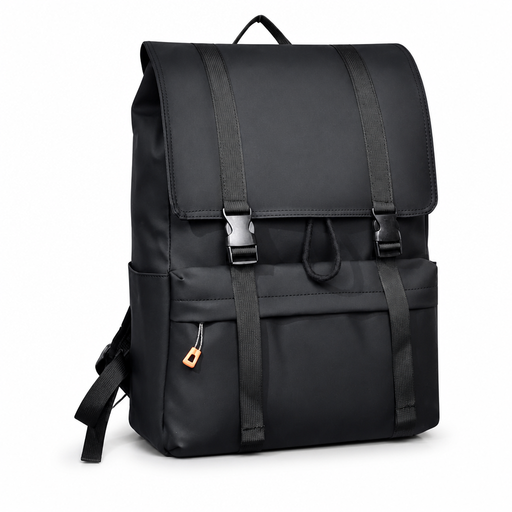
Why This Fits Their Persona: A straightforward choice for students and school pupils carrying a 15.6-inch laptop, school supplies and everyday accessories to class or the library.
The product name specifies a 15.6-inch laptop compartment and water-resistant properties. Check the internal dimensions before ordering.
Flip-top design; suitable for school, work, city use and travel according to the product listing.
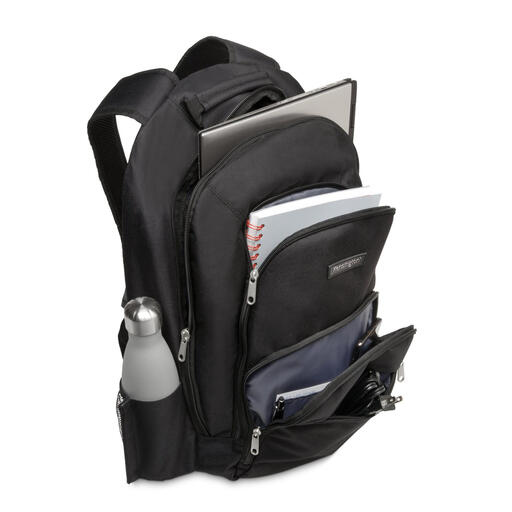
Why This Fits Their Persona: Well suited to professionals seeking a discreet business laptop backpack for the office, train journeys and meetings.
The specifications mention 1680D nylon, reinforced laptop compartments and multiple zipped pockets rather than relying solely on generic protection claims.
Suitable for laptops up to 15.6 inches; dimensions 48 × 33 × 18 cm; weight 710 grams.

Why This Fits Their Persona: Convenient for anyone travelling daily between home, the office and the station who wants a slim design with easy access to charging accessories.
The USB port is presented as a practical charging feature, but it requires a separate power bank. The water-repellent claim does not guarantee complete waterproofing.
15.6-inch format; lightweight design; USB charging port for use on the go according to the product name.
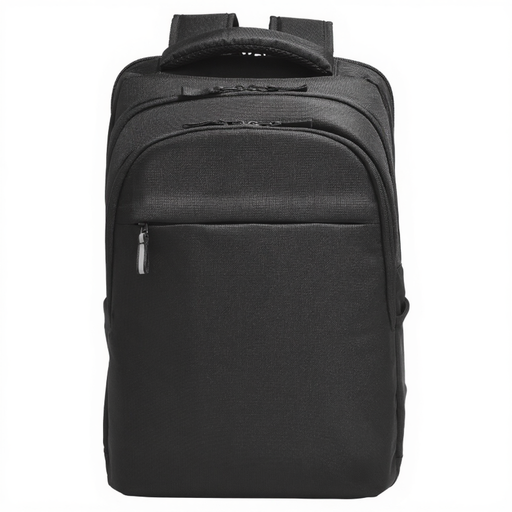
Why This Fits Their Persona: Suitable for users with a larger laptop and plenty of peripherals who frequently move between locations or travel with a wheeled suitcase.
The description lists an RFID pocket, dual zips, a tracker pocket and a luggage strap. These features support organisation and security, but do not replace vigilance.
Suitable for laptops up to 17.3 inches; weight 740 grams; listed as water-resistant; made with recycled plastic according to HP.
Browse a current selection of laptop bags and work bags in a range of sizes, materials and layouts for everyday use.
Choose a model whose laptop compartment is explicitly suitable for 15.6-inch devices and check the internal dimensions wherever possible. Also measure the thickness of your laptop. A 15.6-inch laptop backpack with a separate, padded compartment generally provides a more clearly organised interior than a regular backpack with one large main compartment.
Its lifespan depends on the materials, zips, seams, load and maintenance. Do not overfill the bag, as this puts strain on the zips and seams. Clean it according to the product instructions and do not machine-wash it unless this is specifically recommended. In the European Union, many consumer products are covered by a minimum two-year statutory guarantee of conformity; additional rights may apply under Dutch law.
That depends on how you use it. A USB port is convenient if you use a power bank on the go and want to charge your phone without taking it out of your bag. The port itself usually does not provide power. Check whether the bag includes a cable pass-through and whether your own power bank fits. If you rarely charge devices while travelling, a well-padded laptop compartment may be more valuable than this extra feature.
