
Vandaag of morgen in huis

Kwaliteit gegarandeerd

Welkomstaanbiedingen ontgrendelen: GRATIS bezorging | Tot 80% korting | Gratis 30 dagen JoyPlus-proefperiode
Download de app
A good laptop backpack isn't a luxury; it's a necessity. Whether you're cycling to college, commuting to the office by train, or travelling frequently, your laptop is a valuable asset. The wrong bag can lead to a soaked laptop, a sore back, or a chaotic mess of cables and papers. Many backpacks promise the world but fall short in practice. Let's look at the most common pitfalls and discover what you really need to pay attention to.
Before you make a choice, it's important to know where things often go wrong. Manufacturers use fancy terms, but the reality can be quite different.
To avoid a bad purchase, focus on the specifications that truly matter. These are the three most important points to check.
The size of your laptop is the starting point. A backpack with a laptop compartment should not only be large enough but also provide a snug fit. A compartment that's too loose allows your laptop to slide around, increasing the risk of damage.
The material determines the durability and how well your belongings are protected from the elements.
A good school backpack for your laptop or a business backpack is more than just a storage space. The layout and extra features make all the difference in usability.
Based on these criteria, we have selected a number of products that suit different user profiles.
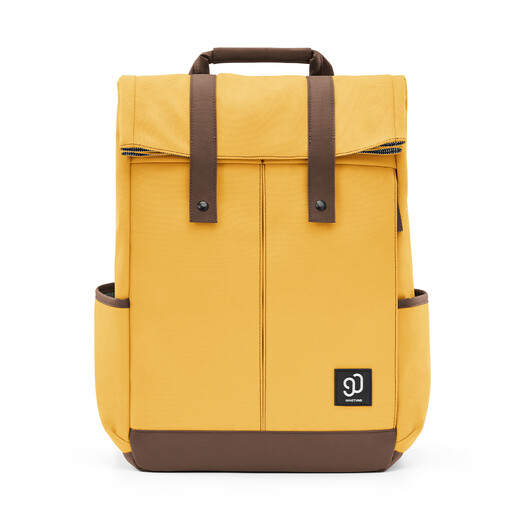
Why This Fits Their Persona: Ideal for those who carry a 14-inch laptop and books daily. The bag combines a sleek design with practical organisation, perfect for campus or public transport.
Prevents the "black hole" effect with three front pockets and a separate laptop compartment. The Level 4 water-repellent finish offers reliable protection against an unexpected shower.
Side zip for quick access to your laptop without opening the entire bag. Reinforced side pockets keep a water bottle or wet umbrella separate from your other belongings.
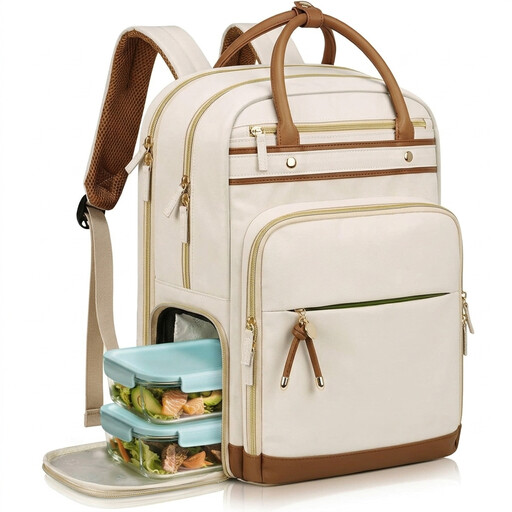
Why This Fits Their Persona: Specifically designed for professionals, teachers, or nurses who want to carry their lunch, laptop (up to 15.6 inches), and work documents in a single bag. A typical, functional work backpack for women.
Solves the organisation problem with an insulated lunch compartment that completely separates food and electronics. The ergonomic straps and breathable back panel prevent the comfort issue.
The detachable lunch compartment is the main selling point. Additionally, the bag is TSA-friendly and features a USB charging port for extra convenience on the go.
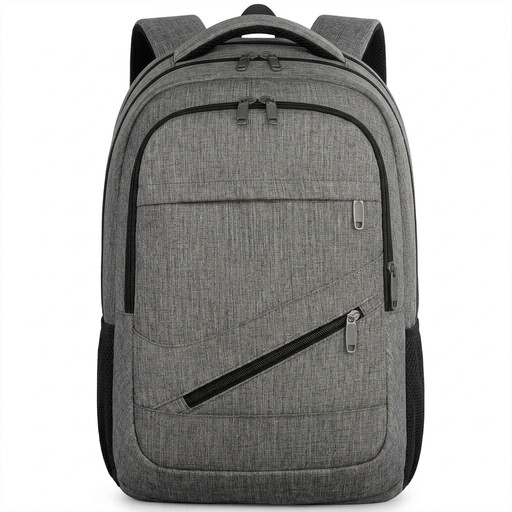
Why This Fits Their Persona: For users with a large 17-inch laptop who travel frequently for work or study. Security and convenience at the airport are top priorities. This is a fully-featured laptop travel backpack.
Tackles the security risk with a hidden anti-theft pocket on the back. The TSA-friendly design, which opens 180 degrees, prevents hassle at airport security checks.
Large compartment for laptops up to 17 inches. The combination of a USB port, luggage strap, and TSA-friendly design makes this a very complete bag for travellers.
We've compiled a complete, up-to-date list of products that meet these strict selection criteria.
The inch size (e.g., 15.6 inches) is a good guideline, but always check the exact dimensions (length x width x thickness) of the laptop compartment in the product description. Measure your own laptop and compare these measurements to ensure a snug and secure fit.
Water-resistant means the bag can withstand light rain or splashes. The material is treated with a coating that repels water. However, the seams and zips are usually not waterproof. For a heavy downpour, the bag is not fully waterproof. For maximum protection, you can use a separate rain cover or choose a bag explicitly described as waterproof.
A backpack with a USB port does not have its own battery. It's a pass-through cable. Inside the bag, there is a USB cable where you connect your own power bank. On the outside of the bag, there is a USB port where you can plug in the charging cable for your phone or other device. This allows you to charge your device while keeping the power bank safely inside your bag.
